Sling TV Promo Code: 50% Off + 1% Cash Back April 2026

If you are tired of the endless subscription shuffle—like signing up for a YouTube TV free trial just to catch a weekend of playoff football before bailing on that massive monthly bill—it might be time to finally settle down with Sling TV. With major streaming competitors continually pushing aggressive price hikes in early 2026, this highly flexible platform stands out as one of the last reliable options for budget-conscious cord-cutters.
Our Top Sling TV Promo Codes Available In April 2026
Sling TV Orange Day Pass Subscription
$4.99Get 24 hours of access to Sling Orange with this newly-announced deal, including channels like ESPN, ABC, and TBS - perfect for sporting events like Monday Night Football. Other options include Weekend Pass for $9.99 - offeering Friday, Saturday, and Sunday access, and Week Passes. Monthly subscriptions start from $45.99/mo.
Sling TV Orange & Blue Combo Subscription
$30 for first monthGet the Sling TV Orange & Blue combo bundle for 50% off for your first month. After that, you'll be charged the standard $60.99 per month or the standard rate at the time. You can cancel at any time, but the payment method on file will be charged automatically on a monthly basis. Also, check out the extra bundles like sports and entertainment.
Sling TV Subscription
50% off first monthSubscribe to Sling TV and get 50% off your first month. Plans start as low as $29.99 per month. This Sling TV offer is ongoing.
Stream Live NBA at Sling TV
Plans from $4.99Stream NBA games live at Sling TV. Subscribe to Orange and passes for 1 day, 3 days, or 7 days starting at $4.99. Other plan options start as low as $30. This offer is valid for a limited time only.
Sling TV Orange & Blue 3-Month Prepay Subscription
$160For new subscribers only in November 2025, that's a $23 savings on your first three months of Sling TV Orange & Blue. It includes channels like ESPN, MSNBC, TBS, and ABC. The subscription auto-renews after three months at $60.99 per month unless cancelled.You can bundle this with Sports Extra for $204.99, auto-renewing at $75.99 per month.
Sling Select Subscription
From $20/mo.The Sling Select Subscription starts as low as $19.99 per month. This subscription includes a curated selection of channels including NFL Network, National Geographic, FS1, FOX News, and more. Other fees and exclusions may apply. This offer ends December 31, 2026.
Sling TV Combo Pack
50% off 1-monthGet the Sling TV Orange and Blue Combo Pack for half off for one month (from $30). After your first month, prices start at $60.99. Other fees and exclusions may apply. This offer ends December 31, 2026.
Sling TV Blue 3-Month Prepay Subscription
$115For new subscribers only, that's a $23 savings on your first three months of Sling TV Blue. It includes channels like MSNBC, USA, and ABC. The subscription auto-renews after three months at $45.99 per month unless cancelled.You can bundle this with Sports Extra for $147.99, auto-renewing at $56.99 per month.
Sling TV Orange 3-Day Pass
$9.99Get a Sling TV Orange 3-Day Pass for $4.99. There are no refunds once activated. Other fees and exclusions may apply. This offer ends December 31, 2026.
Sling TV Orange Day Pass Subscription
$4.99Get 24 hours of access to Sling Orange with this November 2025 deal. It includes channels like ESPN, TNT, and TBS. Monthly subscriptions start from $45.99.
Sling TV Orange Week Pass Subscription
$15Get a week-long subscription to Sling Orange with this November 2025 offer. You'll get access to channels including ESPN, TNT, and TBS. Monthly subscriptions start from $45.99 per month.
Sling TV Orange 7-Day Pass
$14.99Get a Sling TV Orange 7-Day Pass for $4.99. There are no refunds once activated. Other fees and exclusions may apply. This offer ends December 31, 2026.

Discovery Plus on Sling TV
7-day free trialGet a weeklong free trial of Discovery+ on Sling TV — Sling Freestream is included as part of the trial. After the seven days are up, your chosen plan will renew at its regular monthly rate ($4.99 or $6.99) unless cancelled. This deal is ongoing.
Discovery Plus on Sling TV
30-day free trial w/ bundleYou can get a whole month of Discovery Plus for free when you sign up for a Sling Orange or Sling Blue streaming plan. Orange plans start from $4.99, and includes over 30 channels. This deal is ongoing.
Sling TV Orange Subscription
From $4.99/mo.The Sling TV Orange Subscription starts as low as $4.99 per month. You can get 1-day, 3-day, 7-day, monthly, or prepaid subscription to get NCAA, WNBA, ESPN, TNT, Disney, and more. Add Sports Extra for SEC, ACC, ESPNU, and more. Other fees and exclusions may apply. This offer ends December 31, 2026.
Sling TV Orange Weekend Pass Subscription
$9.99Get 3 days of access to Sling Orange with this November 2025 offer. You'll get access, from Friday through Sunday, to channels like ESPN, TNT, and TBS. Monthly subscriptions start from $45.99 per month.
Sling TV Blue 3-Month Prepaid Subscription
$115Get the Sling TV Blue 3-Month Prepaid Subscription for $114.99 ($46 per month). This offer is valid for new customers only. Other fees and exclusions may apply. This offer ends December 31, 2026.
Sling TV Orange 1-Day Pass
$4.99Get a Sling TV Orange 1-Day Pass for $4.99. There are no refunds once activated. Other fees and exclusions may apply. This offer ends December 31, 2026.
Sling TV Blue Subscription
From $45/mo.The Sling TV Orange Subscription starts at $45 per month. Other fees and exclusions may apply. This offer ends December 31, 2026.
Sling TV Orange 3-Month Prepay Subscription
$115For new subscribers only, that's a $23 savings on your first three months of Sling TV Orange with this November 2025 deal. It includes channels like ESPN, TNT, and TBS. The subscription auto-renews after three months at $45.99 per month unless cancelled.You can bundle this with Sports Extra for $147.99, auto-renewing at $56.99 per month.
Discovery+ on Sling TV
$9.99 per monthYou can add a Discovery Plus ad-free plan to your Sling TV subscription for $9.99 per month. (The with ads plan costs $5.99. Sling Orange plans start from $4.99 per month.) This deal is ongoing.
Sling TV Orange 3-Month Prepaid Subscription
$115Get the Sling TV Orange 3-Month Prepaid Subscription for $114.99 ($46 per month). This offer is valid for new customers only. Other fees and exclusions may apply. This offer ends December 31, 2026.
If you are looking to cut your entertainment budget this spring, our team is currently tracking a massive wave of aggressive discounts from Sling TV. For April 2026, the streaming provider has pivoted heavily away from traditional 30-day free trials and hidden promotional codes, opting instead to offer instant checkout discounts and high-value prepay bundles. Whether you are a brand new user looking to test the waters or a student trying to save cash before summer break, we have compiled the ultimate guide to optimizing your streaming subscription.
Best Introductory Deals For New Subscribers
Instead of hunting for an alphanumeric string to paste at checkout, the best deals for new accounts are automatically applied when you navigate directly to the official promotional page.
| Deal Type | Estimated Cost | Discount Details |
| 50% Off First Month | $20 to $32.50 | Instantly halves the base price of Sling Orange, Sling Blue, or the combined tier. |
| 3-Month Prepay Bundle | $49.99 | Locks in three months of live television with up to $30 in guaranteed savings. |
| Sling And HBO Max Bundle | Varies | Secures a recurring $5 monthly discount when you combine the two platforms. |
| AMC Plus Freebie | Varies | Takes $10 off your initial base package and includes a free month of AMC Plus. |
| Free Unlimited DVR | $0 | Upgrades your new account with a free month of premium cloud recording. |
Free Options And Short-Term Access
- Test Sling Freestream: Instead of offering a standard free trial, the platform provides access to over 600 live channels and thousands of on-demand titles completely for free. This tier requires absolutely no credit card and zero account creation to start watching.
- Buy Flexible Day Passes: If you only need live television for a specific playoff game or weekend tournament, you can purchase a 1-Day Pass for roughly $4.99 or a 3-Day Pass for $9.99. These micro-subscriptions automatically cancel at midnight on the final day to prevent unwanted auto-renewal charges.
Discounts For Students And Existing Users
- Claim The Student Discount: Actively enrolled college students can verify their status through Student Beans to receive a flat $10 discount on their monthly bill for six consecutive months.
- Prepay To Lower Existing Bills: Public promo codes rarely work for returning accounts, but existing users can log into their dashboard and upgrade to a 3-month prepay plan to secure a much lower monthly rate.
- Check Boost Mobile Offers: Existing Boost Mobile customers with at least seven months of active service are frequently eligible for targeted Sling TV savings.
- Utilize Cashback Portals: We highly recommend routing your subscription renewals through trusted cashback sites like Rakuten to stack additional monetary returns on top of your standard monthly payment.
Expert Strategies To Maximize Your Savings
- Watch Out For Local Surcharges: If you select the Sling Blue package and live in a market that provides local broadcast networks, expect a mandatory regional surcharge of $4 to $9 added to your final monthly bill.
- Hunt For Hardware Freebies: Prepaying for two or three months frequently unlocks massive hardware bonuses, allowing you to score a free AirTV Mini, a Roku streaming stick, or an Amazon Fire TV device.
- Opt-In For Marketing Texts: Provide your active phone number during the initial sign-up process to receive exclusive, highly targeted retention offers and unique promo codes directly from the provider.
- Clear Your Digital Footprint: The automated 50% off checkout discount will actively fail if the system detects you have had a previous account. We suggest using an incognito browser window and a brand new email address to guarantee the system categorizes you as a first-time subscriber.
Navigating the live streaming market requires a bit of strategy, but leveraging these specific April 2026 promotions ensures you never pay full retail price for your favorite channels. By pairing the platform's inherently flexible channel packages with the meticulously verified deals we track down every day here at DealNews, you can easily build a premium entertainment lineup that completely respects your wallet.
How To Redeem A Sling Promo Code
While the majority of Sling TV's best 2026 discounts—like that massive 50% off your first month—are applied automatically when you click a dedicated promotional link, you might still find yourself with a unique alphanumeric code. Whether it is a targeted win-back offer or an employee discount, knowing exactly where to plug it in is the only way to guarantee your savings.
To get through checkout without a headache, follow these exact steps to apply your discount successfully. The process depends entirely on whether you are setting up a brand new account or adding a code to an existing subscription.
Steps For New Subscribers
If you are completely new to the platform, you have two easy ways to lock in your discount. Simply choose the method below that best fits how you are signing up.
Method 1: Apply the Promo Code on the Deals Page
- Navigate directly to sling.com/deals using your preferred web browser.
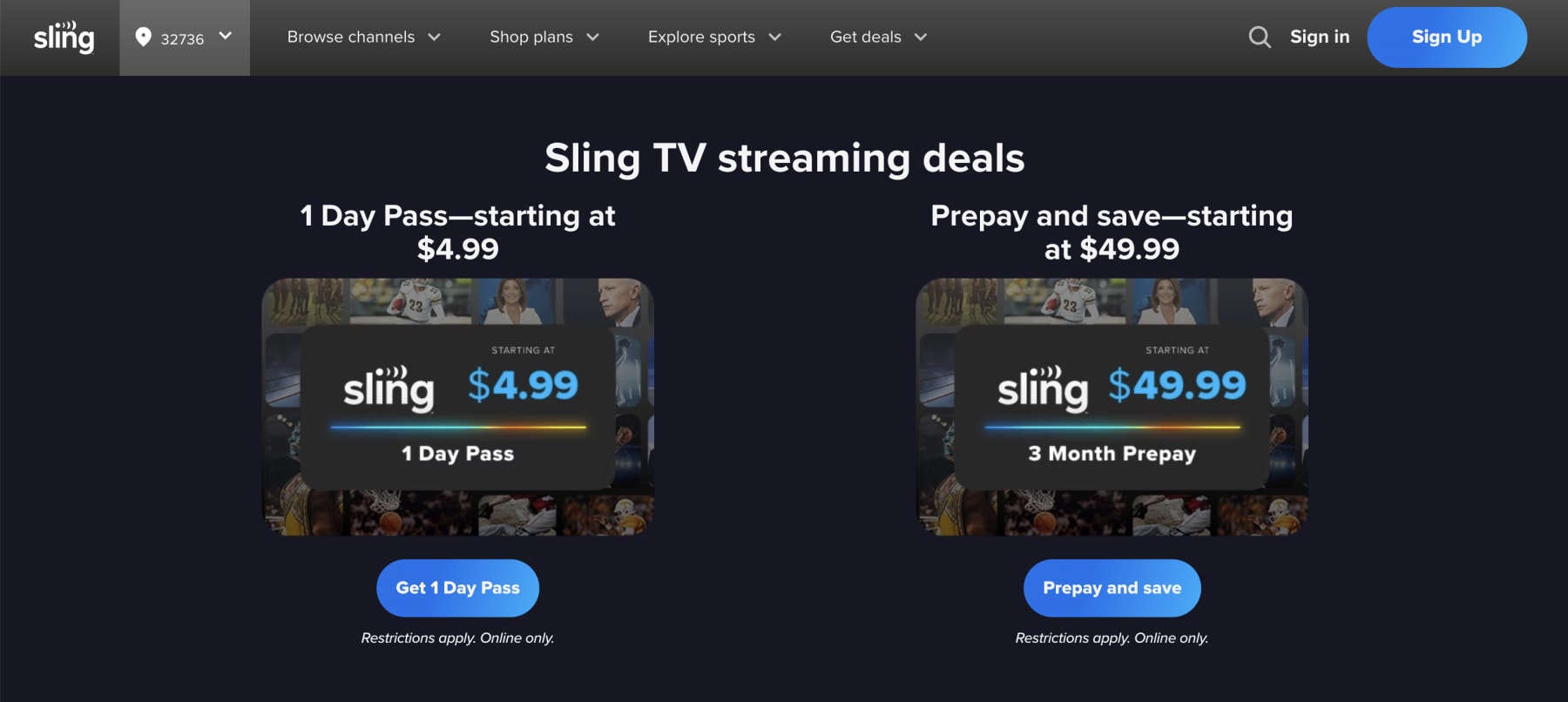
- Enter your specific Sling promo code in the designated entry field right in the middle of the screen. (If there are no valid promo codes floating around, this section might not appear.)
- Click the button labeled "Validate Code" or "Apply" to verify the offer.
- Create your brand new account by entering a fresh email address and a secure password.
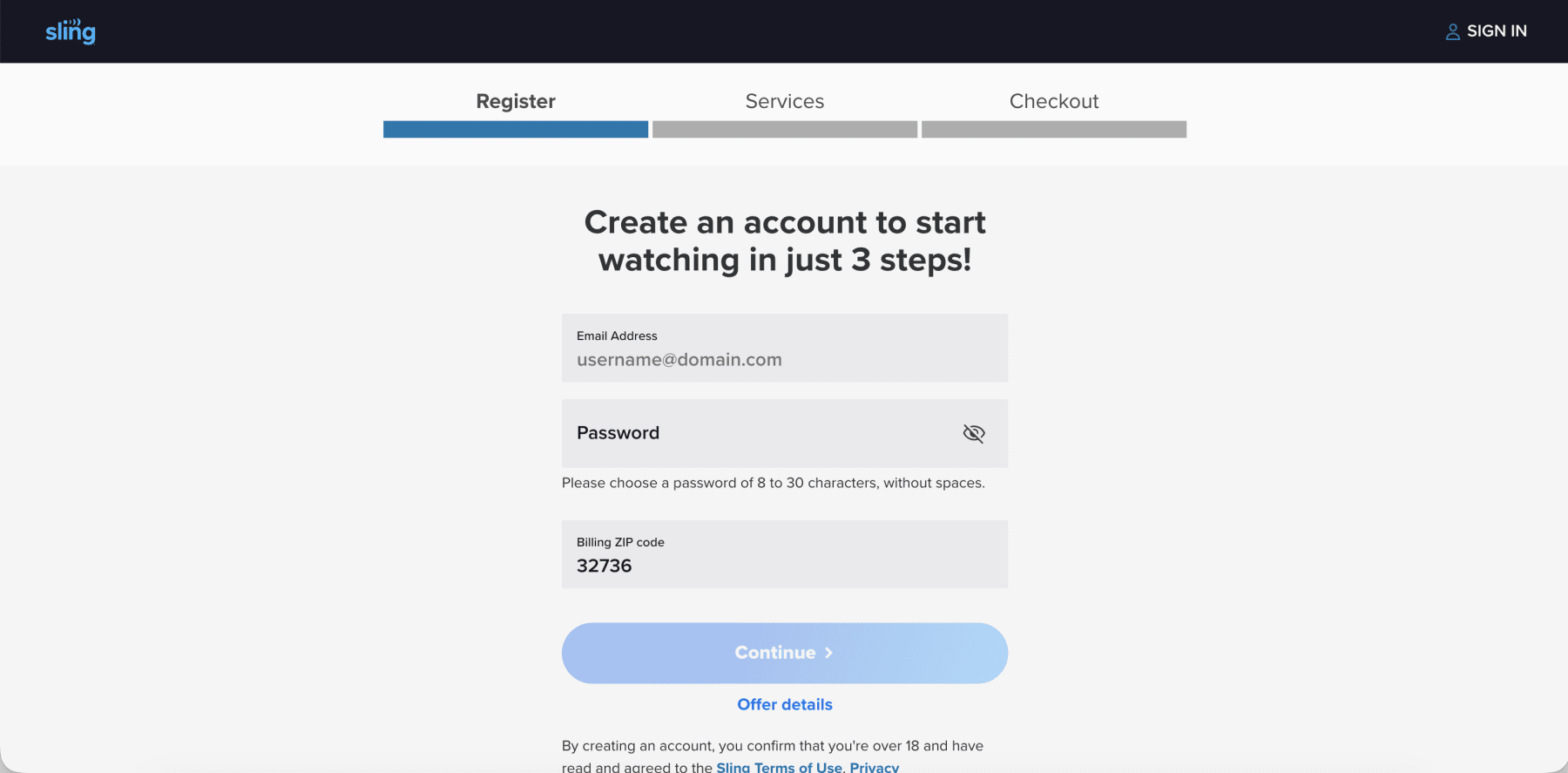
- Select your preferred base package (Sling Orange or Sling Blue) and any extra channel packs.
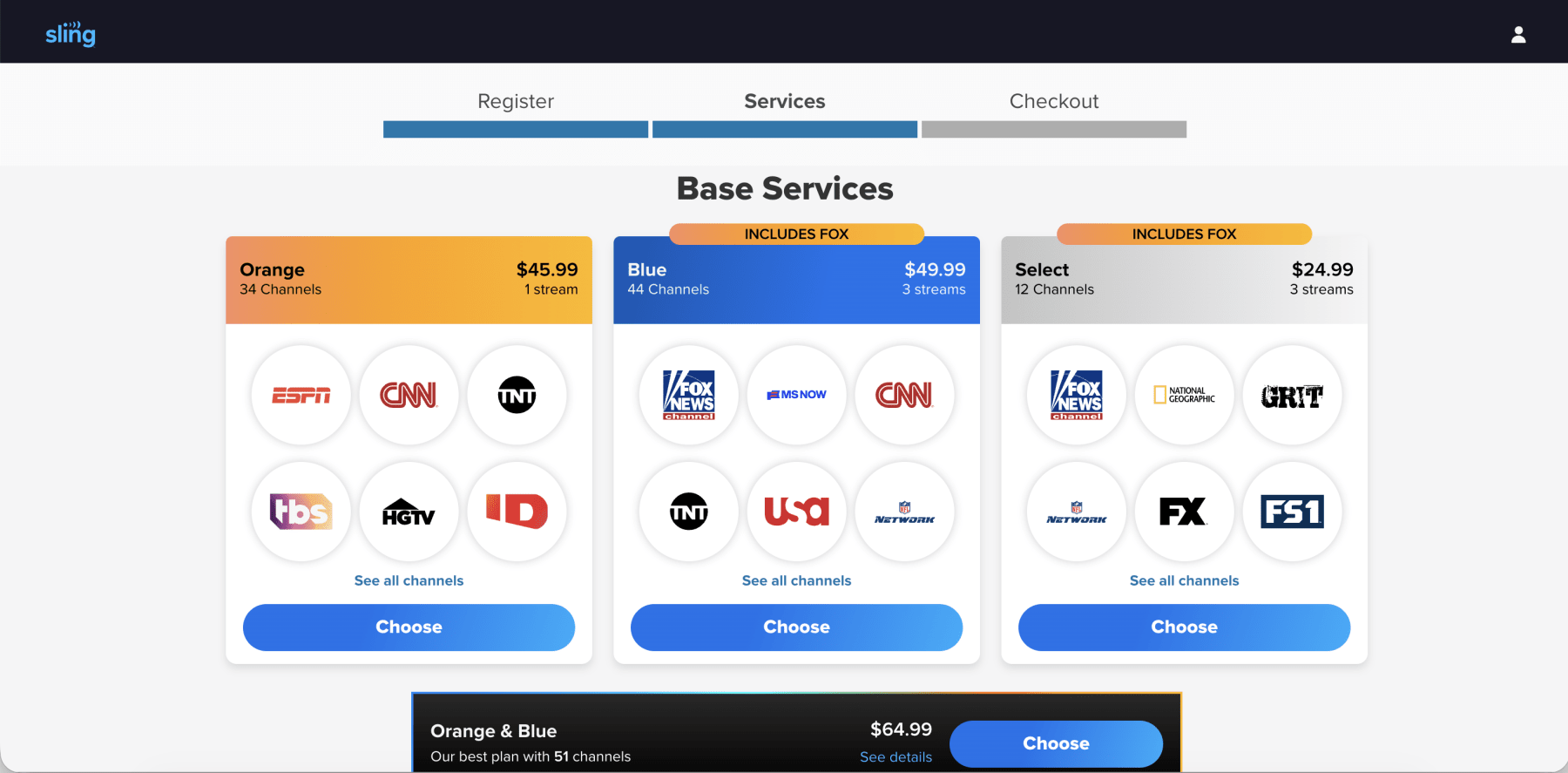
- Proceed to the final screen, where your discount will be automatically applied to your checkout total.
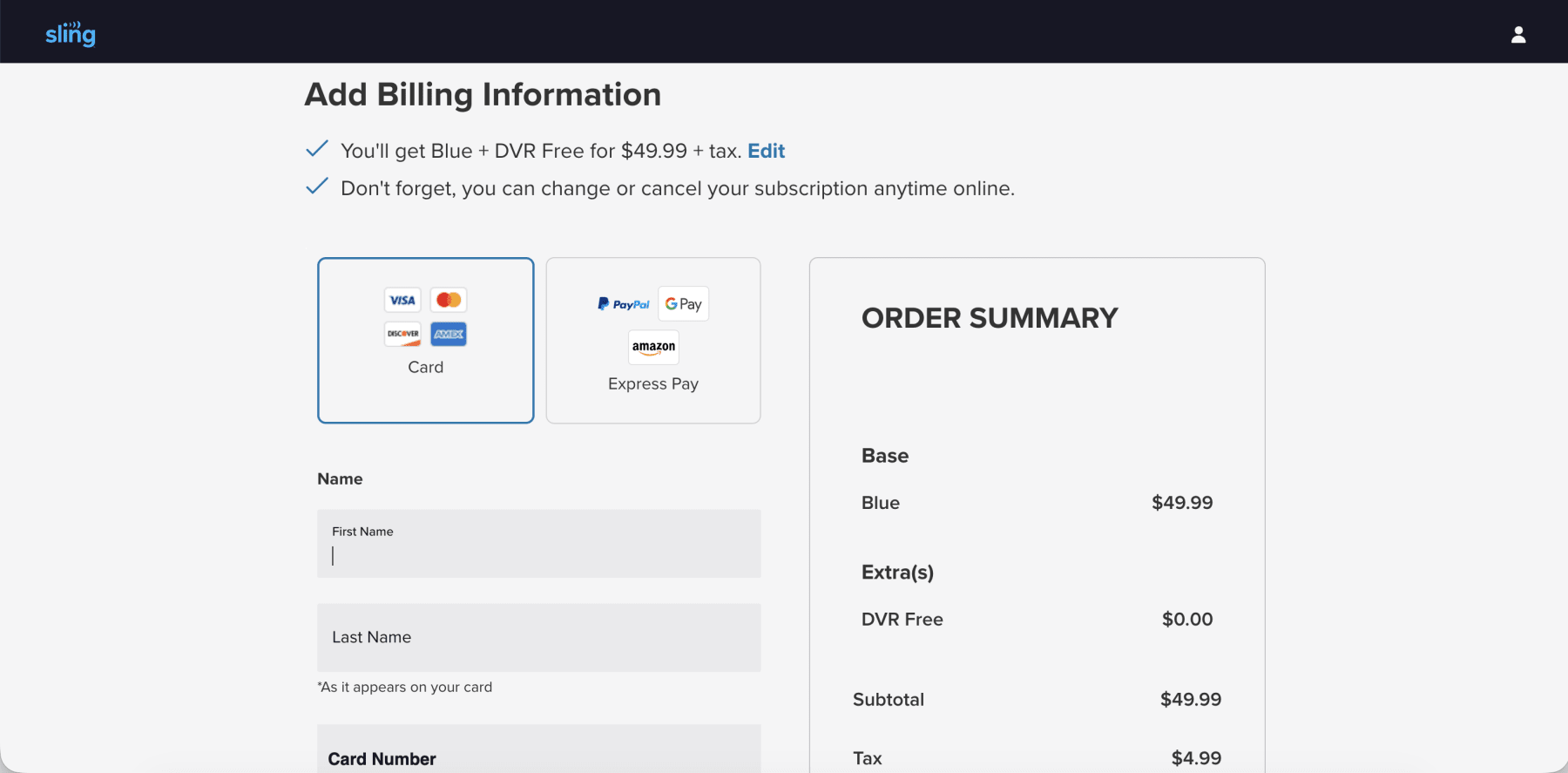
Method 2: The Standard Checkout Route
- Head over to the main Sling TV homepage and select your desired base plan.
- Proceed to the primary checkout screen to begin building your account.
- Look carefully for the specific promo code entry box before you type in any of your payment information.
- Type in your code, making absolutely sure there are no accidental blank spaces before or after the text.
- Click "Apply" to visually verify that the discount has reduced your order summary.
- Complete your sign-up process to finalize the deal and start streaming.
Steps For Existing Subscribers
If you already have an active subscription, the standard checkout page will not help you. Instead, you need to apply the code directly to your account dashboard.
- Log in to your account at sling.com/my-account.
- Look for the specific "Redeem Promo Code" option right on your My Account dashboard (again, this might not appear if the company doesn't have any current alphanumeric coupon codes in circulation).
- Enter your code and apply it to your account to see your next billing cycle update.
DealNews Pro Tip: If you are trying to redeem a Sling TV gift card rather than a traditional discount code, you need to navigate to a completely different page. Head over to sling.com/gift to apply those funds to your account balance.
Troubleshooting: What To Do If Your Code Is Not Working
Digital couponing relies heavily on backend server verifications, and things do not always work flawlessly on the first try. If you hit an error message, run through this quick troubleshooting checklist.
- Check For Automatic Application: Remember, many of the best current deals do not require a manual code at all. If you clicked a special offer link, the discount is likely already baked into your final price.
- Verify New Customer Status: This is the most common roadblock. Many codes are strictly reserved for brand-new accounts. If you are an existing user trying to apply a new-user code, the system will flag it as invalid or ineligible.
- Check The Expiration Date: Promotional marketing campaigns operate on very tight timelines. If your code is showing up as invalid, it might simply be expired.
- Ask The Chatbot: If you are still stuck, Sling makes it easy to get help. Click the Chat icon on the Sling TV help page and type "promo code" to get immediate assistance from their automated support bot.
Key Things To Know About Sling TV Promotions In 2026
Entering the digital checkout line without knowing the rules of the road is a surefire way to overpay. The streaming landscape has shifted dramatically over the past two years, bringing massive price hikes and new regional fees across the entire industry. To make sure you are getting the absolute best return on your entertainment investment, you need to deeply understand how this platform operates.
Whether you are wondering about cancellation policies, how their pricing stacks up against the competition, or if you can stack a Sling promo code with a student discount, we have compiled everything you need to know to stream smarter this year.
What Is The Best Time To Save At Sling?
Patience is incredibly profitable in the modern digital streaming economy. While Sling TV offers introductory discounts year-round, their most aggressive promotional deals typically drop in the late fall and winter. The massive Black Friday and Cyber Monday shopping weekend in late November is historically the absolute best time to subscribe.
You will frequently see massive buy-one-get-one promotions, heavy discounts dropping base packages to roughly $15, or highly expensive streaming hardware thrown in completely free of charge. The start of the college and professional football seasons in late August and September also triggers a wave of excellent sports-focused deals.
What Does Sling Normally Cost In 2026?
To really know if a discount is worth your time, you first need to understand the sticker price. Sling's cost structure has evolved a bit for 2026, so let's break down exactly what the main Sling TV plans cost before you apply any coupons.
- Sling Select ($19.99/month): The newest ultra-budget tier features essential news and lifestyle channels but strictly excludes all expensive live sports networks.
- Sling Orange ($45.99/month): Highly focused on family programming and major sports, including the ESPN family of networks and Disney channels, limited to a single simultaneous stream.
- Sling Blue ($45.99/month): Heavily focused on news, premium entertainment, and select local broadcast networks like NBC and FOX, allowing up to three simultaneous streams.
- Sling Orange And Blue ($60.99/month): Combines every single channel from both lineups with an automatic $30.99 built-in monthly discount.
What Channels Can I Get With Each Sling TV Plan?
Sling is famous for its "a la carte" philosophy, letting you build a customized lineup instead of forcing you to pay for 200 channels you never actually watch. Depending on the base package and add-ons you choose, you can access everything from premium prestige dramas to live college football. Here is a breakdown of what you can expect to find:
- Sling Select: The ultra-budget tier keeps you informed and entertained with Fox News, MSNBC, CNN, the Hallmark Channel, the History Channel, and FX, but completely excludes sports.
- Sling Orange: This is your go-to for family and sports, featuring ESPN, ESPN2, ESPN3, the Disney Channel, Freeform, CNN, HGTV, and the Food Network.
- Sling Blue: Perfect for news and entertainment junkies, this tier packs in NBC, FOX, and ABC (in select local markets), plus the USA Network, FX, Bravo, the Discovery Channel, MSNBC, Fox News, AandE, and National Geographic.
- Premium Networks: Sling acts as a hub for massive premium streaming brands, allowing you to bundle Max, Paramount Plus with Showtime, Starz, MGM Plus, and AMC Plus directly into your monthly bill.
What Features and Add-Ons Does Sling TV Include?
To truly maximize your entertainment budget, you need to deeply understand exactly what you are paying for. Sling TV operates on an "a la carte" philosophy. This highly modular approach allows you to select a streamlined base plan and meticulously build out your channel guide using specific extra packages and premium network integrations.
Here is our comprehensive breakdown of the core Sling TV features and add-ons available in 2026.
Add-On Packages
Once you choose your base plan, you can add premium networks or genre-specific mini bundles that cost between $6 and $15 per month. Viewers can add channels dedicated to sports, comedy, kids programming, lifestyle, or news.
- Sports Extra: For $11 to $15 per month (depending on your base plan), die-hard fans gain access to NFL RedZone, NBA TV, the NHL Network, and regional college networks like the SEC Network.
- Comedy Extra: For $6 per month, this pack adds entertainment staples like MTV, the Paramount Network, CMT, and TV Land.
- Kids Extra: Keep the family entertained for $6 per month with Nicktoons, Nick Jr., TeenNick, and Boomerang.
- Lifestyle Extra: Also priced at $6 per month, this bundle features the Cooking Channel, the Magnolia Network, and the DIY Network.
- News Extra: Stay informed globally for $6 per month with BBC World News, NewsNation, and CNBC.
- The Total TV Deal: If you want it all, this massive bundle combines all seven available extras into one package for just $21 per month, offering incredible value over buying them individually.
- Premium Networks: You can seamlessly add prestige networks directly to your Sling guide. Top options include Paramount Plus With Showtime for $10 per month, Starz for $11 per month, and AMC Plus for $9 per month. You can even bundle Max for $17 per month.
Cloud DVR And Other Popular Features
A robust channel lineup is useless if the underlying technology cannot keep up. Sling offers a solid suite of technical features designed to compete with the heavy hitters in the streaming industry.
- Standard Cloud DVR: Every single base subscription automatically includes 50 hours of free cloud DVR storage. You can record live sports, movies, and daily news broadcasts, and you can fast-forward through the commercials on your recorded content.
- Unlimited DVR Upgrade: If 50 hours is not enough for your household, you can purchase the DVR Plus upgrade. For an extra $5 per month, this expands your storage capacity up to 200 hours (often marketed as an unlimited DVR capacity tier during specific promotional periods), ensuring you never have to delete an old recording to make room for a new one.
- 4K Streaming: Sling has actively rolled out 4K streaming capabilities for select live sporting events and premium content, providing crystal-clear resolution on supported smart TVs and streaming dongles.
- Flexible Access: The platform requires absolutely no long-term contracts. You can downgrade, upgrade, or pause your service entirely from your dashboard, and you can access your account from virtually any modern streaming device, including Roku, Amazon Fire TV, and Apple TV.
How Do Sling Discounts Compare With Competitors?
To really know if you are getting a good deal, you have to look at the bigger picture. The streaming world is crowded in 2026, so let's see how Sling holds its own against the big corporate giants trying to take over your living room.
| Streaming Service | Starting Price | Primary Focus | Best Discount Strategy |
| Sling TV | $19.99 to $45.99 | Affordable, customizable skinny bundles | 50% off first month or prepay bundles |
| Philo | $25.00 | Pure entertainment, zero sports or local news | Occasional 7-day free trials |
| YouTube TV | $82.99 | Premium, comprehensive cable replacement | Free trials or first-time user discounts |
| Hulu Plus Live TV | $89.99 | Massive Disney integration and on-demand libraries | Bundle with Disney Plus and ESPN Plus |
| Fubo | $79.99+ | Extreme niche sports and regional sports networks | Short-term free trials |
If you are hunting for YouTube TV promo codes or similar premium service discounts, you will quickly notice that their base prices start incredibly high. Even with a generous first-time user discount, you are still committing to a massive monthly bill of over $70 once the promotional period ends. Sling TV remains over $30 cheaper per month than YouTube TV and Hulu Plus Live TV, providing the exact same essential networks without forcing you to subsidize the cost of massive on-demand libraries or bloated channel lineups you never watch.
For extreme budget hunters, Philo used to be the undisputed king at $25 a month. However, the newly introduced Sling Select package completely undercuts Philo's base price while actually providing access to major national news networks like Fox News and CNN. Unless you need highly specific regional sports networks that only Fubo savings can provide, or you require the massive Disney bundle included with Hulu Plus Live TV discounts, Sling is mathematically the smartest choice for general audiences.
What Have Sling Prices Looked Like In The Past?
Sling TV originally made waves as the ultimate budget-friendly cable alternative, famously launching its base packages for just $20 and eventually resting at $25 a month for years. However, as the cost of network broadcast rights and sports licensing skyrocketed to unprecedented levels across the entire market, Sling had to adapt and push the baseline cost of both Sling Orange and Sling Blue up to their current $45.99 price tags. Sling introduced the Sling Select tier for $19.99 in 2026 to give customers a more affordable alternative.
Can I Use Multiple Discount Codes?
We all love stacking coupons at the grocery store, but streaming services play by a much stricter set of rules. Unfortunately, Sling's checkout system isn't going to let you double-dip on digital discounts.
- No Direct Code Stacking: You absolutely cannot apply two different promo codes at checkout. The system will only accept one alphanumeric code per transaction.
- Combining Introductory Promos: You generally cannot combine a 50% off first-month promotion with a hardware prepay bundle. You must choose which introductory offer provides the highest total value for your specific needs.
- Bundle Stacking: You can, however, take advantage of built-in package discounts. For example, you can combine the discounted Sling Orange and Blue tier with the 4-Extra channel bundle, layering platform-level discounts together.
Does Sling Offer Student Or Military Discounts?
Sling knows that college tuition and textbooks aren't getting any cheaper, so they have carved out some specific discounts to help students keep their entertainment budget under control.
- Student Discount: Actively enrolled college students can navigate to the dedicated student discount landing page to receive a highly generous $10 off per month for six months. This requires secure verification through a third-party partner like Student Beans using a valid .edu email address.
- Military Discount: Currently, Sling does not offer a heavily advertised, verified military or veteran discount program. Military families are encouraged to utilize the standard 50% off new user promotions or prepay deals to secure their initial savings.
What To Do If My Promo Code Does Not Work?
If your promo code isn't working, the culprit is almost always your account history. Streaming companies burn through marketing budgets to get new users, not reward old ones. If you try to use a "new customer" code on an email address that had a subscription three years ago, the system will block it immediately. You need a brand new email address to unlock those savings. Also, old browser cookies can mess with the tracking, so open an incognito window to clear out the digital cobwebs.
Does Sling Have A Rewards Program?
While most streaming services just take your money every month, Sling actually rewards you for sticking around. They have turned watching TV into a game where consistent viewing can literally pay off.
- Watch And Win Sweepstakes: By simply watching 30 minutes of television daily, you earn direct entries into regular cash sweepstakes.
- Spin And Win Wheel: Meeting daily viewing requirements unlocks spins on a digital prize wheel directly within the user interface.
- Inclusive Participation: You do not even need a paid subscription to participate. Users enjoying the free, ad-supported Sling Freestream tier are fully eligible to build watch streaks and win cash prizes or free months of premium service.
How Do I Cancel My Sling TV Subscription?
Let's face it: the absolute best part about ditching the cable company is that you are no longer held hostage by a multi-year contract. Sling operates on a strict, prepaid 30-day billing cycle, meaning you can pull the plug and cancel your subscription at the drop of a hat.
Expert deal seekers exploit this flexibility through "subscription churning." This involves applying a Sling TV promo code to secure a discounted subscription, adding premium channel packs only when a specific show or sports season is active, and instantly canceling the add-on the morning after the finale concludes.
To manage your plan, you must navigate to the My Account section using a web browser, as you cannot access the cancel subscription settings directly through the app on your streaming device or any other supported device. Here is the exact process to stop your service:
- Log In On A Web Browser: Sign in using your computer or mobile browser.
- Access Your Dashboard: Click your profile icon to open your main dashboard and select Manage Account.
- Initiate Cancellation: Click the Cancel Subscription link and follow the on-screen prompts to confirm your decision.
- Check Your Email: Always ensure you receive a confirmation email for your records to avoid any unexpected auto-renewal charges to your credit or debit card.
Account Management Tips:
Before you completely walk away from the platform, there are a few critical account management details our team recommends you review.
- The Pause Option: Instead of a full cancellation, you can choose to pause your subscription for 1 to 3 months. This is perfect if you only use the service for football season or are taking a long vacation. Just be aware that pausing for more than 1 month will permanently delete your saved DVR recordings.
- Third-Party Billing: If you initiated a free trial or paid for your service through a third-party platform like Roku, Amazon, Google Play, or Apple, you cannot use the standard Sling portal. You must navigate directly to the specific subscription menu on that exact platform to stop your billing.
- Keep Watching Until The End: Because Sling does not offer partial refunds, your cancellation simply stops the next scheduled payment. You can continue streaming your channels until the exact moment your current billing cycle expires.What Is Sling's Return And Refund Policy?
Because Sling is a prepaid service, they generally don't do refunds if you change your mind halfway through the month. If you cancel on day ten, you won't get cash back for the remaining twenty days—but you do get to keep watching until your billing cycle officially runs out.
How Do Local Channel Surcharges Impact My Bill?
The biggest headache for streamers in 2026 is undoubtedly the local channel surcharge. If you grab the Sling Blue package, your bill might jump by $4 or even $9 a month depending on where you live, just for the privilege of watching your local ABC, NBC, or FOX affiliates.
The only way to totally dodge these fees? Stick to Sling Orange or the new Sling Select tier, which skip local broadcasts entirely.
How Do Sling Day Passes Work?
Sling recently shook up the market by introducing the Flexible Day Pass, a feature that completely changes the game for casual viewers who don't want to get stuck with a monthly bill.
- 1-Day Pass ($4.99): Provides full access to live programming for exactly 24 hours.
- 3-Day Pass ($9.99): Perfect for a specific weekend sports tournament or a short vacation.
- 7-Day Pass ($14.99): Ideal for comprehensive coverage of multi-day cultural events or election weeks.
Expert Tip: The service automatically terminates at midnight on the final day, completely eliminating cancellation hassles and unexpected credit card charges with automatic renewals.
Other Ways To Save On Sling TV This April
Securing a discount on your first month is an excellent starting point, but if you want to keep your bank account happy in the long run, you need to think beyond the initial sign-up bonus. True financial optimization comes from actively managing your subscription rather than just setting up auto-pay and forgetting about it.
Whether it is downgrading to a hidden budget tier, churning your add-ons based on the NFL schedule, or utilizing new micro-subscription options, there are plenty of passive strategies to keep your costs down. Here are the expert moves you need to make to maximize your return on investment in 2026.
Stop Paying Entirely With Sling Freestream
Sometimes the absolute best discount is paying nothing at all. If you are looking to cut your entertainment budget to zero, Sling Freestream is the platform's secret weapon. Unlike "free trials" that require a credit card and hope you forget to cancel, Freestream is a permanently free, ad-supported tier that requires absolutely no financial commitment.
It is arguably the most robust free offering in the 2026 streaming market. You simply open the app and start watching—no login required. Here is exactly what you get without spending a dime:
- No Credit Card Needed: You do not even need to create an account to access the service. You can browse and watch anonymously, ensuring you never get hit with a surprise auto-renewal charge.
- Massive Channel Lineup: Access over 600 live linear channels covering news, sports highlights, reality TV, and classic sitcoms.
- On-Demand Library: The service includes a library of over 5,000 on-demand movies and TV shows, perfect for weekend binges.
- Free Cloud DVR: Uniquely, Sling provides 10 hours of cloud DVR storage for Freestream users (if you create a free account), allowing you to record shows just like a paid subscriber.
- Earn While You Watch: Even as a free user, you can participate in the "Watch and Win" loyalty program. By watching 30 minutes of free content daily, you earn entries into sweepstakes for cash prizes and free months of premium service.
The Sling Orange And Blue Bundle Strategy
The most straightforward method to maximize your dollar-to-channel ratio is to stop thinking of Sling Orange and Sling Blue as separate products. If your household is split between die-hard sports fans who need ESPN and reality TV lovers who cannot live without Bravo, buying two separate accounts is a massive financial mistake that will cost you nearly $92 a month.
By choosing the combined Sling Orange and Blue package for $60.99, Sling automatically applies a massive $30.99 monthly discount. This strategy eliminates the need for a second subscription from a different provider while ensuring everyone gets their fix.
Utilize Flexible Day Passes For Short-Term Needs
In a massive industry shakeup for 2026, Sling introduced the Flexible Day Pass, a feature that completely revolutionizes how casual viewers interact with live TV. Instead of forcing you to pay $45.99 for a full month just to watch a single weekend golf tournament or election night coverage, you can now purchase highly specific micro-subscriptions.
- 1-Day Pass ($4.99): Perfect for a specific event like the Super Bowl or the Academy Awards.
- 3-Day Pass ($9.99): Ideal for a weekend sports tournament or a short holiday.
- 7-Day Pass ($14.99): Great for a full week of news coverage or a short-term guest.
No Commitment: The service automatically terminates at midnight on the final day, meaning you avoid all cancellation hassles and never have to worry about an unexpected auto-renewal charge.
Switch To The New Sling Select Tier
If you are tired of paying nearly $50 dollars a month when you really just want the news and some evening entertainment, the new Sling Select package is a game-changer. Responding to consumer frustration over rising costs, Sling launched this tier for exactly $19.99 per month. The catch? They stripped out the single most expensive component of cable TV: live sports.
If you can live without ESPN and NFL RedZone, downgrading to Sling Select saves you over $300 a year. You still get major news networks like CNN, Fox News, and MSNBC, alongside entertainment staples like FX and the Hallmark Channel. It is the absolute bare essentials of the "skinny bundle" concept, and for non-sports households, it is the best value in streaming.
Leverage Hardware Bundles To Bypass Fees
One of the best long-term savings strategies involves a bit of upfront investment in the AirTV ecosystem. The AirTV Anywhere is a network tuner box that connects to a standard HD antenna and your Wi-Fi router. It captures free local broadcast signals from ABC, CBS, FOX, NBC, and PBS and wirelessly integrates them right into your Sling guide.
Why does this matter for your wallet? It allows you to downgrade to a cheaper base package or avoid the Sling Blue tier entirely, helping you dodge the new $4 to $9 monthly regional broadcast surcharges. Sling frequently runs promotions where prepaying for a few months of service heavily discounts this hardware, effectively paying for itself within the first year by eliminating those recurring fees.
Strategic Timing And Subscription Churning
Unlike traditional cable contracts that lock you in for two years, Sling operates on a strict month-to-month basis. Expert deal seekers exploit this by "churning" their add-ons. You absolutely do not need to keep the Sports Extra package all year round. The morning after the NFL regular season ends in January, log into your dashboard and remove the $11 add-on with a single click.
The same applies to the Hollywood Extra or other premium packs. If you only subscribed to watch a specific series, drop the pack the moment the finale airs. By strictly aligning your active add-ons with the television release calendar, you ensure you are only ever paying for content you are actively consuming.
Take Advantage Of The Student Discount
If you are currently balancing tuition, rent, and expensive textbooks, Sling recognizes that your budget is tight. They offer a highly verified student discount that knocks a flat $10 off your monthly bill for six consecutive months. This isn't a random promo code you can find on a forum; you have to verify your active enrollment status through Student Beans using a valid .edu email address or student ID. That translates to $60 in total savings over a single semester, which is definitely better spent on late-night pizza than on broadcast fees.
Binge During Free Preview Weekends
One of the best passive saving strategies is to keep an eye out for "Free Preview" weekends. Sling frequently partners with premium networks like Starz, MGM Plus, or Paramount Plus with Showtime to unlock their entire libraries for 48 hours, usually from Friday evening through Sunday night. If there is a specific ten-episode drama series you are dying to watch, do not immediately pay the $10 monthly add-on fee. Wait for a free preview weekend, binge the entire season for free, and enjoy the content without ever adding a cent to your bill.
What Else To Consider About Sling TV In 2026
Before you finally cut the cord, you must understand the true value proposition of Sling TV in 2026. While their highly modular channel packages offer incredible savings over traditional cable, the service relies strictly on your physical billing zip code to determine your local channel lineup. This means your channel guide and those mandatory local broadcasting surcharges will shift based on your location, and specific regional sports blackouts will absolutely still apply.
It is also vital to read the fine print before applying a Sling TV promo code to your account. Your streaming subscription is legally bound to personal, residential use, meaning broadcasting a playoff game at a commercial business will trigger an immediate account ban. For a complete breakdown of binding arbitration clauses and strict refund policies, we highly recommend reviewing the official Sling Terms of Use.
How We Find And Verify Streaming Promotions
The streaming landscape shifts daily, which is exactly why our expert team actively monitors the internet to ensure every Sling TV promo code we publish is authentic. We source these deals by constantly scouring official press releases, hidden community forums, and exclusive affiliate networks to uncover targeted returning-user offers and unadvertised prepay bundles.
Once a deal is sourced, we never take it at face value. Our team manually tests how codes are sourced and verified by running every single promotional link and checkout code through the actual shopping cart to guarantee the final price, validate the exact expiration date, and confirm that the discount actively lowers your monthly bill without any hidden catches.
Stay Updated On The Latest Sling TV Promo Codes
Sling TV is always releasing new promo codes, exclusive offers, and limited-time discounts—sometimes with little warning. To make sure you never miss out on the best ways to save:
- Bookmark this page: We regularly update our list of verified Sling TV promo codes and deals, so check back before every order.
- Sign up for deal alerts: Subscribe to our DealNews Select newsletter to get the hottest streaming discounts delivered straight to your inbox.
- Set a custom deal alert: Create a personalized deal alert for Sling TV or your favorite premium channel add-ons and receive instant notifications when a new promo goes live.
- Follow us on social media: We frequently share flash promo codes and exclusive deals on our social channels. Follow us here:
Staying proactive is the best way to maximize your Sling TV savings all year long.

Sign In or Register