YouTube TV Promo Code: Discounts Up to $93 in August 2026

Ready to cut the cord without losing access to live sports and your local channels? While YouTube TV's standard $82.99 monthly price tag can be steep, new subscribers can currently drop that rate to $72.99 for their first three months. You can also test the platform before committing to a paid plan by taking advantage of a 21-day free trial, or maximize your savings by utilizing partner bundles like Verizon's $20 monthly discount.
Our Top YouTube TV Promo Codes and Coupons Offered in August 2026
YouTube TV Base Plan New User Offer
$75 off first 5 monthsYouTube TV's main plan starts at $67.99 per month for new subscribers' first 5 months, down from the regular $82.99 per month. It includes unlimited cloud DVR storage and support for up to 6 household accounts with 3 simultaneous streams. Note that after 5 months your subscription will automatically renew at the then-current price unless you cancel beforehand. This offer is available to new subscribers who are not current YouTube TV Base Plan subscribers, have not been YouTube TV Base Plan subscribers, or participated in a YouTube TV Base Plan trial previously. This deal ends August 31.
YouTube TV Subscription at Verizon
$62.99/mo. for 6 monthsNew YouTube TV customers can get the service for just $62.99 per month for the first six months with eligible home internet and mobile plans. After six months, your subscription price will increase to the then-current standard rate ($82.99 per month at the time of publishing). Some exclusions may apply.
YouTube TV Subscription at Frontier Internet
Up to $180 off for 12 monthsFrontier Internet customers who are new to YouTube TV can save $10 per month on the service for 12 months. Additionally, customers who have both Frontier Internet and Frontier TV or Fiber TV will save $15 per month on the service for 12 months. In both cases, customers must be totally new to YouTube TV - current subscribers, former subscribers, and trial users are not eligible. After 12 months, your subscription will automatically renew at the then-current rate ($82.99 per month at the time of publishing). Some exclusions may apply.
YouTube TV Free Trial
Sign Up TodayGive this premium service a try before going all-in on a subscription! Trial lengths can vary, so before you sign up, you may want to check the length to make sure you get the most from your trial period. We've seen trials as short as 2 days but also as long as 21 or even 30 days in the past, so it's worth digging around to make sure you're getting enough time to explore everything YouTube TV has to offer. Note that as soon as your trial ends, you'll be charged the then-current rate for the service. This deal is ongoing.
YouTube TV 4K Plus Add-On
$4.99/mo. for 12 monthsIf you want to upgrade your YouTube TV experience, you can grab the 4K Plus add-on right now for just $4.99 per month instead of the usual $9.99 per month. Even better, this deal will net you that discounted price for a whole 12 months. Be sure to set a reminder to cancel this add-on before it renews in a year, though, unless you're okay with paying double for the perks.
YouTube TV Premium Channel Add-Ons
From $1.99/mo.Customize your YouTube TV experience and add on your favorite premium channels to have all your streaming favorites in one place! These add-ons start at just $1.99 per month, and you'll find tons of popular options like Shudder, Max, Starz, AMC+, and much more. In some cases you may be able to try out these channels for free for a limited time, as well, so it's a good way to test out some you may be less familiar with before committing.
YouTube TV Entertainment Plus Add-On
$29.99/mo.Add this package to your YouTube TV subscription and you'll get HBO Max, Paramount+ Premium, and Starz in one handy bundle. It's a great way to have your streaming favorites in one place for easier binge watching. This offer is ongoing.
YouTube TV Sports Plus w/ NFL Redzone Add-On
$10.99/mo.Sports enthusiasts can add this bundle to their YouTube TV subscription for just $10.99 per month. You'll get access to more than 13 sports networks to catch all your favorites and be able to enjoy watching live games without jumping through a ton of hoops.
YouTube TV Spanish Plus Add-On
$14.99/mo.Sign up for Spanish Plus with your YouTube TV account and you'll get instant access to telenovelas, live sports, and more for just $14.99 per month. Note that some exclusions may apply. This offer is ongoing.
YouTube TV Spanish Plan
$34.99/mo.YouTube TV subscribers can add more Spanish content to your account with the Spanish Plan for an additional $34.99 per month. You'll get a 7-day trial to see if it's worth the cost, so if you're not totally sold, be sure to cancel before your trial period is up. This is an ongoing offer.
HBO Max at YouTube TV
From $18.49/mo.YouTube TV subscribers can add HBO Max to your account starting at just $18.49 per month. You'll get all your favorites from both services streaming in one place, which makes binge-watching even easier. Note that some exclusions may apply. This is an ongoing offer.
Paramount+ Premium Subscription at YouTube TV
$10.99/mo.YouTube TV subscribers can add Paramount+ Premium to your account for an additional $10.99 per month and get all your streaming favorites in one place. You'll have a 7-day trial to see if you want everything Paramount+ Premium (the tier with Showtime) has to offer, but if you decide it's not worth it, you can cancel at any time. Note that some exclusions may apply. This offer is ongoing.
YouTube TV generally relies on seasonal promotions, direct partner links, and targeted discounts rather than standard alphanumeric promo codes. Based on current promotions, here are the best ways to secure a discount on your streaming package this month.
Verified Introductory Offers and Base Plan Discounts
Instead of hunting for a promo code at checkout, the best YouTube TV discounts are automatically applied when you sign up directly through promotional landing pages or partner bundles.
-
New Customer Base Plan Markdown: New users can frequently bypass the standard $82.99 monthly pricing and get the Base Plan (which includes over 100 live channels and unlimited DVR) for just $67.99 per month for the first three months.
-
Partner Deals: By signing up through exclusive partner offers, such as the current Business Insider promo, new users can score $75 off the Base Plan. This is applied as a $15 monthly discount for your first five months, bringing your cost down to $68 per month.
-
Internet Provider Bundles: If you use Verizon Home Internet or Frontier, check your account for bundle deals. Eligible users can score a $10 to $20 monthly discount on YouTube TV for six months.
-
Sports Plus Plan Discounts: New subscribers who want more sports coverage can lock in the Sports Plan for $54.99 per month for their first 12 months—a $10 monthly discount off the standard rate.
YouTube TV Military, First Responder, and Student Discounts
YouTube TV offers excellent long-term markdowns for specific demographics, though these require third-party identity verification rather than a standard coupon code.
-
Military and First Responders: Eligible new subscribers can get $15 off per month for 12 months on the YouTube TV base plan. This equals a total savings of $180, but requires you to verify your identity through the ID.me Shop.
-
Student Discounts: While there is no base plan discount for students, verified college students can secure a reduced rate on the NFL Sunday Ticket Student Plan using SheerID. Additionally, if you are simply looking for ad-free video streaming, the standalone YouTube Premium service offers a heavily discounted student membership.
Discounts for Existing YouTube TV Subscribers
You don't have to be a new user to save. Existing subscribers have two distinct ways to lower their monthly bill:
-
Targeted Retention Offers: If you are already a member, log into your YouTube TV account via a web browser (these offers will not show up on the mobile or TV app). Navigate to Settings > Membership. Existing users frequently find "we want you back" or retention promos here, which can discount your Base Plan by $10 to $20 per month.
-
The Referral Program: Current subscribers can generate a unique referral link from their account. If a friend or family member signs up using your link, the new user will receive a discount on their first month, and you will earn a discount on your next monthly bill.
Current YouTube TV Free Trial Offers
While YouTube TV does not currently offer a standard 14-day, 30-day, or 12-month free trial, you can easily test the service for free. Trial lengths are highly dynamic and generally range from 5 to 10 days for new users, though extended trials up to 21 days are occasionally offered during special holiday events or through device partnerships.
You do not need a special code to claim a free trial. Simply navigate to the YouTube TV Welcome Page and enter your ZIP code during registration to view the specific trial duration currently available in your local area.
How to Redeem a YouTube TV Promo Code
While most of the best YouTube TV deals are applied automatically during sign-up, you may occasionally get your hands on a special promo code that needs to be entered manually. The process is simple, but there's one key detail to remember: you must redeem codes through a web browser on your computer or phone, as there is no option to do so within the YouTube TV app.
Here is a step-by-step guide to applying your code:
-
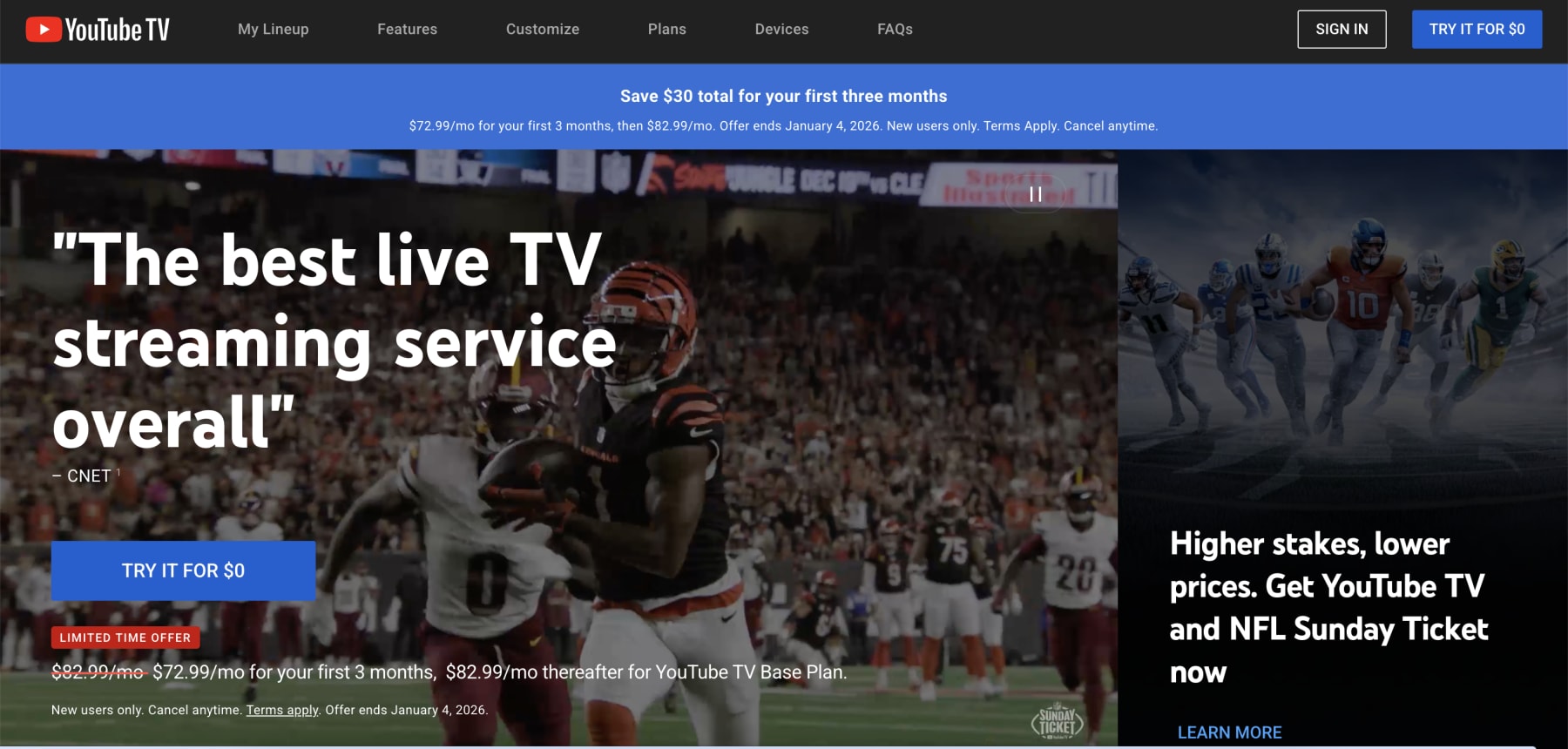
Go to the YouTube TV Website: Navigate to tv.youtube.com in your preferred web browser.
-
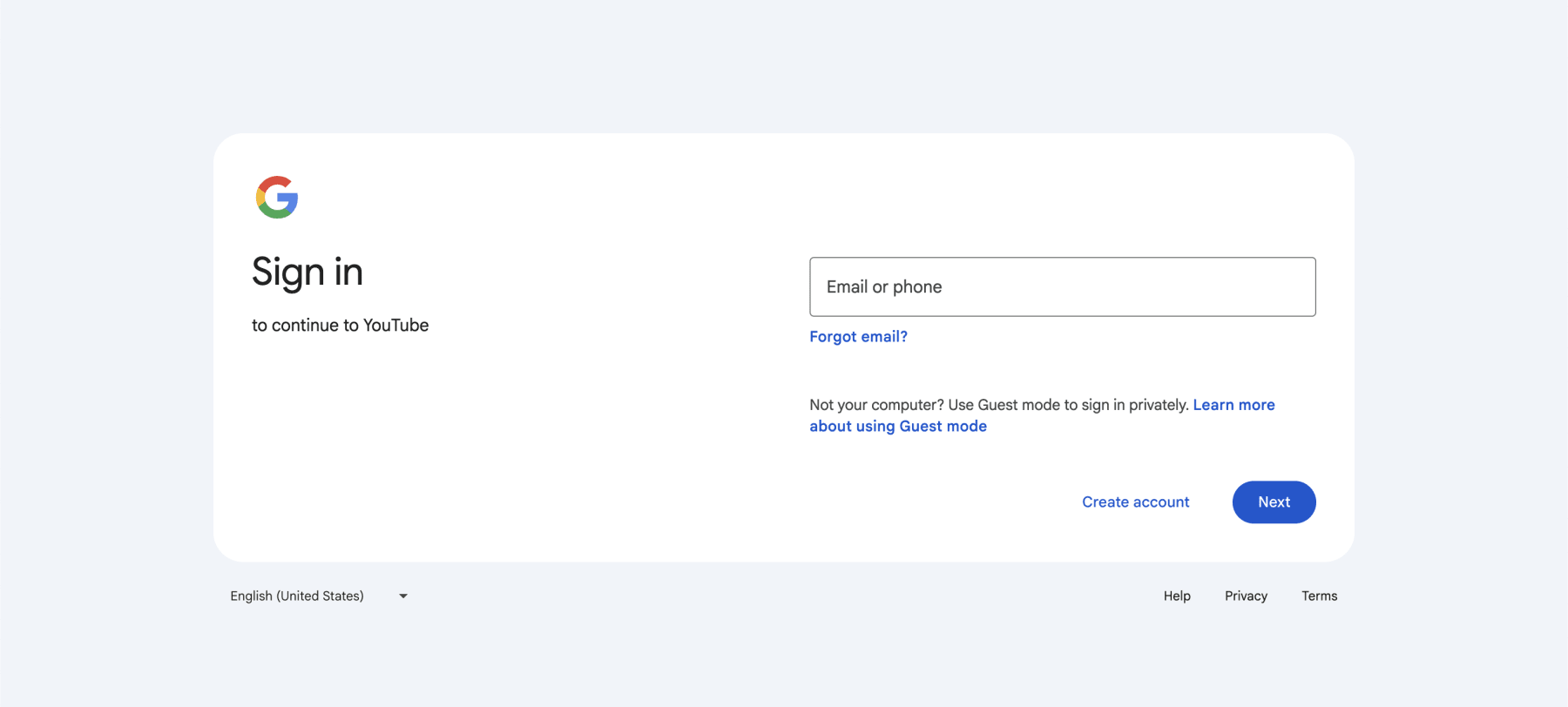
Sign In: Log in using the Google account associated with your YouTube TV subscription.
-
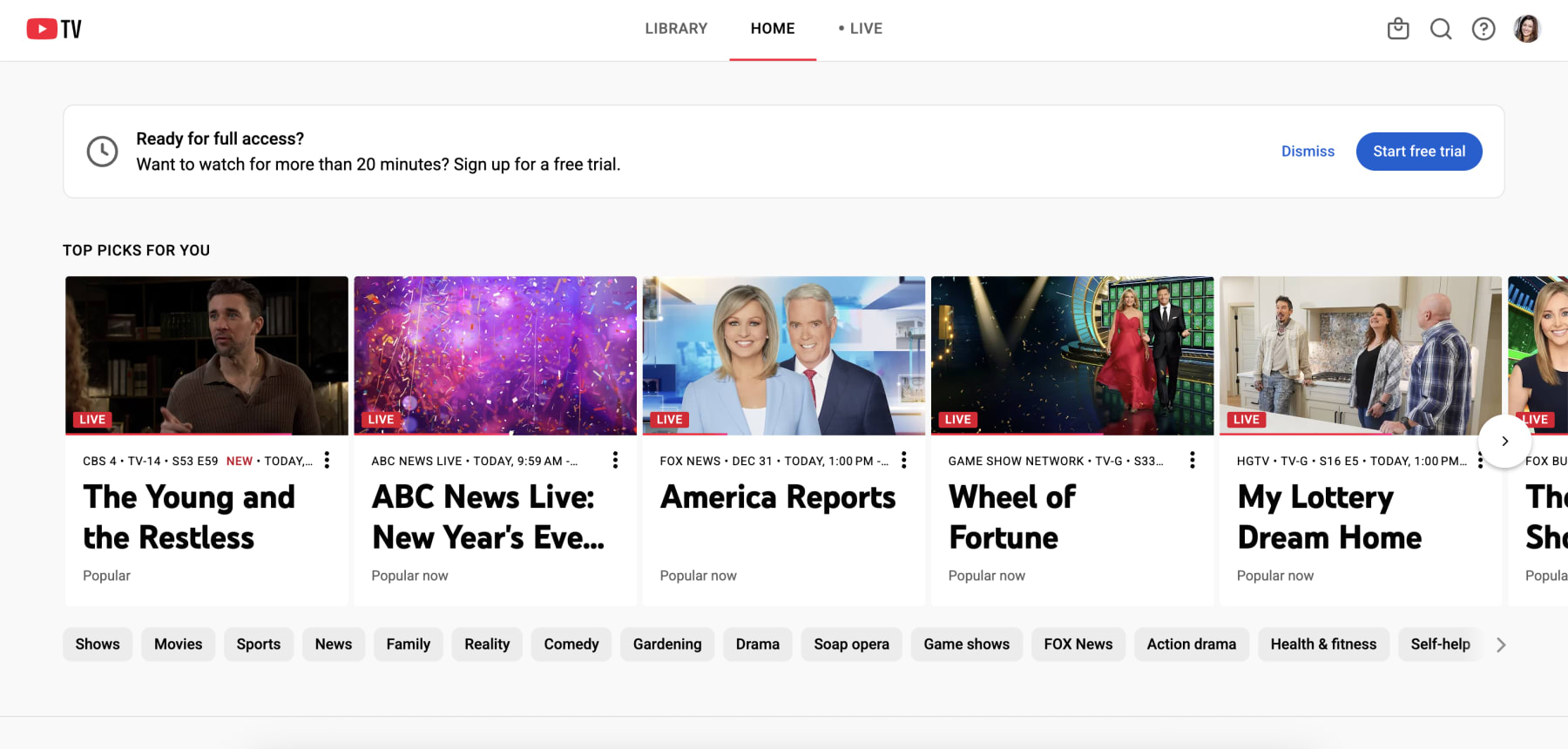
Access Your Settings: Click on your profile picture, which appears in the top-right corner of the page.
-
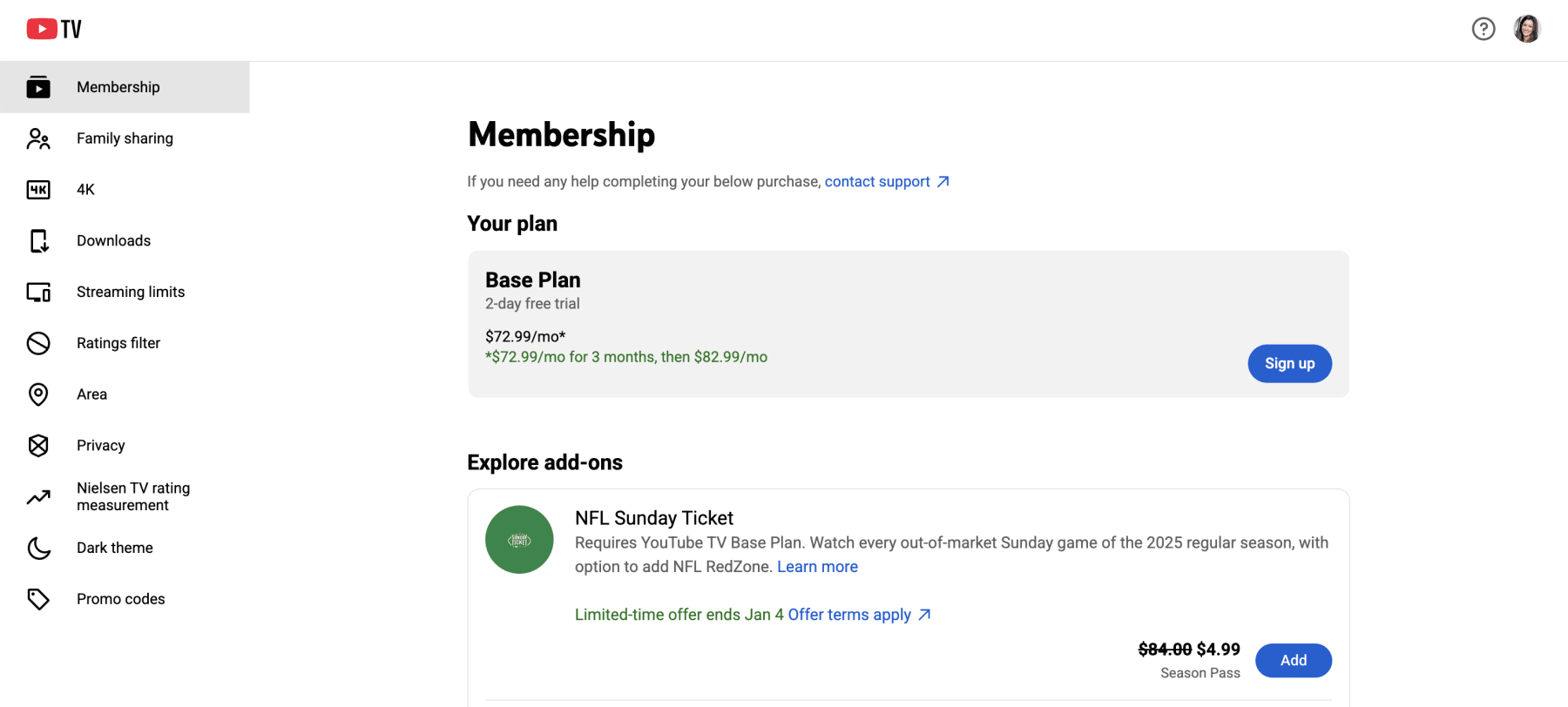
Select 'Promo code': From the settings menu, choose the "Billing" tab.
-
Enter the Promo Code: Look for a link or field labeled "Add promo code." Click it, carefully type or paste your code into the box, and apply it.
-
Verify the Discount: Before you finish, make sure the promotional discount has been successfully applied to your subscription total. The price should reflect the savings from your code.
Important Tips for Using Promo Codes
If you run into trouble, don't worry. Keep these expert tips in mind to ensure you get the savings you're looking for.
-
Check the Terms and Conditions: The most common reason a code fails is because of eligibility restrictions. Many codes are valid only for new subscribers who have never had a YouTube TV subscription or free trial before.
-
Use Referral Links Directly: If a friend sent you a referral offer, it's likely a special link, not a code. You must sign up for YouTube TV by clicking that exact link to receive the discount.
-
Look for Pre-Applied Offers: Before you even look for a promo code box, check the checkout summary. The best introductory offers from YouTube TV are often applied automatically just by signing up on their website.
-
Check Your Membership Page for Deals: Occasionally, targeted offers (like discounts on the 4K Plus add-on) will appear directly in your account. You can find these by navigating to Settings > Membership and clicking "Manage" next to your base plan.
Key Things to Know About YouTube TV Promotions This August
Beyond the sign-up offers and promo codes, there are a few more key things every deal seeker should know to get the most out of their YouTube TV experience. We've answered the most common questions to help you save time and money.
When Is the Best Time to Look for YouTube TV Promos?
While YouTube TV offers deals year-round, you can often find the most significant discounts during specific promotional periods. If you're not in a rush to subscribe, it can pay to wait for one of these windows.
-
Major Holidays: Keep an eye out around Black Friday, Cyber Monday, and the New Year. During these times, YouTube TV often rolls out its best introductory offers for new subscribers, such as $15 to $20 off per month for the first few months.
-
Early in the Year: February and March are also common months for aggressive promotions as streaming services compete for new customers.
-
Back-to-School Season: As students get ready to head back to campus, streaming services compete to be the go-to choice for dorm rooms and apartments. Look for back-to-school deals timed with the start of the school year.
-
NFL Season: As the exclusive home of NFL Sunday Ticket, YouTube TV frequently rolls out special promotions in late summer and early fall to attract football fans. Look for bundled savings on the Base Plan and the Sunday Ticket add-on.
For existing subscribers, the best "deal" often comes when you decide to leave. If you start the cancellation process on the YouTube TV website, you may be presented with a "retention offer" to convince you to stay. These can be surprisingly valuable, sometimes offering a discount of $10 to $30 per month for several months.
Does YouTube TV Have a Free Trial?
Yes, it absolutely does. Trying YouTube TV with a free trial is the best way to see if YouTube TV is the right fit for you. The standard trial period typically ranges from 7 to 21 days, giving you full access to the Base Plan's 100+ channels and unlimited DVR. You can find our full guide on YouTube TV free trials for more information.
How YouTube TV Promos Compares to Competitors
| Service | Typical Discount Strategy | Live TV and Sports | Pricing Context |
| YouTube TV | Introductory monthly rates; internet provider bundles. | Yes (Core Feature) | $82.99/mo standard |
| Hulu Plus Live TV | Bundled with Disney Plus and ESPN Plus for value. | Yes (Core Feature) | $82.99/mo (Includes bundle) |
| Sling TV | Half-off first month; long-term prepay deals. | Yes (Limited) | $40 - $55/mo |
| Fubo | Free trials; introductory tiered pricing. | Yes (Sports Focus) | $79.99/mo + RSN fees |
| Paramount Plus | 50% off annual plans; extended free trials. | Yes (NFL and CBS) | Often $5.99 - $12.99/mo |
| Peacock | Deeply discounted annual codes (e.g., $19.99/yr). | Yes (Select Events) | Often $7.99 - $13.99/mo |
| Max | Annual plan savings; carrier bundles (Verizon). | Limited (Via Add-on) | $9.99 - $20.99/mo |
| Disney Plus | Multi-service bundles; rare seasonal offers. | Limited (Via Bundle) | $9.99 - $15.99/mo |
| Netflix | Very rare; almost exclusively via carrier bundles. | Special Events | $6.99 - $22.99/mo |
When evaluating the value of YouTube TV, it is essential to look at both the direct live TV competitors and the broader on-demand streaming landscape. YouTube TV distinguishes itself by offering significant dollar-value discounts on a premium, all-in-one service, whereas on-demand platforms like Peacock or Paramount Plus typically focus on low-cost entry points and percentage-based annual savings. Direct competitors like Hulu plus Live TV offer a similar price point of $82.99 dollars but differentiate by including the Hulu Plus Disney Plus Bundle, though they lack YouTube TV's superior six-profile household flexibility.
Meanwhile, budget-friendly options like Sling TV offer a lower entry price of $40 to $55 dollars but come with a much smaller channel list and limited DVR storage compared to YouTube's unlimited capacity. Fubo is another strong contender starting at 79.99 dollars, but sports fans should be aware that mandatory Regional Sports Network fees often make its final monthly total higher than a YouTube TV subscription.
Platforms like Peacock and Paramount Plus are more aggressive with direct promotions. It's common to find Peacock coupon codes that slash the price of an annual subscription, while the best Paramount Plus deals often include extended free trials and steep 50% discounts on yearly plans during specific sale periods. Ultimately, YouTube TV's approach is to offer a significant dollar-value discount on a premium, comprehensive service, whereas on-demand competitors focus on low entry prices and frequent, percentage-based savings.
You can find some of the best Max deals by paying for a full year upfront or through bundles with providers like Verizon. On the other hand, it's very unusual to find direct Netflix bundle deals, with the best savings almost always coming from "on us" promotions from mobile carriers like T-Mobile.
YouTube TV hinted at introducing new plans in 2026, giving customers more options, enhancing content discovery and accessibility—and the ability to convince you to add premium extras.
Can You Get YouTube TV Without Ads?
This is a common point of confusion, so let's clear it up. Because YouTube TV is a live TV streaming service designed to replace cable, you cannot get an ad-free version of the base service. Ads will play during live broadcasts and on-demand content from networks, just as they would on traditional TV.
However, YouTube TV's unlimited cloud DVR is your secret weapon against ads. When you record a show, you can fast-forward through the commercials when you watch it back.
It's also important to know that a YouTube Premium subscription, which removes ads from regular YouTube videos, does not remove ads from the YouTube TV live streaming service. The two subscriptions are separate.
How Do You Cancel a YouTube TV Subscription?
YouTube TV makes it easy to cancel your service without having to call anyone. You can do it directly from their website in just a few steps:
-
In a web browser, go to tv.youtube.com and sign in.
-
Click on your profile picture in the top-right corner and select Settings.
-
Navigate to the Membership tab.
-
Click Manage next to your Base Plan, and then select Cancel membership.
-
Follow the final prompts to confirm your cancellation.
After you cancel, you'll still have access to the service until the end of your current billing cycle. As a final perk, YouTube TV saves your DVR recordings for 21 days after your membership ends, just in case you decide to come back.
How Long Do YouTube TV Deals and Coupon Codes Last?
Promotions for YouTube TV can be a bit unpredictable, with deals and coupon codes varying in both duration and availability. Some discounts last only a few days, while others might stick around for a few weeks or even a full month—but there's no guarantee they'll be there when you check back.
That's why you should act fast when you spot a good offer, as promo codes and discounts can expire or change without warning. Some deals are tied to specific events or partnerships, meaning they might disappear as quickly as they arrived. If you see a solid discount that fits your needs, don't overthink—grab it before it's gone!
Understanding the Fine Print, Terms, and Conditions
Before you get too excited about a discount, it's crucial to understand the fine print. YouTube TV promo codes come with specific terms and conditions, and knowing these rules can save you from a headache later. Here's a breakdown of the most common promo code restrictions you'll encounter:
-
Eligibility and Usage Restrictions: Most offers are exclusively for new subscribers only. If you've ever had a YouTube TV subscription or even a free trial on your Google account, you likely won't be eligible for new-customer promotions. Additionally, deals typically have geographic restrictions and are only valid for residents in the United States where the service is available. Promo codes are almost always for one-time use and are non-transferable.
-
Promo Code Expiration and Validity: Deals don't last forever. Every promotion has a promo code expiration date, so you must redeem it before it becomes invalid. Pay attention to any "redeem by" deadlines, as these offers can change or be pulled without notice.
-
Impact of Cancellation or Changes: Canceling or pausing your account can affect your discount. If you cancel during a free trial, your access is typically revoked immediately. According to the official terms, there are no refunds for partial billing periods. Pausing your membership might also cause you to forfeit any remaining promotional credit.
-
Non-Stackability of Offers: You can't stack your savings. YouTube TV deals cannot be combined with other promotions, discounts, or referral credits. You'll have to pick the one best offer that applies to your situation.
-
Add-On Exclusions: Watch out for add-on exclusions. Most promo codes apply only to the YouTube TV Base Plan and won't discount premium extras like NFL Sunday Ticket or the 4K Plus package unless the promotion specifically states otherwise.
For the most current and complete details, it's always best to check the official YouTube TV offer terms.
How Do I Know if a Promo Code Is Trustworthy?
In a sea of websites all claiming to have the best deals, it can be tough to know which ones are legit and which are just a waste of your time. A great deal site can save you money, but a bad one can lead to frustration with expired codes or even expose you to security risks like malware or phishing scams. The key is knowing what to look for.
Before you trust a site with your time, ask yourself these questions:
-
Do they explain how they verify their deals? Reputable sources will have an editorial team that tests codes and checks the fine print. They should be transparent about this process.
-
Are the deals up to date? Look for a "last tested" or "verified on" date. If the most recent deals are from months ago, the site likely isn't actively maintained.
-
Does the site look professional? Be wary of sites that are overloaded with pop-up ads, ask you to download software, or require unnecessary personal information just to view a code. These are major red flags.
Ultimately, the safest source for a discount is always the official one—in this case, the YouTube TV website itself or a direct email offer. However, a high-quality deal site can be an invaluable resource if it has a clear commitment to verifying its information.
What Channels Are Included With YouTube TV?
The YouTube TV base plan provides a robust lineup of more than 100 channels, though the exact selection can vary slightly based on your local zip code. Sports enthusiasts get a wide variety of coverage through ESPN, ESPN2, FS1, FS2, SEC Network, Big Ten Network, CBS Sports Network, and NBA TV.
For those following the news, the service includes ABC News Live, CNN, MSNBC, FOX News, BBC World News, and CNBC. Entertainment options are also plentiful with networks like AMC, Bravo, Comedy Central, Disney Channel, FX, HGTV, Investigation Discovery, TBS, TNT, and USA. Most subscribers also receive live access to their local ABC, CBS, FOX, and NBC affiliates.
Other Ways Customers Can Save With YouTube TV Discounts In 2026
Getting a great introductory price is just the beginning. To be a true savings expert, you need to know the long-term strategies that can keep your monthly bill as low as possible. We've gathered the best insider tips that go beyond the sign-up page to help you lock in savings for the long haul.
Share the Cost With Your Household
This is one of the most overlooked but powerful features of YouTube TV. Every single subscription, regardless of what you pay, comes with the ability to create six separate user profiles and stream on three different devices at the same time. This makes it incredibly easy to split the monthly cost with family members or roommates. With six profiles, everyone gets their own personalized library, DVR, and recommendations, making it feel like their own private account.
Pause, Don't Cancel Your Subscription
Going on a long vacation or know you'll have a busy month? Instead of canceling and losing your new subscriber eligibility, use the option to pause your subscription. You can pause your membership for up to six months, which stops billing and saves you money without completely severing ties.
Try the 'Cancellation Trick' for a Retention Offer
If you're an existing subscriber paying the full price, you may have more power than you think. Streaming services want to keep their customers, and they will often provide a special discount to prevent you from leaving. To see if you're eligible, simply start the cancellation process on the YouTube TV website. Before you have to make a final decision, you may be presented with a "retention offer," such as $15 off per month for the next three months, to convince you to stay. There's no guarantee, but it's a simple step that could save you a significant amount of money.
Pay Your Bill With Discounted Gift Cards
This is a fantastic strategy for creating your own permanent discount. You can often find Google Play gift cards for sale at a discount of 10% to 15% off from various online retailers and big-box stores. By purchasing these discounted cards and loading them onto your Google account, you can use that balance to pay for your YouTube TV subscription. This effectively gives you a perpetual 10% to 15% discount on the service.
Bundle With Your Internet or Mobile Provider
Always check for partnership deals. The most well-known is the ongoing promotion with Verizon, which can save eligible Fios and mobile customers a significant amount on their YouTube TV bill. However, they aren't the only ones. Internet providers like Frontier and WOW! have also offered bundled savings in the past. Before signing up, it's always worth making a quick call to your internet or mobile provider to see if they offer any exclusive streaming perks.
Check Your Credit Card for Streaming Perks
Take a look at the benefits offered by your credit cards. Many popular cards, especially those from American Express, now offer monthly or annual statement credits specifically for streaming service purchases. This is essentially free money that can cover a portion of your YouTube TV bill every month just for using the right card to pay for it.
Rotate Through Premium Add-On Trials
If you only watch one or two shows on a premium network like Max or Showtime, there's no need to pay for it year-round. Be strategic and use their free trials. You can sign up for a trial to binge-watch a new season of a show, cancel it before you're billed, and then re-subscribe a year later when the next season drops. This allows you to enjoy premium content without the long-term cost.
Leverage the "Refer-a-Friend" Program
Once you're a paying subscriber, take advantage of the YouTube TV refer-a-friend program. When someone signs up using your unique link, they get a discount on their first month, and you get a credit applied to your next bill. It's a win-win for spreading the word.
Are YouTube TV Discounts Worth Pursuing This Year?
YouTube TV offers a wide range of live content, including news networks (ABC, CBS, CNN, MSNBC), sports channels (ESPN, Fox Sports), and entertainment options (AMC, Comedy Central, BBC America). With more than 130 live channels and unlimited DVR, it remains a strong choice for those who enjoy live TV.
At $82.99 per month in 2026, it's still cheaper than traditional cable, with no hidden fees or equipment rental costs. However, it's not as budget-friendly as it once was. If you're looking for savings, watch for seasonal discounts, promo codes, or free trials that can bring down the cost.
What Else to Consider About YouTube TV in 2026
Understanding the YouTube TV Terms of Service
Before you sign up, it is important to know that YouTube TV remains one of the most flexible streaming services on the market. In 2026, the core of the YouTube TV Terms of Service is built around a "no-commitment" model. Unlike traditional cable, there are no annual contracts, no hidden equipment rental fees, and—most importantly—zero cancellation fees.
If you decide to leave, you can cancel at any moment through your account settings. You will typically retain access to your channels until the end of your current billing cycle. A unique feature for 2026 is the ability to "Pause" your membership for up to six months. This is a great deal-hunting tactic: if your favorite sport is out of season, you can pause your billing and keep your DVR recordings and custom settings intact for when you return. Just keep in mind that if you fully cancel, your library recordings will expire after 21 days.
Accessing YouTube TV Customer Service
If you run into technical issues or have a billing discrepancy, the fastest way to get a resolution is through the official YouTube TV Customer Service portal. While many third-party sites list various phone numbers, we recommend starting directly within the YouTube TV app or at the Help Center website to ensure you are speaking with an authorized representative.
The 2026 support system offers three primary ways to get help:
-
Live Chat: Generally the quickest way to reach a human expert for billing or sign-up issues.
-
Phone Support: You can request a "call back" through the Help Center so you don't have to wait on hold.
-
Help Community: For "how-to" questions or troubleshooting specific smart TV apps, the community forums are a goldmine of peer-to-peer advice.
DealNews Tip: Before reaching out to support, check the "System Status" at the top of the help page. If there is a widespread outage affecting a specific channel or local area, YouTube TV usually posts a real-time alert there, saving you the time of a phone call.
How We Find and Verify Streaming Discounts
We don't rely on bot-driven scrapers to curate our streaming deals. Instead, our team of expert editors manually hunts down and tests every YouTube TV promo code and subscription offer. By combining daily insights from our crowdsourced community with rigorous editorial review, we pinpoint exactly when rare free trials or subscription discounts actually drop.
Because advertised "bundle deals" often restrict access to premium channels or live sports, we dive deep into the details. Our team actively runs through the checkout process firsthand, verifying payment methods and promotional terms to guarantee you're getting genuine, usable savings on your entertainment.
To make sure you never waste time on an invalid promo code, our daily testing process features a few concise steps:
-
Testing Exclusive Packages: We evaluate targeted marketing campaigns to separate generic duds from truly valuable offers. For instance, when Senior Editor Julie Ramhold analyzed the upcoming Peacock and YouTube Premium bundle, she verified the ad-free streaming terms and baseline subscription costs to ensure subscribers were getting legitimate bonus programming without hidden upcharges.
-
Deciphering the Fine Print: We read the legal disclosures so you don't have to. If a free trial is strictly for "new subscribers only" or a discounted digital gift card excludes local networks, we actively investigate those usage restrictions and highlight them upfront.
-
Checking Stackability: Promotional policies for streaming platforms can be notoriously strict. We test store policies to see if you can combine discounted digital gift cards with existing promos to maximize your monthly savings.
-
Real-Time Competitor Tracking: Content Editor Jason Savage brings 10+ years of cost-cutting expertise to the table, instantly comparing prices across the entire tech landscape. Whether it's a direct YouTube TV promotion or a hidden markdown on a streaming media player that includes a free subscription trial, Jason ensures we only post the absolute lowest price on the internet.
-
Maintaining Editorial Independence: While we may earn a commission when you save using our links, our verification is fully independent. If a code doesn't actively work in our test carts, it never makes the cut—period.
Stay Updated on the Latest YouTube TV Promo Codes
YouTube TV is always releasing new promo codes, exclusive offers, and limited-time discounts—sometimes with little warning. To make sure you never miss out on the best ways to save:
-
Bookmark this page: We regularly update our list of verified YouTube TV promo codes and deals, so check back before every subscription renewal or add-on purchase.
-
Sign up for deal alerts: Subscribe to our DealNews Select newsletter to get the hottest streaming discounts delivered straight to your inbox.
-
Set a custom deal alert: Create a personalized deal alert for YouTube TV or your favorite streaming devices and receive instant notifications when a new promo goes live.
-
Follow us on social media: We frequently share flash promo codes and exclusive deals on our social channels. Follow us here:
Staying proactive is the best way to maximize your YouTube TV savings all year long!

A merging of our Streaming Services roundup writers into a singular, binge-watching, channel-surfing organism of expertise. Come for the convenient consolidation of promotions, promo codes, and free trials on top entertainment platforms like Disney Plus, YouTube TV, and Hulu—plus live sports streaming passes for the NFL, UFC, and beyond—stay for the rapid descent into absolute nonsense. Curated and manually verified by seasoned DealNews leaders Julie Ramhold and Jason Savage.
Sign In or Register