Sling TV Deals: Best Promo Codes Offered in April 2026

If you are staring at your credit card statement this April, wondering how your entertainment budget ballooned, you certainly aren't alone. We have all watched live TV streaming services slowly creep up in price, making the cord-cutting dream feel a bit like a lateral move. That is where Sling TV continues to shine as a customizable outlier, offering a way to grab just the channels you actually watch without paying for the fluff you don't.
Navigating the sign-up perks can be a little tricky, though. One week, you might see a traditional Sling TV free trial for 2026 users, and the next, it has vanished in favor of deep discounts on your first month. Whether you are looking to catch the NFL playoffs or just want a cheaper way to watch HGTV, we have broken down everything you need to know about scoring the best deal on Sling right now.
Top Sling TV Deals in 2026
Sling TV Orange 1-Day Pass
$4.99Get a Sling TV Orange 1-Day Pass for $4.99. There are no refunds once activated. Other fees and exclusions may apply. This offer ends December 31, 2026.
Sling TV Orange 3-Day Pass
$9.99Get a Sling TV Orange 3-Day Pass for $4.99. There are no refunds once activated. Other fees and exclusions may apply. This offer ends December 31, 2026.
Sling TV Orange 7-Day Pass
$14.99Get a Sling TV Orange 7-Day Pass for $4.99. There are no refunds once activated. Other fees and exclusions may apply. This offer ends December 31, 2026.
Sling TV Day Pass Deal
$1 Day PassBuy a 1-, 3-, or 7-Day Pass for Sling TV from March 19 through March 22, and if a 12-16 seed reaches the final 16, you'll get your next Day Pass for $1. Sling says eligible customers should watch their email to claim the $1 pass if the promotion triggers. Passes are one-time subscriptions, programming availability is limited to the United States, and blackout restrictions may apply. Deal ends March 22.
Sling TV Student Discount
$10 off for 6 monthsStudents can get $10 off for six months on Sling Orange, Sling Blue, or Sling Orange + Sling Blue through Student Beans. Verify your student status to access the Sling TV education store and unlock the discount. After the promo period, pricing starts at $45.99 for Sling Orange or Sling Blue and at $60.99 for Sling Orange + Sling Blue unless you cancel online. This offer is available only to new customers, and availability may vary by geographic location. This deal ends December 31.
Sling TV Orange Subscription
from $4.99/mo.The Sling TV Orange Subscription starts as low as $4.99 per month. You can get 1-day, 3-day, 7-day, monthly, or prepaid subscription to get NCAA, WNBA, ESPN, TNT, Disney, and more. Add Sports Extra for SEC, ACC, ESPNU, and more. Other fees and exclusions may apply. This offer ends December 31, 2026.
Sling TV MLB Streaming Deal
Sling Select starting at $19.99Watch MLB live on Sling Select with access to FS1, FOX, and NBC in select markets starting at $19.99. This offer is available to new customers upon account activation, with regular monthly billing beginning after the first month unless you cancel online. Availability for some local channels varies by market, and service is only offered in the United States. Deal ends December 31.
Sling Select Subscription
from $20/mo.The Sling Select Subscription starts as low as $19.99 per month. This subscription includes a curated selection of channels including NFL Network, National Geographic, FS1, FOX News, and more. Other fees and exclusions may apply. This offer ends December 31, 2026.
Sling TV Blue Subscription
from $45/mo.The Sling TV Orange Subscription starts at $45 per month. Other fees and exclusions may apply. This offer ends December 31, 2026.
Sling TV 3-Month Prepay Deal
Plans from $49.99Prepay for three months of Sling and prices start at $49.99, with plan options including Orange, Blue, Select, and Orange & Blue. The Select prepay plan starts at $49.99 for three months, while Orange and Blue are priced at $114.99 and Orange & Blue starts at $159.99. After the prepaid term ends, monthly billing continues at the plan's standard rate, and local channel availability varies by market. Deal ends December 31.
Sling TV Orange & Blue 3-Month Prepay Subscription
$160For new subscribers only in November 2025, that's a $23 savings on your first three months of Sling TV Orange & Blue. It includes channels like ESPN, MSNBC, TBS, and ABC. The subscription auto-renews after three months at $60.99 per month unless cancelled.You can bundle this with Sports Extra for $204.99, auto-renewing at $75.99 per month.
Sling TV Blue 3-Month Prepaid Subscription
$115Get the Sling TV Blue 3-Month Prepaid Subscription for $114.99 ($46 per month). This offer is valid for new customers only. Other fees and exclusions may apply. This offer ends December 31, 2026.
Sling TV Orange 3-Month Prepaid Subscription
$115Get the Sling TV Orange 3-Month Prepaid Subscription for $114.99 ($46 per month). This offer is valid for new customers only. Other fees and exclusions may apply. This offer ends December 31, 2026.
Sling TV Orange 3-Month Prepay Subscription
$115For new subscribers only, that's a $23 savings on your first three months of Sling TV Orange with this November 2025 deal. It includes channels like ESPN, TNT, and TBS. The subscription auto-renews after three months at $45.99 per month unless cancelled.You can bundle this with Sports Extra for $147.99, auto-renewing at $56.99 per month.
Sling TV Blue 3-Month Prepay Subscription
$115For new subscribers only, that's a $23 savings on your first three months of Sling TV Blue. It includes channels like MSNBC, USA, and ABC. The subscription auto-renews after three months at $45.99 per month unless cancelled.You can bundle this with Sports Extra for $147.99, auto-renewing at $56.99 per month.

Discovery Plus on Sling TV
30-day free trial w/ bundleYou can get a whole month of Discovery Plus for free when you sign up for a Sling Orange or Sling Blue streaming plan. Orange plans start from $4.99, and includes over 30 channels. This deal is ongoing.
Discovery Plus on Sling TV
7-day free trialGet a weeklong free trial of Discovery+ on Sling TV — Sling Freestream is included as part of the trial. After the seven days are up, your chosen plan will renew at its regular monthly rate ($4.99 or $6.99) unless cancelled. This deal is ongoing.
Discovery+ on Sling TV
$9.99 per monthYou can add a Discovery Plus ad-free plan to your Sling TV subscription for $9.99 per month. (The with ads plan costs $5.99. Sling Orange plans start from $4.99 per month.) This deal is ongoing.
What Sling TV Promo Codes Are Available This April?
Sling TV tends to operate a bit differently than your standard pizza delivery app; you rarely need to hunt down a cryptic string of letters and numbers to paste into a checkout box. Instead, Sling generally prefers "click-to-claim" offers where the discount is automatically applied when you use a specific link.
However, that doesn't mean savings are hard to come by. In fact, for April 2026, Sling is leaning heavily into flexible options that cater to commitment-phobes and budget-conscious streamers alike, offering everything from half-off deals to micro-subscriptions that last just a single day.
Here is a comprehensive breakdown of the best Sling TV promotions currently available, organized to help you find the right fit for your viewing habits.
Top Sling TV Deals And Discounts For April 2026
- 50% Off First Month: This is the flagship offer for the new year. New subscribers can slice the price of their first month in half on Sling Orange, Sling Blue, or the combined Sling Orange and Blue package.
- 60% Off Total TV Deal: If you want to maximize your channel lineup, this is arguably the best value. You can score the Total TV package—which bundles seven different extras including Sports, Comedy, and News—for just $21 per month, representing a 60% savings compared to buying them individually.
- Sling Select Starting At $19.99: For those looking to trim the fat, the new "Sling Select" package focuses on essential sports and entertainment channels with a lower entry price of $19.99 per month.
- Prepay And Save: If you are willing to lock in for a season, check out the 3-month prepaid offer. You can secure base packages for as low as $49.99 for the full three months, effectively lowering your monthly rate significantly.
- Free Month Of Premium Pass: Movie buffs should look for the Premium Pass bundle. Currently, you can get your first month free (a $35.98 value), which grants you access to Paramount Plus with Showtime, AMC Plus, and STARZ.
Student Discounts And Short-Term Passes
- Student Discount: University students can verify their status through Student Beans to unlock a $10 monthly discount on any base plan for six months.
- Daily And Weekly Passes: In a move that sets them apart from competitors like YouTube TV, Sling now offers micro-passes. You can buy a 1-day pass for $4.99, or opt for 3-day and 7-day passes if you only need access for a specific event, like a playoff game or an awards show, without starting a monthly subscription.
Expert Tips For Maximizing Your Savings
- Stack With Cash Back: Before you sign up, check cash back portals like Rakuten. They are currently offering up to $15 cash back on new subscriptions, which effectively puts money back in your pocket on top of the 50% off deal.
- Sling Freestream: If you aren't ready to pull out a credit card, Sling Freestream offers over 500 channels completely free. It is an ad-supported service that requires no registration, making it a great way to test the interface.
- Watch And Win Rewards: Once you are subscribed, don't ignore the "Rewards" icon in the app. You can participate in the "Watch and Win" sweepstakes for chances to win free service months, effectively extending your deal.
- Check For Device Bundles: While less common than they used to be, keep an eye out for hardware bundles. Some promotions, often found via partners like Valpak, may still include a free or deeply discounted AirTV Mini device when you prepay for service.
Sling TV continues to be one of the most malleable services on the market, allowing you to build a plan that fits your specific budget rather than forcing you into a bloated cable-replacement package. By utilizing the 50% off offer for your first month and stacking it with cash back opportunities, you can start 2026 with a robust entertainment lineup for less than the cost of a movie ticket and popcorn.
How To Redeem A Sling TV Discount
On the rare instance you find a Sling TV promo code, new users can visit the Sling TV website to enter and validate their code before creating an account. Existing subscribers can apply credits by logging into their account dashboard and selecting the "Redeem Promo Code" link. Most general discounts, such as the 50% off deal, are applied automatically via specific offer links and do not require a manual code entry.
Here are the specific steps for applying discounts based on your account status:
For New Subscribers
Signing up for the first time is usually the easiest way to score a deal, but timing is everything. If you have a specific alphanumeric code rather than a click-through offer, you will want to input it before you start picking your channel lineup to ensure it validates correctly.
- If the option exists, navigate to sling.com/promo and enter your code in the designated text box and click "Validate Code."
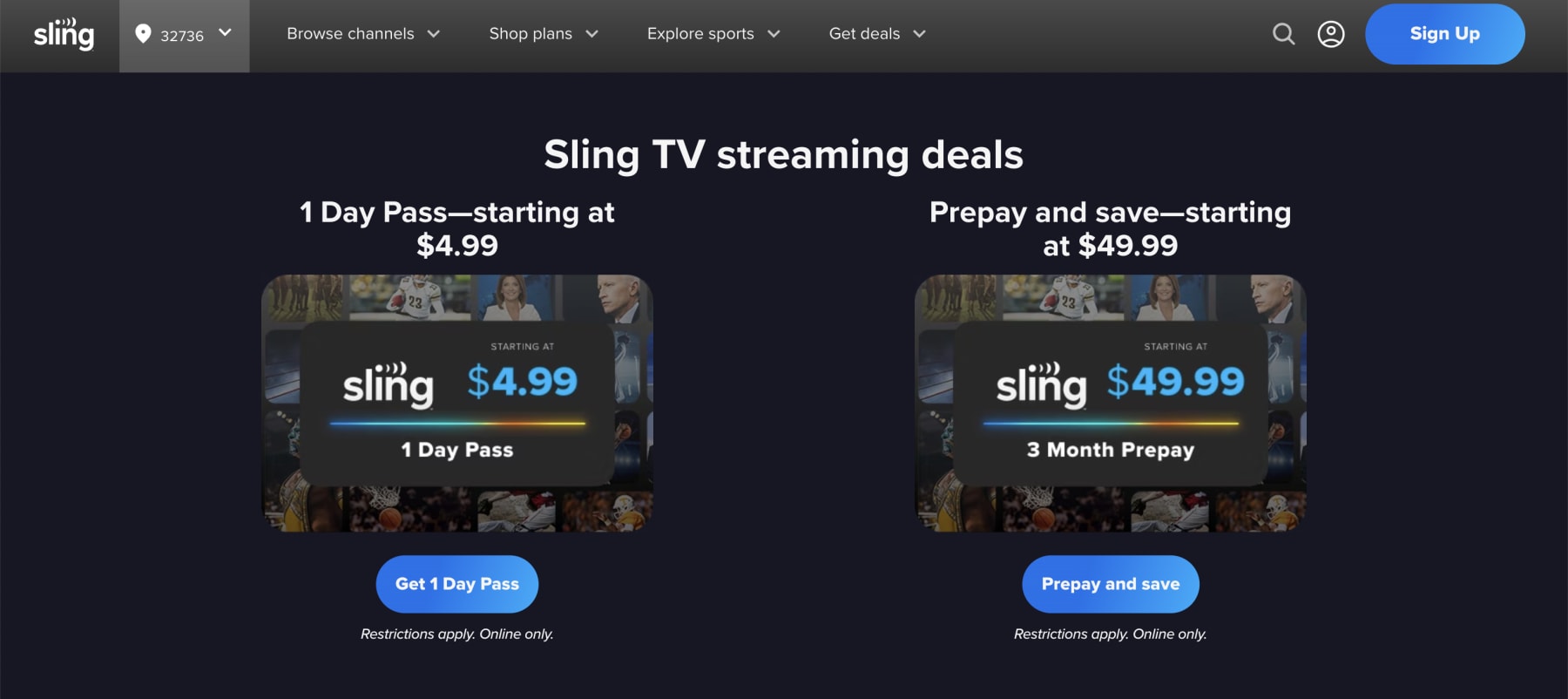
- Otherwise, click the "Sign Up" button or choose your preferred discount. You'll then be prompted to create your account.
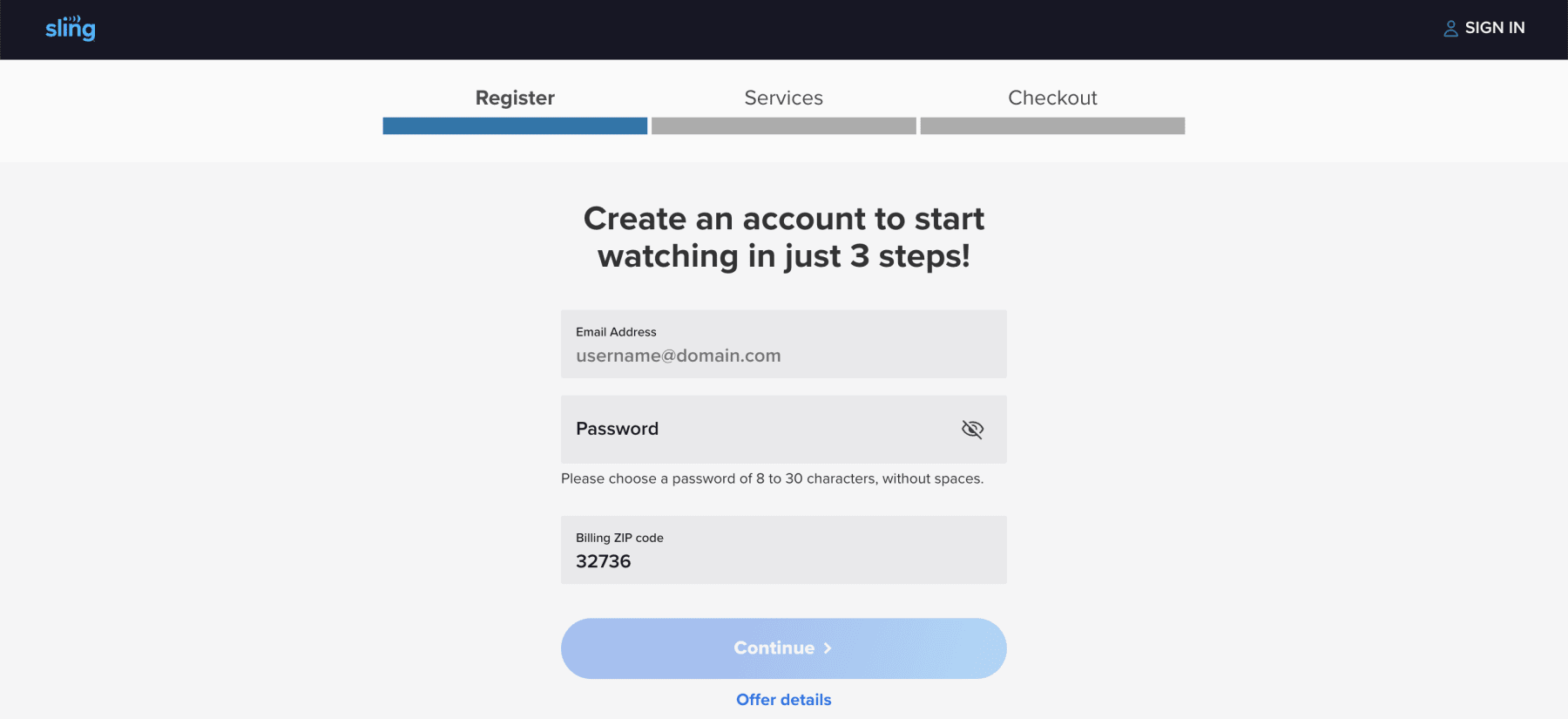
- Once validated, proceed to select your base package (Orange, Blue, or Combo) and any extras or add-ons. Of note, new subscribers can get one month free of several premium streamers, including Starz, MGM Plus, and Paramount Plus With Showtime.
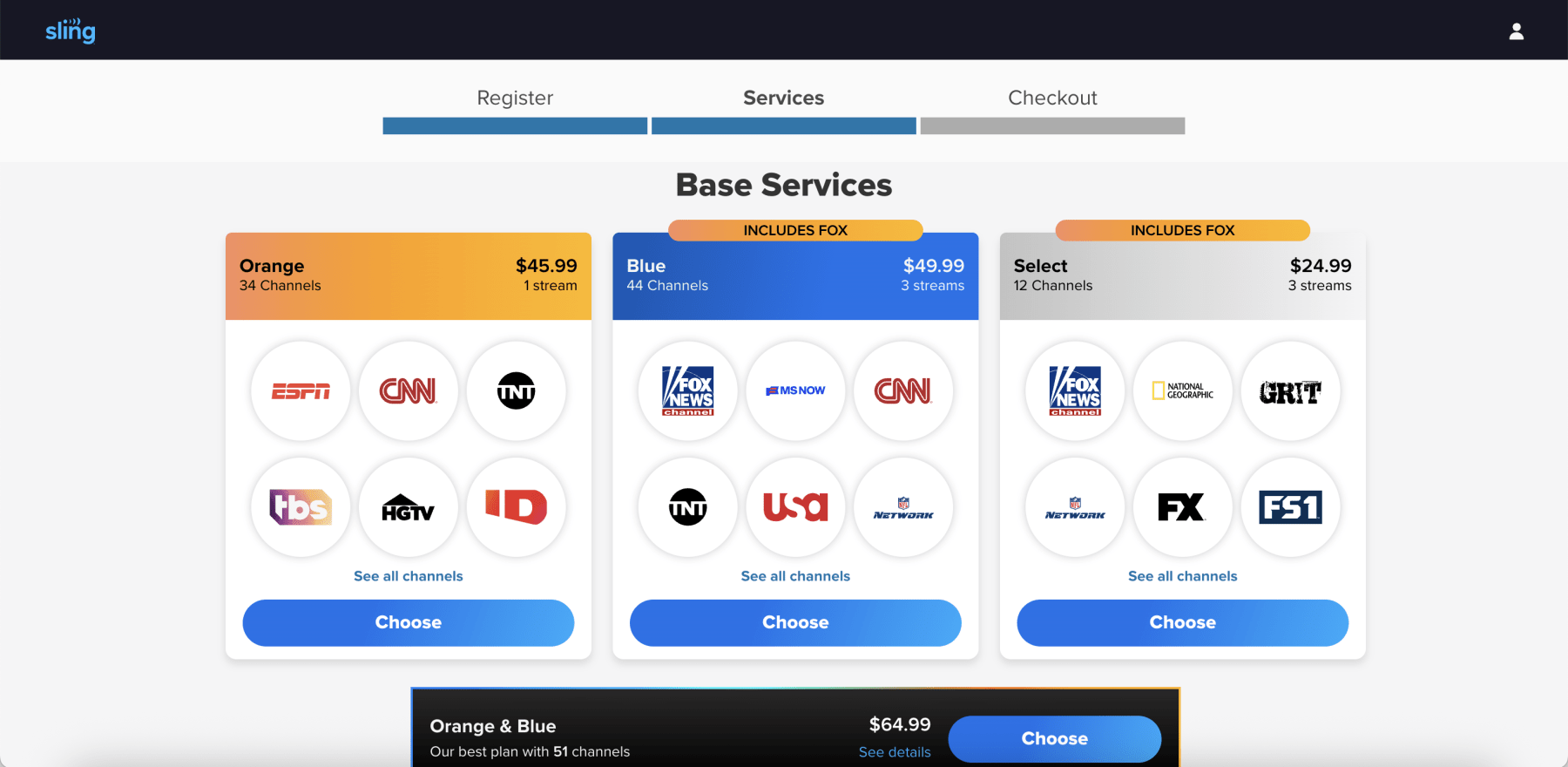
- Once you're happy with your selections, click the "Checkout" button in the lower right corner to proceed. You'll see your order summary and payment information — plus a prominent spot to paste in your promo code.
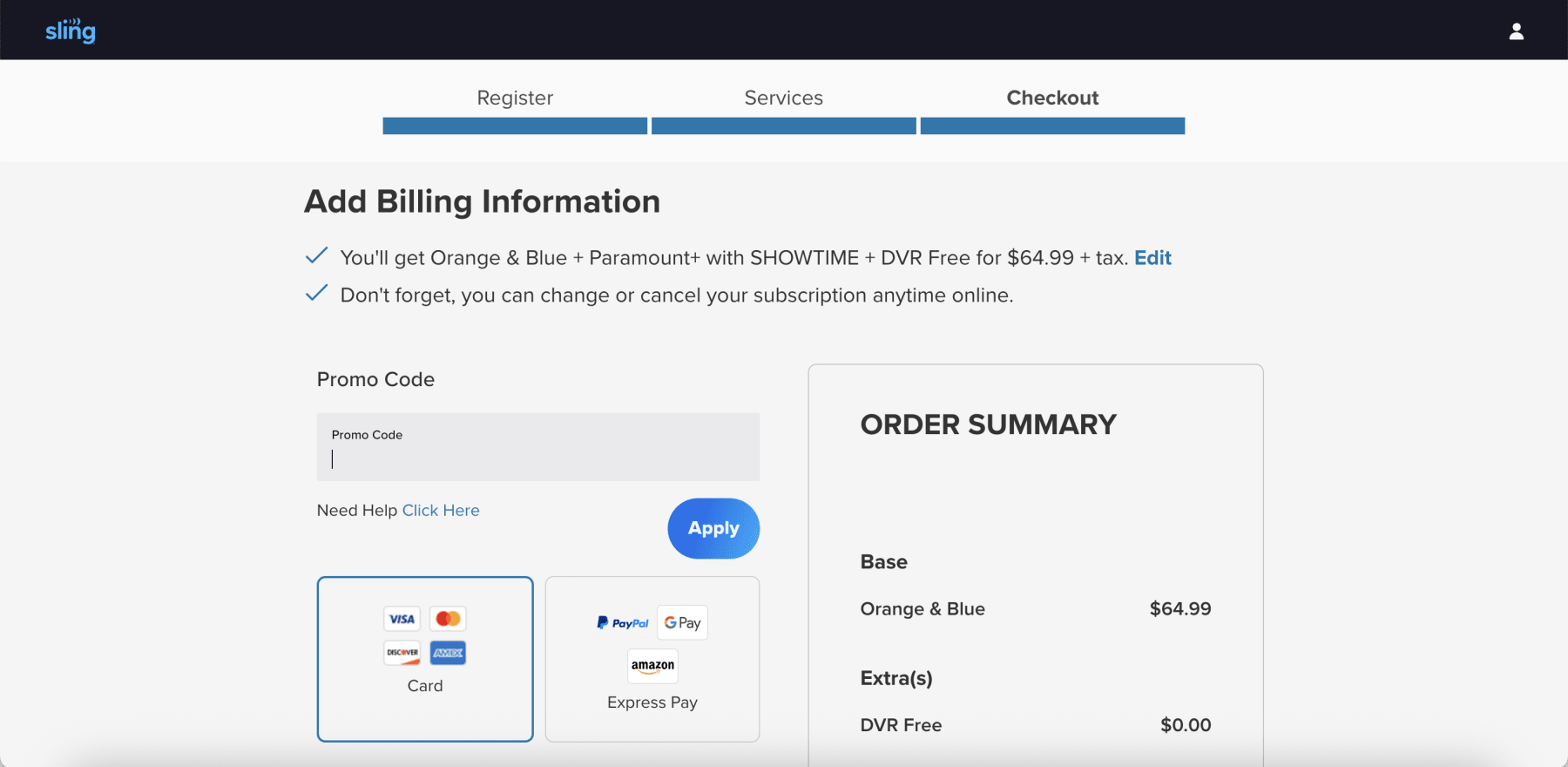
- Once you enter your code and click "Apply," be sure to review your order summary to ensure the promotional price is reflected before finalizing payment.
For Existing Subscribers
If you already have an account, you aren't entirely out of luck. While the biggest doorbuster deals are generally reserved for newbies, existing customers can still apply specific promotional credits or gift codes directly from their dashboard without disrupting their current binge-watch.
- Log in to your account at sling.com/account.
- Navigate to the "My Account" dashboard.
- Locate and select the "Redeem Promo Code" link.
- Enter your code to apply the credit to your next billing cycle.
Troubleshooting Tips
Technology is great until it isn't. If you hit that "Apply" button and nothing happens—or worse, you get an error message—it is usually due to a few common culprits like expiration dates or strict account restrictions.
- Check Eligibility: Many codes, particularly the "50% off first month" offers, are strictly for new customers who have not had an active subscription in the past.
- Verify Student Status: If you are trying to redeem the student discount, you cannot use a standard promo code box; you must verify your status through Student Beans to generate a unique redemption link.
- Gift Cards: If you are redeeming a gift card rather than a coupon, visit sling.com/gift instead of the standard promo page.
- Browser Cache: If a valid code isn't applying, try clearing your browser cache or opening the page in an Incognito/Private window to reset the session.
Key Things To Know About Sling TV Promo Codes
When you are trying to cut the cord without cutting corners on your entertainment, Sling TV is often the first name that pops up. But between the color-coded packages and the rotating door of discounts, it can be a little confusing to know if you are actually getting the best price. To help you navigate the fine print, we have compiled the most critical questions users ask about saving money on Sling this April.
When Is The Best Time To Save On Sling TV?
While the "50% off your first month" deal is available almost year-round, Sling TV is known for dropping its most aggressive doorbusters during specific windows.
- September (Football Season): Historically, Sling offers its deepest discounts (sometimes up to 60% off or free months of RedZone) right as the NFL and college football seasons kick off.
- Black Friday and Cyber Monday: Look for bundle deals that include free hardware (like AirTV or streaming sticks) or extended prepay discounts.
- National Streaming Day (May): In previous years, this has been a trigger for "flash sales" like $10 for your first month.
- End of Quarter: Retention offers often spike near the end of financial quarters. If you go through the cancellation process online, you might be presented with a "stay with us" offer, such as $10 off for the next three months.
How Long Do Sling TV Promo Codes Last?
Unlike a department store coupon that might be valid for a year, Sling TV discounts are highly volatile. New subscriber codes with offers like "50% off your first month" usually have a rolling expiration date, meaning they are available for a few months at a time before the terms change slightly (e.g., changing from 50% off to $20 off).
Flash sales, such as "$10 for your first month" or "Free AirTV with prepay," often last only for a weekend or a specific holiday window (like Black Friday or National Streaming Day).
Does Sling TV Offer Student Or Military Discounts?
If you are currently enrolled in college and looking to cut costs, you are in luck. Sling TV is one of the only live TV streaming services that offers a consistent, dedicated discount for students, making it a very attractive option for dorm rooms and off-campus apartments.
Sling TV's Student Discount
- The Offer: Verified students can get a $10 discount every month for six months on any of the core Sling TV packages (Orange, Blue, or the combined Orange and Blue plan).
- How to Claim It: To get this deal, you must verify your student status through Student Beans, a third-party verification platform. Once you are successfully verified, Student Beans will provide you with the unique link to sign up and claim the offer.
- The Fine Print: This offer is designed for new Sling TV customers. After your first six months, your subscription will automatically renew at the standard monthly rate, so be sure to set a reminder if you are on a tight budget.
Unfortunately, as of April 2026, Sling TV does not offer a specific, standing discount for military members, veterans, or seniors. While platforms like ID.me are used by other services to verify military status, Sling is not currently a participant for its live TV packages.
The best course of action for military members and seniors is to take advantage of the general promotions available to all new customers. The 50% off your first month deal is almost always the best available offer and provides a significant upfront saving that is accessible to everyone.
How Do Sling TV Discounts Compare To Competitors?
While Sling TV is almost always the cheapest on paper, it is crucial to see how its promotions stack up against the competition. Other services might have a higher sticker price but offer longer free trials or different kinds of bundle savings. Here is how the major live TV streaming services compare in April 2026 when it comes to scoring a deal.
| Sling TV | YouTube TV | Hulu + Live TV | Fubo | |
| Base Price | $45.99 - $60.99 | $72.99 - $83.00 | $76.99 - $90.00 | $79.99 - $89.99 |
| Best For | Budget-conscious viewers | DVR, local stations | Bundle with Disney Plus | Hardcore sports fans (RSNs) |
| Channel Count | 30 - 50+ | 100+ | 85+ | 150+ |
| DVR Storage | 50 Hours (Free) | Unlimited | Unlimited | 1,000 Hours |
| No. of Streams | 1-3 (Plan dependent) | 3 | 2 | Up to 10 |
| Free Trial | No (Uses Sling Freestream) | Yes (7-21 days typical) | No | Yes (7 days typical) |
| Promos/Discounts | 50% off 1st month, prepay | Discounts on first 3 months | Black Friday deals | Quarterly discounts, add-ons |
When you are looking for the best overall value, the right choice really depends on your viewing priorities and how you prefer to save.
Sling TV leads with the most consistent and aggressive upfront discount, making its initial prices the lowest on the market by offering 50% off your first month instead of a traditional free trial. YouTube TV provides a generous free trial that sometimes lasts several weeks, allowing you to fully explore its premium, all-in-one channel lineup before committing.
Hulu Live TV's value is baked into its powerful bundle, packaging Disney Plus and ESPN Plus with its service, with its deepest discounts usually appearing on Black Friday for maximum long-term savings. Finally, hardcore sports fans can usually turn toward the 7-day Fubo free trial for users to see if its comprehensive, sports-heavy channel lineup is worth the premium investment.
Does Sling TV Offer A Free Trial?
Sling TV has largely moved away from the traditional "7-day free trial" model for its premium packages. Instead, they now focus on Sling Freestream and deep first-month discounts.
- Sling Freestream: This is the current "forever free trial." It requires no credit card and offers over 500 live channels and 40,000 on-demand titles. It is ad-supported but completely free, allowing you to test the user interface without risk.
- Short-Term Passes: If you need premium access for a specific event (like a playoff game), Sling offers 1-Day ($4.99), 3-Day, and 7-Day passes.
- Occasional Trials: While rare, traditional free trials do pop up during slower seasons or through partner promotions (like purchasing a new streaming stick), but you should not count on them being available year-round.
Which Sling TV Packages Have Ads?
It is important to manage expectations here: Sling TV is primarily a live TV replacement, not an on-demand library like Netflix. Therefore, yes, all Sling TV base packages (Orange and Blue) include commercials. Since you are watching live feeds of networks like ESPN, TNT, and CNN, you will see the exact same ad breaks you would see on cable.
However, there is a silver lining for on-demand content. Many shows available in Sling's on-demand library do have ad breaks, but if you utilize the Cloud DVR (50 hours included for free), you can fast-forward through commercials on anything you have recorded.
What Add-Ons Are Available?
The beauty of Sling is that you don't pay for "Sports Extra" if you hate sports. You can customize your base plan with mini-bundles that typically cost between $6 and $11 per month.
- Sports Extra: Includes NFL RedZone, NBA TV, SEC Network, and more.
- Comedy Extra: Adds MTV, TruTV, Paramount Network, and others.
- Kids Extra: Includes Disney Junior, NickToons, and Boomerang.
- Premium Channels: You can add standalone premium networks like STARZ, AMC+, and Discovery+ without leaving the Sling app
How Much Does Sling TV Cost In 2026?
Sling TV's pricing model is designed to be a la carte, meaning you pay for the package that fits your viewing habits rather than a one-size-fits-all cable bill. As of April 2026, the pricing structure allows you to choose between budget-friendly essentials, specific genre packages, or a combined experience.
Here is the current pricing breakdown:
| Package Name | Monthly Price | Key Features | Best For… |
| Sling Freestream | Free | 500+ channels and 40,000 on-demand titles | Casual viewers who don't mind ads |
| Sling Select | $19.99 | 10+ essentials like FOX News and NFL Network | Users who just want a few channels |
| Sling Orange | $45.99 | 30+ channels like ESPN and Freeform; one stream | Sports fans and families |
| Sling Blue | $45.99 | 40+ channels like Bravo and USA; three streams | News and reality TV lovers |
| Sling Orange + Blue | $60.99 | Orange and Blue channel lineups; four streams | Households that need it all |
Here is the simplest way to think about Sling TV's lineup in 2026, from a free taste to the full meal deal.
Sling Freestream is your no-risk entry point—a completely free, ad-supported service with hundreds of channels that lets you test the waters without a credit card. If you are willing to pay but want to keep it under $20, Sling Select is the "skinny bundle," giving you a core set of essential news and lifestyle channels without the expensive sports programming.
The main decision comes down to the two flagship plans. Sling Orange is built for sports fans and families, as it is the only way to get ESPN and Disney Channel, but it is limited to a single stream. Sling Blue caters to news and entertainment junkies with channels like Bravo, FX, and NFL Network, and it allows for three simultaneous streams.
If your household is divided and needs it all, the Sling Orange and Blue combo package merges both lineups so you don't have to choose between the big game and your favorite reality show.
Can You Watch Local Channels On Sling TV?
One of the biggest questions for cord-cutters is access to local news and sports. Sling TV handles this differently than its competitors.
- Sling Blue: Includes local NBC, FOX, and ABC affiliates, but only in select designated market areas (usually major cities).
- Sling Orange: Does not include local channels.
- The Antenna Solution: Sling strongly encourages pairing their service with an HD antenna. They often run promotions where prepaying for a few months of service gets you a free antenna and AirTV device, which integrates your local over-the-air channels right into the Sling guide grid.
What Is Sling TV's Refund Policy?
If you are thinking about testing the waters, you need to know that Sling TV maintains a strict no-refund policy. They do not offer prorated refunds for partial months, account downgrades, or unused service.
- Cancellation Rules: If you cancel your subscription halfway through the month, you will simply continue to have access until the end of your current billing cycle. The service will not renew, but you won't get money back for the remaining days.
- Free Trials: If you are lucky enough to snag a rare 7-day trial, be aware that cancelling usually terminates access immediately, unlike a paid subscription, which runs out the clock.
- Prepaid Offers: Those 3-month prepaid deals are final sale. Once you pay the discounted rate, you are locked in for that duration.
What Devices Can I Watch Sling TV On?
Sling TV has been around since 2015, which means they have had plenty of time to build apps for almost every screen in your house. As of 2026, device support is near-universal.
| Device Category | Supported Platforms |
| Streaming Players | Roku, Amazon Fire TV, Apple TV, Chromecast with Google TV, TiVo Stream |
| Smart TVs | Samsung (2018+ models), LG WebOS (2018+), Vizio SmartCast, Android TV (Sony, Hisense, TCL) |
| Mobile and Tablets | iOS (iPhone/iPad), Android (Phone/Tablet), Amazon Fire Tablets |
| Gaming Consoles | Xbox Series X/S, Xbox One (Note: PlayStation support has historically been limited/unavailable) |
| Computers | Chrome, Safari, Edge, and Windows 10/11 native apps |
| VR/Other | Meta Quest headsets, Facebook Portal |
Other Ways to Save on Sling TV in 2026
So you have already claimed the 50% off your first month—congratulations, you have snagged the best upfront deal. But the savings do not have to stop there. For a truly savvy streamer, keeping your monthly bill low is an ongoing strategy. We have dug through the fine print and compiled the best pro-level tips to help you save on Sling TV all year long, long after that initial discount has worn off.
Embrace The ‘Free' In Freestream
Before you even think about paying, you should be taking full advantage of Sling's free content. Sling Freestream is Sling's most underrated feature. It offers over 500 live, ad-supported channels and a massive library of 40,000 on-demand shows and movies for free. You do not need a credit card or even an account. It is the perfect zero-cost alternative for months when your budget is tight or to supplement a cheaper base plan.
Prepay to Lower Your Monthly Rate
This is one of the best long-term savings hacks. Instead of paying month-to-month, look for Sling's 3-month prepay offers. These deals can bring your total cost down to as low as $49.99 for three full months, which is a significant discount over the standard rate.
Wait for Seasonal Sales
While the 50% off deal is common, Sling rolls out even better offers during key sales periods. Keep an eye out during the start of the NFL season (late August/early September) and especially around Black Friday and Cyber Monday, when they have historically offered free hardware like an AirTV Mini with a two-month prepayment.
Manage Your Plan Like a Deal Hunter
Because Sling TV has no annual contracts, you have the power to adjust your subscription on the fly to fit your viewing habits and your wallet.
- Rotate Between Orange and Blue: Do you really need both plans all year? Instead of paying for the combined "Orange + Blue" package, consider subscribing to Sling Blue during the fall for pro football and then switching to Sling Orange in the winter for college basketball on ESPN.
- Use the Pause Feature: If you know you will be on vacation or your favorite shows are on a summer hiatus, do not just let your subscription run. Use Sling's "Pause" feature to temporarily freeze your account for one, two, or three months, ensuring you are not paying for a service you are not using.
- Use Short-Term Passes: For one-off major events like the Super Bowl or the Oscars, buying a 1-day or 3-day pass can be far cheaper than paying for an entire month you do not need.
Leverage Free Add-On Trials
When you sign up, Sling often offers free trials for premium add-ons like STARZ, AMC Plus, or the "Sports Extra" package. Take advantage of these to binge-watch a specific series or catch a big game, but be sure to set a calendar reminder to cancel them before you are charged.
Unlock Hidden Discounts and Rewards
Beyond the main deals page, there are other ways to shave a few extra dollars off your bill.
- Play the "Watch and Win" Game: Inside the Sling TV app is a rewards feature often called "Spin and Win." By watching 30 minutes of content, you can earn a daily spin on a virtual wheel for a chance to win prizes, including account credits and even free months of service.
- Integrate a TV Antenna: This is the ultimate cord-cutter's hack. Sling's local channel coverage can be spotty. By pairing the service with an over-the-air antenna, you can get your local ABC, CBS, NBC, and Fox affiliates for free, allowing you to subscribe to a cheaper Sling package without losing your local news and sports.
- Buy Discounted Gift Cards: Keep an eye out at warehouse clubs like Sam's Club or Costco, which occasionally sell Sling TV gift cards at a 10-20% discount. Paying for your subscription with these cards is like creating your own sale.
Troubleshooting Tips: What to Do If Your Sling TV Discount Isn't Working
We have all been there. You have hunted down what looks like the perfect promo code, you are ready to save some cash, and you hit "Apply" only to be met with an angry red error message. It is frustrating, but don't give up just yet. More often than not, a Sling TV promo code fails for a simple, fixable reason. Before you resign yourself to paying full price, let's walk through the common culprits and how to solve them.
Common Reasons Your Sling TV Promo Code Failed
If your code is not working, it is likely due to one of these usual suspects. Run through this list first to see if you can spot the problem.
- It's a Welcome Mat, Not a Doormat: The vast majority of Sling TV's best promo codes—especially the "50% off" deals—are exclusively for new, first-time subscribers. If you have had an account before, even a trial, the code will likely be rejected.
- The Code Has Expired: Many promotional codes are tied to specific sales (like Black Friday or a holiday weekend) and have a strict expiration date.
- You Made a Typo: It sounds simple, but it is the most common error. Promo codes are often case-sensitive, so double-check that you have entered it exactly as it appears, with no extra spaces at the beginning or end.
- It's for a Different Package: Some codes are very specific. A coupon might only apply to the "Sling Orange" plan or the "Sports Extra" add-on. If you are trying to buy a different package, the code won't be valid.
- You're Trying to Double-Dip: Sling TV's system does not allow you to "stack" offers. You can only apply one promo code per order, and it typically cannot be combined with another click-through promotional offer.
Your Step-by-Step Troubleshooting Checklist
If you are still stuck after reviewing the common reasons, follow these simple steps in order.
- Re-Type, Don't Copy-Paste: Manually type the code into the promo box instead of copying and pasting it. This can prevent hidden spaces or formatting from being carried over.
- Read the Fine Print: Go back to where you found the code and read the terms and conditions. This will confirm if it is for new users only, if it has expired, or if it applies to the specific plan you want.
- Try a Digital Reset: Technology can be finicky. Try applying the code in a different web browser or opening an "Incognito" or "Private" window. Clearing your browser's cache and cookies can also resolve stubborn technical glitches.
- Check If It's Already Applied: If you clicked a special promotional link to get to the Sling TV website, the discount (like 50% off) may already be applied automatically. Check your cart total to see if the savings are already reflected before you try to enter a code manually.
Who to Contact for Help
If you have gone through the entire checklist and are confident the code is valid, but it is still not working, it is time to call for backup. Your best bet is to contact Sling TV's customer support directly. Use the chatbot on their help site as your first stop. Be ready to provide the exact promo code and explain the steps you have already taken.
Need to Cancel Your Sling TV Subscription? Here's How
Whether you are just taking a break from streaming or switching to another service, Sling TV makes the cancellation process fairly straightforward. You will need to use a web browser on a computer or mobile device, as you typically cannot cancel directly from the streaming app on your TV.
Here is a step-by-step guide to canceling your account:
- Log In: Go to sling.com and sign in to your account.
- Access Your Account: Click on the profile icon (usually in the top-right corner) and select "Manage Account" or navigate directly to sling.com/my-account.
- Find The Cancellation Link: On your account dashboard, look for and click on the "Cancel Subscription" link.
- Follow The Prompts: Sling will ask you for a reason for leaving (this is for their internal data). Select a reason and continue to follow the on-screen instructions to confirm your cancellation.
What Happens After I Cancel My Sling TV Subscription?
Once you confirm your cancellation, your service does not stop immediately. You will retain full access to your Sling TV channels and DVR recordings until the end of your current paid billing cycle. For example, if your plan renews on the 25th of the month and you cancel on the 10th, you can continue watching for the next 15 days.
What If I Cancel During A Free Trial?
This is a key exception to the rule above. If you are on a rare free trial and decide to cancel, your access will terminate immediately. You will not be able to use the remainder of the trial period.
Can I Pause My Sling TV Subscription Instead Of Canceling?
Yes. If you know you just want to take a short break (for example, during the summer when your favorite shows are on hiatus), Sling offers a "Pause" feature. This allows you to pause your subscription for one, two, or three months. Your service will automatically restart and resume billing after your selected pause period ends. This is a great way to keep your account active without paying for months you will not be using it.
How Do I Cancel If I Signed Up Through Amazon, Roku, or Apple?
This is a critical point that trips up many users. If you did not sign up directly on the Sling TV website, you cannot cancel there either. If your billing is handled by a third party, you must manage your subscription through that specific service:
- For Amazon: Go to your "Memberships and Subscriptions" page on your Amazon account.
- For Roku: Log in at my.roku.com and go to "Manage your subscriptions."
- For Apple: Go to the "Subscriptions" section in the Settings app on your iPhone or iPad.
Are Sling TV Discounts Worth Pursuing in 2026?
So, after all is said and done, is it worth your time to chase down a Sling TV discount? In our expert opinion, the answer is a resounding yes. In a streaming landscape where prices seem to only go up, Sling TV continues to carve out its niche as the go-to service for the cost-conscious cord-cutter who refuses to pay for channel bloat.
Its entire model is built on choice, letting you decide if your household is more of an ESPN and Disney family (Sling Orange) or a Bravo and NFL Network crew (Sling Blue).
While it may not have the sheer volume of channels you will find on YouTube TV or the massive on-demand library of Hulu, Sling's strength lies in its flexibility. You get a solid 50 hours of free cloud DVR storage, and the ability to tack on "Extras" packages—like Sports Extra for RedZone or Kids Extra for NickToons—means you can build a personalized channel lineup for a fraction of what a traditional cable package would cost.
For viewers who know what they want to watch and do not want to subsidize dozens of channels they will never click on, Sling TV is not just worth it; it is one of the smartest buys in streaming today. Pursuing a discount, like the 50% off your first month, simply makes a great deal even better.
How We Find and Verify Streaming Promotions
You might be wondering how we keep up with all these ever-changing deals. Our team of deal curators scours every corner of the internet, from official announcements to hidden landing pages, to find the best savings for you.
But finding a code is only the first step. Rest assured that no discount gets listed on our site without our team first testing it to verify that it works exactly as advertised. We click the links, apply the codes, and confirm the savings so you can feel confident you are getting the best price.
Why Trust DealNews for Sling TV Discounts
DealNews has been saving its readers money for upwards of 25 years. We deliver hundreds of hand-vetted deals to shoppers every single day on everything from laptops and vacations to, you guessed it, streaming services. Those decades of experience go into making sure that every single deal we post is the best price you will find, regardless of our relationship with the store or service provider.
To take advantage of that expertise, consider signing up for the DealNews Select newsletter, which drops a curated list of the day's hottest deals directly into your inbox every weekday. You can also set a deal alert for services like Sling TV and get an instant notification the next time a can't-miss offer goes live.

Jim has been with DealNews for over two decades and still has nightmares about the days when placing an order from mail-order catalogs required a phone call. He's a grizzled deal veteran, having lived through and covered all modern-era Black Friday and Cyber Monday sales. ("Black Friday" as a retail term first emerged in the late 1960s—and he's not quite that old.) As a lifelong (and unapologetic) Apple fanboy, Jim loves helping others find deals on the latest MacBooks, iPads, and iPhones. But he'll happily cross the aisle to uncover the best discounts on PCs and everything else from video games to vacuums. When he's not sleuthing for the next big deal, Jim's either rewatching The Office for the 57th time, finally getting around to finishing The Witcher 3, or planning a trip to a remote, mountainous corner of the world—sans Internet.
Sign In or Register