HP Promo Code: 60% Off Weekly Deals in April 2026

Welcome to your ultimate guide to scoring the best tech upgrades this spring without emptying your wallet. Whether you are building a powerful gaming rig or outfitting a new home office, finding a reliable HP promo code is the smartest way to keep your budget perfectly intact this April. While our DealNews team always loves hunting down lucrative LG promo codes for the wide range of deals on laptops, kitchen appliances, and living room entertainment, right now we are completely focused on bringing you massive price drops on premium HP laptops, versatile printers, and high-resolution monitors. Let us dive right into our insider secrets and top savings strategies for the month.
Our Top HP Promo Codes Available In April 2026

HP Sitewide Promo Code
10% offGet a 10% discount on select consumer PCs at HP when you use promo code "PC10DEAL" at checkout. Free shipping applies. This coupon code expires December 31, 2026.

HP Deals Madness
Up to 60% offShop laptops, gaming desktops, all-in-one printers, docks, software, and more in this sale. Additional discounts are also available for select items, as listed on individual product pages. Shipping is free.

HP Sitewide Promo Code
$25 off $500Use promo code "25CPCBFCM24" to get a $25 discount on orders of $500 or more at HP. Shipping is free. This coupon ends December 31, 2026.
HP Sitewide Promo Code
$40 off $650Use promo code "4DAY40" to get a $40 discount on orders of $650 or more at HP. Shipping is free. This coupon ends December 31, 2026.
HP Sitewide Promo Code
$40 off $599Use promo code "SAVE40PC" to get a $40 discount on orders of $599 or more at HP. Shipping is free. This coupon ends December 31, 2026.
HP Sitewide Promo Code
$100 off $1,199Use promo code "100HP1199" to get a $100 discount on orders of $1,199 or more at HP. Shipping is free. This coupon ends December 31, 2026.
HP Sitewide Promo Code
$75 off $899Use promo code "SAVE75PC" to get a $75 discount on orders of $899 or more at HP. Shipping is free. This coupon ends December 31, 2026.
HP Sitewide Promo Code
$100 off $1,250Use promo code "4DAY100" to get a $100 discount on orders of $1,250 or more at HP. Shipping is free. This coupon ends December 31, 2026.
HP Promo Code
12% off HP Omen LaptopsUse promo code "OMEN12" to get a 12% discount on HP Omen laptops. Shipping is free. This coupon ends December 31, 2026.
HP Sitewide Promo Code
Up to 50% off monitorsUse promo code "HHMONITOR" to get up to a 50% discount on select advanced monitors and 10% off other monitors at HP. Shipping is free. This coupon ends December 31, 2026.
HP Sitewide Promo Code
$50 offUse promo code "HPDAYSPC50" to get a $50 discount on select laptops and desktops at HP. Shipping is free. This coupon ends December 31, 2026.
HP Sitewide Promo Code
$100 off $1,199Use promo code "HPBONUS100" to get a $100 discount on orders of $1,199 or more at HP. Shipping is free. This coupon ends December 31, 2026.
HP Sitewide Promo Code
$15 off $150Use promo code "SPEND150SAVE15" to get a $15 discount on orders of $150 or more at HP. Shipping is free. This coupon ends December 31, 2026.
HP Students, Parents, and Teachers Promo
40% offGet a 40% discount at HP with this promo and no coupon needed. Shipping is free. This promo ends December 31, 2026.
HP Sitewide Promo Code
$50 off $500Use promo code "50HP500" to get a $50 discount on orders of $500 or more at HP. Free shipping applies. This coupon ends December 31, 2026.
Military Discount Promo at HP
20% offGet a 20% discount with this HP military promo. No coupon code is needed. This offer ends December 31, 2026.
HP Sitewide Promo Code
15% offGet a 15% discount on gaming and PC accessories at HP when you use promo code "GAMEON15" at checkout. Free shipping applies. This coupon code expires December 31, 2026.
HP Pavilion Laptops Promo Code
10% offGet a 10% discount on Pavilion laptops at HP when you use promo code "10PAV" at checkout. Free shipping applies. This coupon code expires December 31, 2026.
HP Sitewide Promo Code
10% offGet a 20% discount at HP when you use promo code "GAMING10" at checkout. Free shipping applies. This coupon code expires December 31, 2026.
HP Sitewide Promo Code
20% offGet a 20% discount at HP when you use promo code "LEVELUP20" at checkout. Free shipping applies. This coupon code expires December 31, 2026.
HP Sitewide Promo Code
$200 off $1,999Get a $200 discount at HP when you use promo code "200SMB1999" on orders of $1,999 or more. Free shipping applies. This coupon code expires December 31, 2026.
HP Sitewide Promo Code
11% offGet an 11% discount on select consumer PCs at HP when you use promo code "UPGRADEPC11" at checkout. Free shipping applies. This coupon code expires December 31, 2026.
HP Headset Promo
50% offGet a 50% discount on select headsets at HP during this promo. No coupon code is needed for this discount. Free shipping applies. Promo ends December 31, 2026.
HP Sitewide Promo Code
15% offGet a 15% discount on gaming products at HP when you use promo code "POWERUP15" at checkout. Free shipping applies. This coupon code expires December 31, 2026.
HP Sitewide Promo Code
20% offGet a 20% discount at HP when you use promo code "COMFORT20" at checkout. Free shipping applies. This coupon code expires December 31, 2026.
HP Sitewide Promo Code
20% offGet a 20% discount on HyperX at HP when you use promo code "HYPERX20" at checkout. Free shipping applies. This coupon code expires December 31, 2026.
HP is known for aggressively discounting their technology during the spring, making April an ideal time to upgrade your computing power and home office hardware. Rather than making you hunt through the fine print, we have compiled a comprehensive breakdown of every active promotion on the HP storefront right now.
Whether you need a reliable HP promo code to shave a few dollars off a new printer or want to leverage special financing on a premium OmniBook laptop, understanding this ecosystem is the absolute best way to keep your budget intact.
Verified HP Promo Codes And Sitewide Discounts
Finding a straightforward percentage discount is often the easiest way to save at checkout. We have tested these active codes and sitewide sales to ensure they are currently applying discounts to carts.
- Code NOTKIDDING30: Take 30% off select PCs and accessories. This is currently the most lucrative general code available, but you must use it before it expires on April 4, 2026.
- Code NEWYEAR26: Use this code to secure potential extra savings on already reduced laptops, including popular models like the OmniBook 7.
- Up to 60% Off Weekly Deals: HP is offering up to 61% off select laptops, desktops, and accessories in their standard sale section through April 8, 2026.
- Up to 37% Off Printers: Upgrade your home office with deep discounts on top printer models, valid through April 11, 2026.
- 25% Off Accessory Sale: Look for rotating codes directly on the product pages to take 25% off select gaming PCs and HyperX accessories.
Free Gifts, Bundles, And Special Offers
Sometimes the best value does not come from a direct price cut, but rather from high-value freebies included with your computer purchase. HP loves to utilize bundle deals to move inventory.
- Free HP 320 FHD Webcam: Add any qualifying dock to your cart and receive this high-definition webcam completely free of charge. This offer runs until April 18, 2026.
- Free Resident Evil Requiem Game: Build a qualifying gaming PC featuring the new GeForce RTX 50 series graphics cards and get a free copy of this hit game before April 6, 2026.
- Adobe Software Bundle: Get select Adobe creative software for only $129.99 when you purchase a new PC, an offer valid through July 4, 2026.
- Risk-Free HP Care Pack: Protect your PC for three years with a qualifying HP Care Pack. Thanks to the HP Services Promise, if you never use the service, you can receive a 100% rebate on eligible personal systems Care Packs by April 30, 2026.
Printer Ink And Toner Savings
Printing costs can add up quickly, but HP provides several avenues for heavy users and small businesses to cut down on their consumable expenses.
- Code HPSAVE26: Take $10 off any HP toner order of $100 or more. This long-running code is valid through the end of the year.
- HP Instant Ink Credit: Sign up for a new HP Instant Ink subscription program account and receive a $10 credit. This service can save you up to 70% compared to buying retail cartridges.
- Code 64755: Spend $200 or more on HP toner and receive a $20 Staples gift card as a bonus reward.
- Code HP26CASH: For bulk buyers using Toner Buzz, spend $300 to $500 or more and earn $15 to $30 Visa gift cards.
- Code SHPP26: Secure free 2-day shipping on eligible toner and ink orders over $250.
Identity-Based Discounts And Loyalty Programs
HP is incredibly generous to specific groups of shoppers. If you fall into one of these categories, you can bypass the standard coupon hunt and unlock exclusive pricing tiers.
- Email Newsletter Sign-Up: First-time buyers can sign up for the HP email newsletter to receive an instant $20 discount on their first order of $65 or more.
- HP Education Store: Students, parents, and educators can register with a .edu email address or use UNiDAYS to unlock up to 40% off laptops and accessories.
- Frontline Heroes And Military Discount: Healthcare workers, first responders, and military personnel can save up to 54% on select tech through the dedicated frontline portal.
- AAA Member Discount: Simply verify your AAA membership to access savings of up to 35% on select hardware.
- HP Employee Purchase Program: Check to see if your employer participates in the corporate employee purchase program for exclusive hardware pricing.
Expert Strategies To Maximize Your HP Savings
To truly master the art of the deal, you need to know how the HP checkout system operates. Our deal hunters recommend keeping a few critical details in mind before you finalize your purchase.
- Understand Coupon Stacking: HP restricts coupon stacking. You generally cannot use multiple alphanumeric promo codes on a single order, so always apply the one that yields the highest total dollar discount.
- Applying Your Code: Simply navigate to the "Your Cart" page, click the "Use a promo code" dropdown, paste your code into the box, and click "Apply" to see your new total.
- Utilize Special Financing: If you are eyeing a massive upgrade, do not forget to look into special financing options. HP currently offers 24 months of special financing on purchases of $2,500 or more when using the HP Credit Account.
- Leverage Price Matching: You can always utilize HP's generous price matching policy if you find the exact same computer sold for less at a major authorized retailer.
- Maximize HP Rewards: Make sure you are enrolled in HP Rewards to earn points on your purchase, which acts as a great form of cash back for your next tech upgrade.
By combining a verified HP promo code with free shipping and a strategic bundle deal, you can easily build a premium computer setup for a fraction of the retail cost. Keep checking back with DealNews as we continually update this list with the freshest discounts and exclusive coupons throughout the month.
How to Redeem an HP Promo Code
Nothing is more frustrating than finding a great deal and struggling to get the discount to actually apply at checkout. Our dedicated deals and offers teams spend countless hours sourcing and testing these vetted coupons to ensure their validity period is active. Whether you are buying a premium OmniBook or signing up for an ink subscription this April, here is the exact step-by-step process for applying an HP promo code.
Redeeming Codes for HP Store Purchases (PCs, Laptops, and Accessories)
If you are buying physical hardware directly from the HP online storefront, follow these simple steps to secure your discount:
- Shop for eligible products: Add your desired laptops, desktops, or accessories to your digital shopping cart.
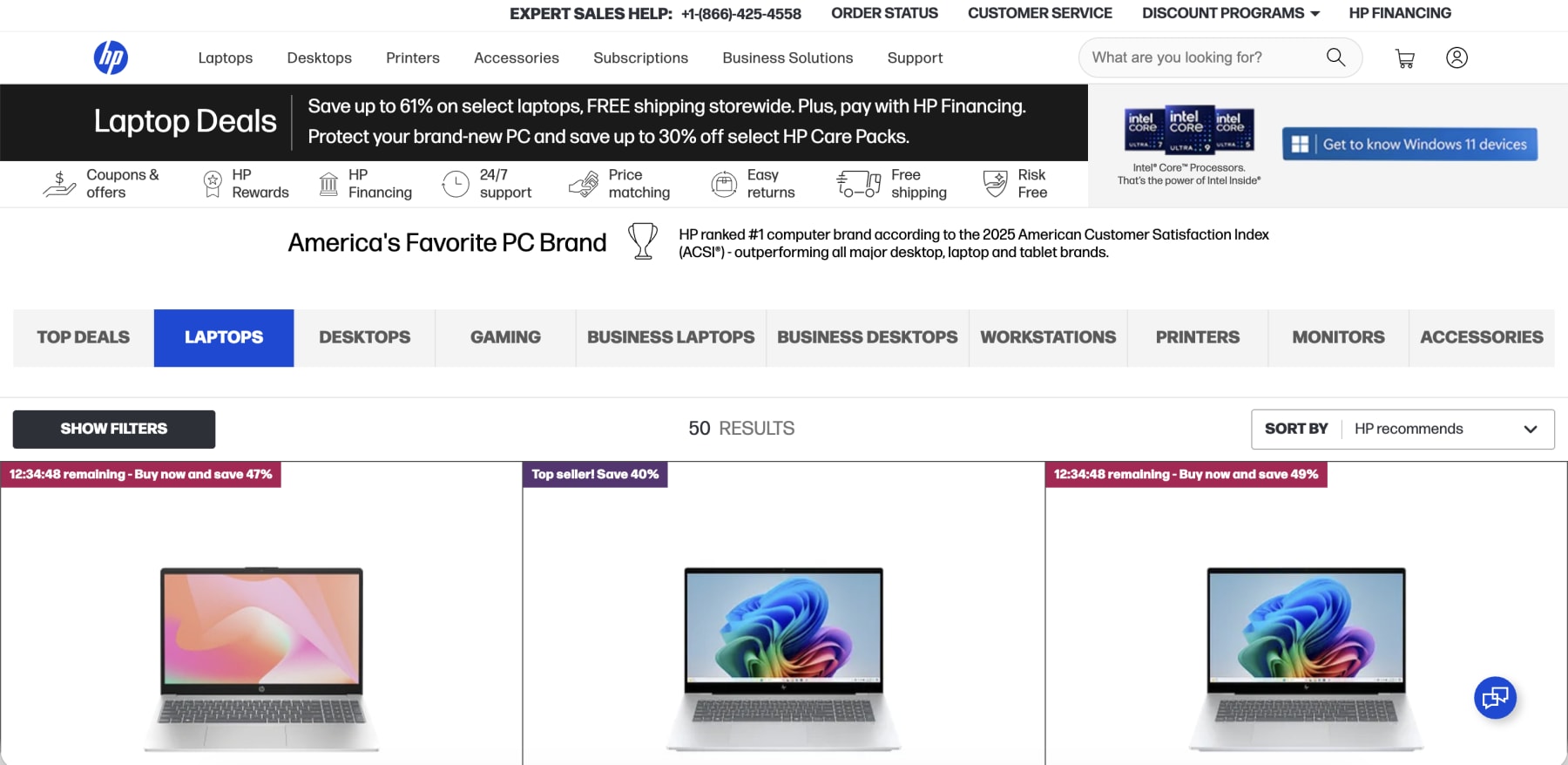
- Go to checkout: Click the shopping cart icon to navigate directly to the "Your Cart" page.
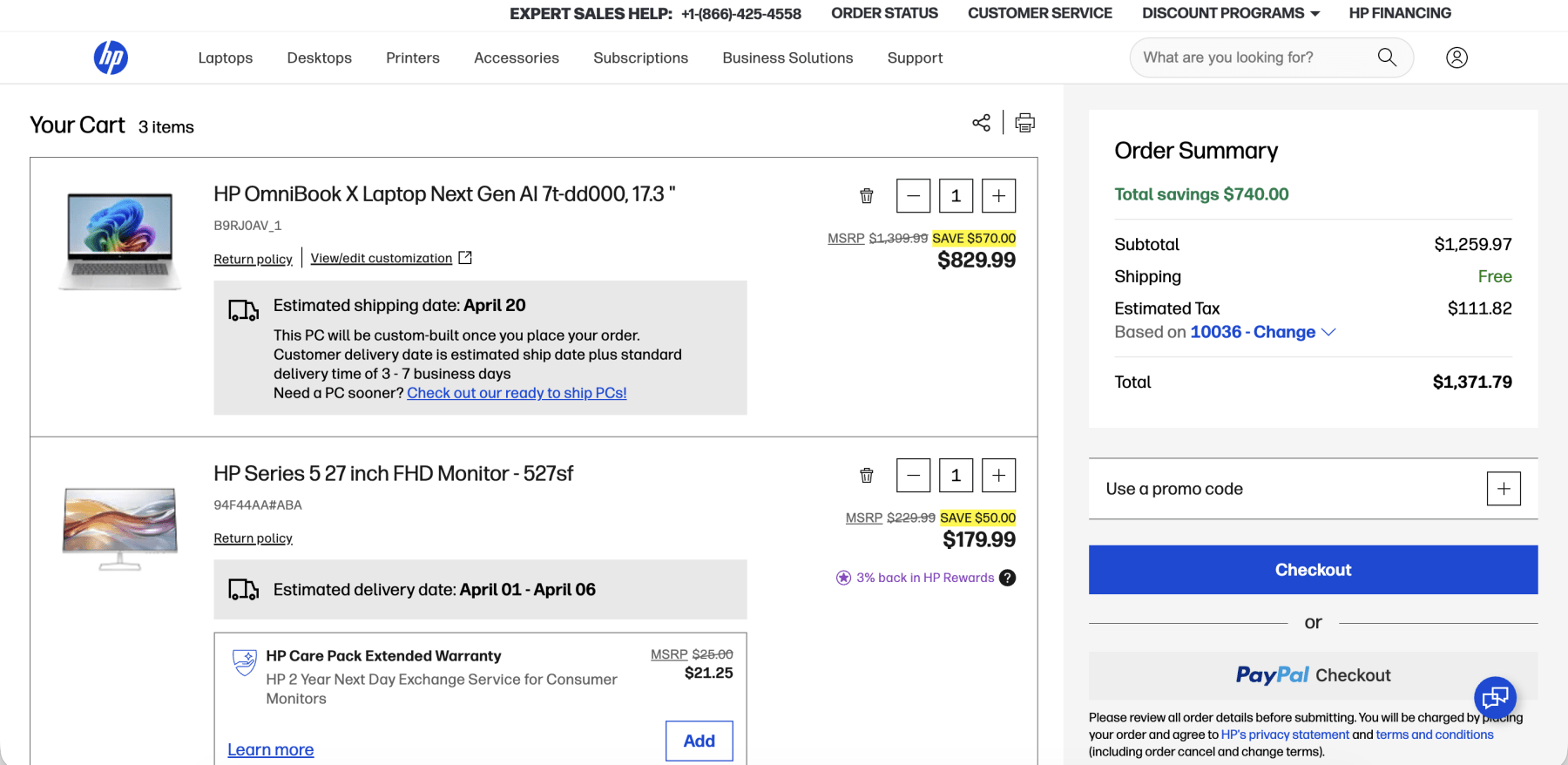
- Locate the coupon code field: Look for the "Use a promo code" dropdown menu on the right side of the screen under your order summary.
- Enter your code: Click the dropdown to reveal the text box, then carefully type or paste your specific HP promo code.
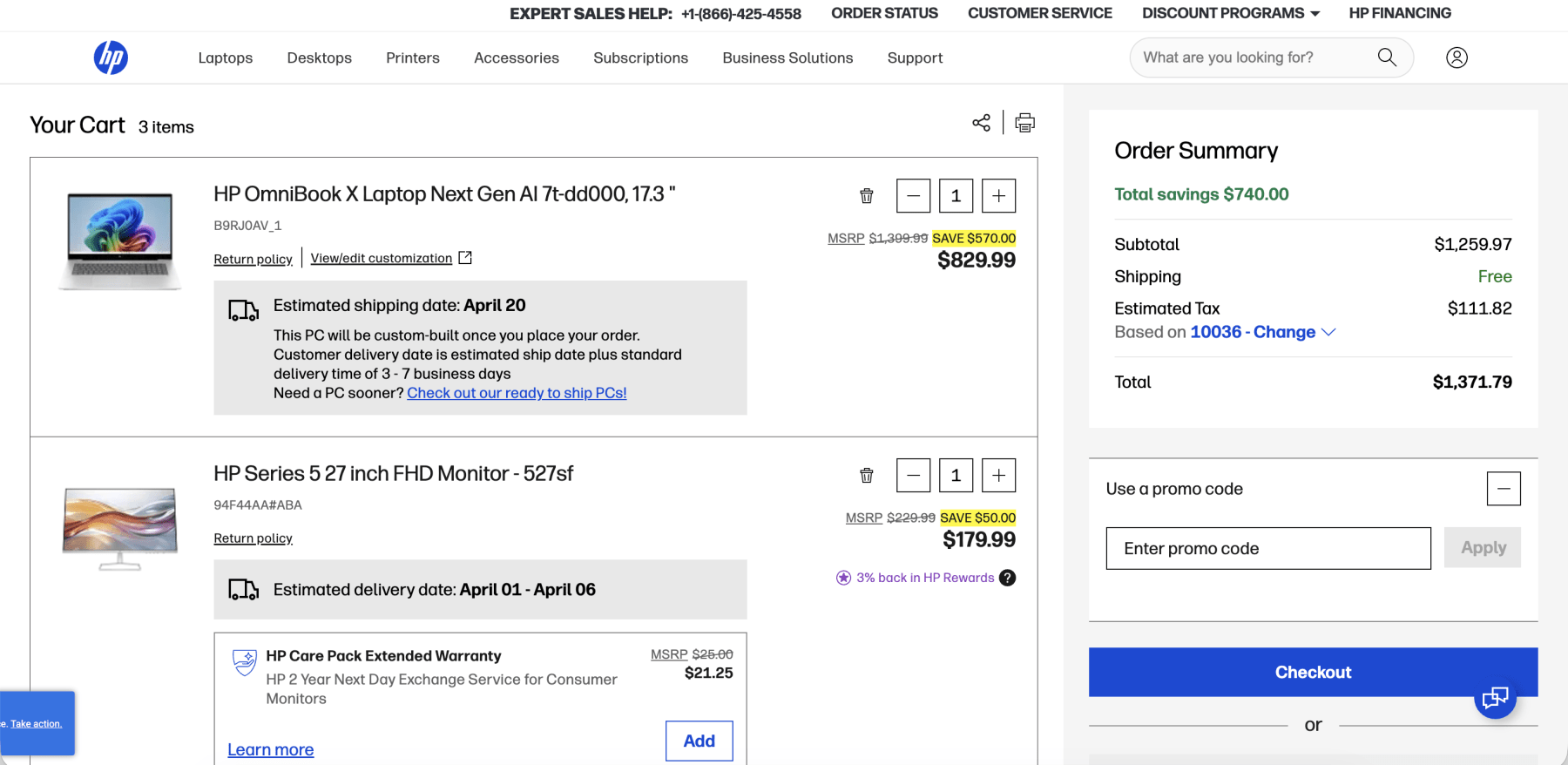
- Confirm the discount: Click the "Apply" button and watch your order total drop. Always verify the discount has successfully attached to your sale prices before entering your payment information.
Redeeming Codes for HP Instant Ink Subscriptions
The process is slightly different if you are trying to redeem a free trial or promotional months for HP's popular ink delivery service:
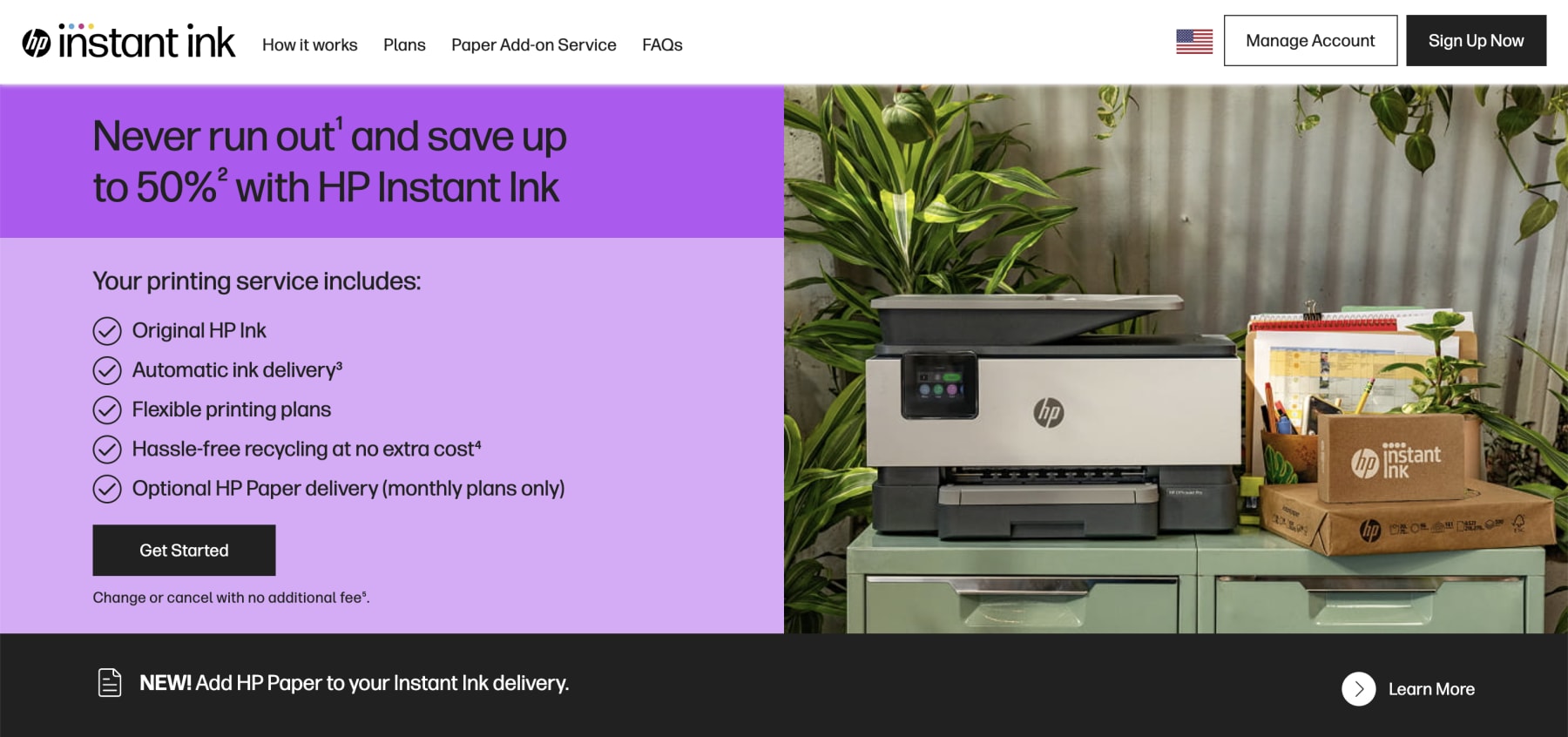
- Set up your printer: Follow the included instructions to connect your new printer using the HP Smart app or via 123.hp.com.
- Start enrollment: Begin the sign-up process for an HP Instant Ink plan.
- Find the promo box: On the very final enrollment confirmation page, look for a text box labeled "Special Offers" or "Promo Code".
- Apply your code: Enter your promotional code (often found on a leaflet inside your printer box or in your welcome email) and apply it to lock in your free months.
Troubleshooting and Promotion Restrictions
Before you finalize your order, make sure you understand the basic terms and conditions associated with HP's checkout system:
- Stacking promo codes: HP has a strict one-code limit per transaction. Reusing coupon codes or trying to stack multiple percentage discounts together simply will not work.
- Excluded items: Always check the fine print! Some promotions carry minimum purchase requirements (like spending $65 plus), while others strictly exclude customized built-to-order PCs, select gaming setups, or already heavily discounted clearance items.
- Missed the code box? If you accidentally completed your purchase without entering your promo code, do not panic. Try reaching out to HP customer service immediately via live chat or phone. If your order hasn't shipped yet and your code is valid, they can occasionally apply a manual price adjustment on their end.
Key Things to Know About HP Promotions in 2026
Navigating the world of online tech shopping can sometimes feel overwhelming, especially when you are trying to maximize your budget on a major hardware purchase. We have compiled this comprehensive FAQ guide to answer every question you might have about securing the best possible price on the HP storefront. From understanding their seasonal sales calendar to troubleshooting a stubborn coupon code, here is everything you need to know to shop like an absolute expert this spring.
What Is the Best Time to Save at HP?
Timing your tech purchase is the ultimate secret to unlocking the deepest discounts. While HP offers monthly coupon codes and rotating weekly deals year-round, shopping during their major event-based sales will always yield the highest savings.
- Black Friday and Cyber Monday: Late November remains the absolute best time of year to buy. You will find massive sitewide sales and doorbuster deals that routinely drop entry-level laptops below $200.
- Back to School Sales: Running from late July through August, this seasonal promotion heavily targets students with steep discounts on lightweight Chromebooks and dorm-friendly printers.
- Spring Sales: April is a prime month for home office upgrades. These promotions often align with the end of the tax year and feature great bundles on business PCs and monitors.
- Prime Day Competition: When Amazon hosts its massive summer sale, HP typically counters with their own aggressive "anti-Prime Day" event featuring savings that frequently match Black Friday pricing.
What Does HP Normally Cost in 2026?
HP covers an incredibly wide spectrum of pricing to accommodate virtually any budget. An entry-level HP Chromebook or basic DeskJet printer will usually cost you between $150 and $250 at full retail price. Mid-range workhorse laptops from the Pavilion or Envy lines typically hover around the $600 to $900 mark. If you are shopping for premium hardware like a high-end OmniBook X, a Spectre convertible, or a custom Omen gaming rig, you should expect to spend anywhere from $1,200 to well over $2,500 depending on your exact configuration.
What Products or Brands Can I Get at HP?
The HP ecosystem is massive, offering much more than just standard office computers. Navigating their vast digital storefront is much easier when you understand exactly how their major product lines are categorized:
- Consumer and business laptops: Whether you need a budget-friendly Pavilion, an OmniBook, or a military-tested EliteBook for corporate travel, HP has a portable machine for every lifestyle. They also offer a great lineup of affordable Chromebooks for students.
- Gaming computers: Hardcore enthusiasts can shop the aggressive Omen brand for top-tier graphics cards and high refresh rates, while the accessible Victus line provides excellent entry-level performance without the massive price tag.
- Desktops and workstations: From sleek All-in-One machines that eliminate cable clutter to massive ZBook mobile workstations and Z Desktop towers built for heavy 3D rendering and CAD work, there is plenty of raw computing power available.
- Printers and scanners: HP dominates the printing market with their blazing-fast LaserJet models, versatile OfficeJet machines for the home office, and economical Smart Tank printers that ditch traditional cartridges for high-yield ink bottles.
- Monitors and peripherals: Complete your desk setup with everything from basic 1080p everyday displays to immersive curved ultrawides, plus a massive selection of ergonomic mice and wireless keyboards.
- Audio and conferencing gear: Thanks to the recent acquisitions of HyperX and Poly, you can now buy world-class gaming headsets, mechanical keyboards, precision mice, and premium professional conferencing cameras directly from the main HP storefront.
How Do HP Discounts Compare With Competitors?
Understanding how HP stacks up against other major technology manufacturers is crucial for making an informed buying decision. The PC and home office market is fiercely competitive, and each brand has its own unique cadence for releasing coupons and promotional pricing.
| Competitor | Average Discount Range | Key Promotional Focus |
| HP | 15% to 50% | Premium Laptops, Printers, Office Bundles |
| Dell | 10% to 40% | XPS Laptops, Alienware Gaming, Monitors |
| Lenovo | 20% to 55% | ThinkPad Workstations, Legion Gaming Rigs |
| Samsung | 10% to 35% | Galaxy Books, Curved Gaming Monitors, Trade-In Offers |
| LG | 15% to 40% | Gram Laptops, UltraWide Displays, Smart Office Tech |
When comparing HP to its closest Windows rival, Dell, both companies offer very similar baseline pricing on consumer machines. However, if you are hunting for a new work computer, utilizing active Dell promo codes on an XPS laptop is often slightly less lucrative than applying an HP code to a comparable Spectre or OmniBook.
Lenovo is famous for running massive sitewide sales, but their starting prices are occasionally inflated to make the discounts appear larger. If you leverage Lenovo discounts alongside their rewards program, you can score great deals on ThinkPads, but HP generally offers a more transparent shopping experience with reliable coupon codes.
If you are expanding your search to broader electronics giants, comparing HP with Samsung or LG offers an interesting contrast in savings strategies. Samsung heavily incentivizes its ecosystem; while you might find a solid percentage discount on a Galaxy Book, Samsung's best discounts often lie in aggressive trade-in credits or bundled offers with their smartphones and tablets.
LG promo codes, on the other hand, are fantastic for scoring their incredibly lightweight Gram laptops or premium UltraWide monitors, but their direct-from-manufacturer sales events are typically less frequent than HP's reliable, rotating weekly deals. Ultimately, HP remains the most consistent option for shoppers looking for straightforward, high-value promo codes on dedicated computing and printing hardware.
What Have HP Prices Looked Like in the Past?
Historical pricing data reveals that HP hardware generally follows a very predictable depreciation curve. When a brand new OmniBook or LaserJet printer launches, it stays at full retail price for roughly three months. After that initial launch window, you will begin to see prices drop by 15% to 20% during holiday weekends. Once Intel, AMD, or NVIDIA announces a new generation of internal processors or graphics cards, HP aggressively slashes the price of their older models by up to 50% to clear out warehouse inventory.
Can I Use Multiple Discount Codes?
If you are hoping to stack multiple discount codes to create a massive price drop, you are out of luck. HP maintains a strict policy that limits shoppers to one promo code per order. Their checkout system is designed so that if you enter a second code, it will automatically overwrite the first one, applying whichever coupon yields the highest overall savings. However, you can absolutely use a single promo code on an item that is already marked down in the weekly sale section, giving you a fantastic double discount.
Does HP Offer Student or Military Discounts?
HP is incredibly generous to specific groups, offering permanent discount portals that require a quick identity verification to access.
- HP Education Store: Students, parents, and teachers can use a .edu email address or the UNiDAYS platform to unlock up to 40% off select laptops, desktops, and accessories.
- Frontline Heroes Program: Healthcare workers, first responders, and nurses can verify their status via ID.me to access savings of up to 54% on everyday tech.
- Military Discount: Active duty military, veterans, and their families also use ID.me to access the Frontline Heroes store for exclusive member pricing.
- AAA Member Savings: Simply verify your active AAA membership to unlock special portal pricing of up to 35% off.
What to Do If My Promo Code Does Not Work?
Encountering an error message at checkout is frustrating, but there is almost always a logical explanation for why your coupon is failing.
- Check the expiration date: Most HP coupons expire exactly at midnight on a specific date, or when promotional inventory runs out.
- Review item exclusions: Promo codes rarely apply to custom built-to-order PCs, brand new product launches, or heavily discounted clearance items.
- Verify the minimum spend: Many codes require you to hit a specific cart total, such as spending $65 plus, before the discount activates.
- Contact customer support: If you simply forgot to add a valid code before paying, contact HP order support immediately. They can occasionally issue a manual price adjustment if your order has not shipped yet.
Can I Get Free Shipping at HP?
High shipping rates can easily ruin a great deal, but HP has you covered with a remarkably consumer-friendly delivery policy. They offer free standard shipping on all sitewide orders with no minimum purchase required, valid for deliveries within the contiguous United States. If you need your new tech quickly, expedited shipping options are available for an extra fee. Just keep in mind that customized PCs have longer assembly lead times before that free shipping window actually begins.
Does HP Have a Rewards Program?
Loyalty pays off handsomely when shopping directly with HP. Their free-to-join HP Rewards program allows members to earn points on every single purchase, from high-end desktops to basic printer paper. You generally earn one point for every dollar spent, though HP frequently runs special promotions offering double or triple points on specific product categories. These points act as a digital form of cash back that you can seamlessly redeem during checkout to lower the price of your next tech upgrade.
Does HP Offer Price Matching or Adjustments?
HP wants you to shop with confidence, which is why they offer a very competitive price match policy to protect your investment.
- Retailer Price Match: If you find the exact same HP product currently in stock and sold for less by an authorized major retailer like Best Buy or Amazon, HP will match the price.
- HP Price Protection: If you buy a laptop directly from HP and they drop the price on their own website within 30 days of your purchase, they will refund you the difference.
- Exclusions: They will not match third-party marketplace sellers, refurbished items, or special doorbuster holiday pricing.
Can I Cancel My HP Order?
Buyer remorse happens, but if you need to cancel an HP order, you have to act with extreme speed. HP typically only provides a strict one-hour window to cancel a transaction after it is placed. This is because their automated fulfillment centers begin processing your items almost immediately. You can track your order status in the "My orders" section of your account. If the cancellation button is no longer visible there, the item is already locked into the shipping process, and your credit card will be charged.
What Is the HP Return Policy?
If you miss the cancellation window or simply realize the computer is not right for you, HP offers a straightforward return process.
- 30-Day Window: You have exactly 30 days from the date of delivery to initiate a return and ship the product back to HP.
- Condition Requirements: The hardware must be returned in like-new condition with all original packaging, manuals, power cords, and bundled accessories.
- Return Exclusions: Digital software purchases, opened printer ink, and select custom-configured workstations are generally exempt from standard refunds.
- Restocking Fees: If you return a built-to-order PC without a valid hardware defect, you may be hit with a 15% restocking fee.
How Do I Troubleshoot HP Instant Ink Promo Codes?
HP Instant Ink is a fantastic subscription service, but applying the promotional codes for your free 3 to 6-month trial can be tricky. These codes are generally reserved for new users and are typically printed on a physical flyer inside your printer box or sent directly to your registration email.
To redeem them, you must enter the code into the "Special Offers" box on the final confirmation screen during the enrollment process. If you already completed registration without adding the code, you can still log into your Instant Ink account dashboard and apply it retroactively in the Special Offers section.
Does HP Offer an Employee Purchase Program?
Yes, the HP Employee Purchase Program is an incredible hidden perk for corporate professionals. HP partners with thousands of major companies across the country to provide their staff with exclusive hardware pricing. If your employer is enrolled in the EPP, you can register through a specialized portal using your corporate email address. This unlocks private pricing tiers that offer up to 10% or more off base retail prices, which can sometimes be stacked with active sitewide promotions for unparalleled savings.
Where Can I Find HP Support and Driver Updates?
If you run into technical issues with your new purchase, HP offers a robust ecosystem of diagnostic tools and support pages.
- HP Smart App: If your wireless printer is offline or failing to connect, run the "Diagnose and Fix" tool within the free HP Smart app to resolve network errors. (Download via Google Play or the App Store)
- Driver Updates: Whenever a major Windows update breaks your peripheral functionality, head directly to the HP Support site to download the latest certified drivers.
- System Information App: If customer service asks for your serial number or exact model number to verify warranty status, you can easily find it using the pre-installed HP System Information app on your computer.
- HP Parts Store: If you need to order an official replacement battery, power supply, or internal component, the dedicated HP Parts Store allows you to buy original hardware with guest checkout tracking.
Other Ways To Save On HP This April
While tracking down the perfect HP promo code is our favorite way to secure a discount, your savings strategy should not end at checkout. From enrolling in automated ink delivery to leveraging clever shopping cart tricks, there are countless ways to keep cash in your wallet. Here are our expert methods for stretching your tech budget further this spring.
Slash Your Printing Costs
Consumables like ink and toner can easily surpass the initial cost of your printer over time. Thankfully, a few smart adjustments to your printing habits can drastically lower your long-term expenses.
- HP Instant Ink: Enrolling in this subscription service charges you based on the pages you print rather than the ink you use, which can reduce your costs by up to 50% to 70% while including free shipping and recycling.
- High-yield cartridges: If you prefer buying retail, always opt for XL or multi-pack cartridges to secure a much lower cost per page than standard sizes.
- Smart print settings: Switch your default settings to draft mode or grayscale for everyday documents, and utilize duplex printing to instantly cut your paper usage in half.
- Ink-efficient fonts: Simply changing your document font to Calibri, Arial, or Times New Roman uses significantly less ink than thicker, heavier fonts.
- Laser tank upgrades: High-volume offices should consider upgrading to an HP Neverstop Laser printer, which uses incredibly economical toner reload kits instead of expensive traditional cartridges.
Shop The Clearance And Refurbished Sections
The dedicated clearance section on the HP website is an absolute goldmine for extreme bargain hunters. This area is constantly updated with last year's models, overstocked items, and discontinued configurations. You can also find an excellent selection of certified refurbished products here. These are items that were returned, rigorously tested, repaired, and restored to factory standards. Purchasing an open-box or refurbished computer is a brilliant way to get premium hardware at a fraction of the original retail cost.
Leverage Special Identity And Corporate Discounts
HP offers several hidden pricing portals and sign-up bonuses that can instantly slash your order total without requiring a traditional coupon hunt.
- Email newsletter sign-up: Simply registering for the HP email newsletter will often trigger an instant welcome discount, giving you $20 off your first purchase of $65 or more.
- HP Education Store: Students, parents, and educators can register with a .edu email address or use UNiDAYS to unlock up to 40% off everyday computing essentials.
- Frontline Heroes portal: Healthcare workers, first responders, and military personnel can verify their status via ID.me to access massive savings of up to 54% on select tech.
- Employee Purchase Program: Check if your company participates in the HP corporate discount program, which grants staff members exclusive pricing tiers that occasionally stack with sitewide sales.
- AAA member savings: Active AAA members can verify their membership on the HP site to unlock up to 35% off select hardware.
Test Out The Abandoned Cart Strategy
This classic e-commerce trick still works remarkably well on the HP storefront. Simply log into your account, add your desired laptop or monitor to your cart, and proceed halfway through the checkout process. Then, close your browser window and walk away for a day or two. HP's automated marketing system hates losing a sale, and they will frequently send you a follow-up email reminding you of your abandoned items. These reminder emails often include a unique, one-time promo code to incentivize you to finish the transaction.
Trade In Your Old Tech For HP Credit
If you have an older laptop collecting dust in your closet, you can easily turn it into spending power for your next tech upgrade. The official HP Trade-In program allows you to exchange eligible laptops, desktops, and monitors for digital cash. The best part is that HP accepts hardware from almost any major manufacturer, meaning you can trade in an old Apple MacBook or Dell XPS and use the credit toward a brand new HP OmniBook.
You simply answer a few questions about the condition of your device to get an instant quote, ship it off using a prepaid label, and receive your digital credit. You can then apply this credit at checkout alongside a valid HP promo code for massive double savings.
Earn Rewards Through The HP Recycling Program
Saving money and helping the environment can go hand in hand when you shop within the HP ecosystem. The HP Planet Partners program makes it incredibly easy to recycle your empty original HP ink and toner cartridges. While HP Instant Ink subscribers automatically receive prepaid recycling envelopes with their deliveries, retail shoppers can drop their empty cartridges off at authorized retail partners like Staples or Best Buy. T
hese office supply stores frequently run recycling promotions where turning in an empty HP cartridge earns you $2 store credit or bonus loyalty points. You can then use those accumulated rewards to subsidize your next batch of retail ink or printer paper.
Stack Cashback Portals And Discounted Gift Cards
Never underestimate the power of third-party platforms when making a large electronics purchase. Sites frequently offer cash back on HP orders, and those percentages can spike during major holidays. A highly effective double-dipping strategy involves purchasing discounted HP gift cards from reputable exchange sites. You can often buy a $100 gift card for $90, instantly saving 10% before you even visit the store. Because gift cards are treated like cash, you can still apply an HP promo code during checkout to maximize your savings.
Utilize Free Warranties And Care Pack Rebates
Saving money is not just about the initial purchase price, but also avoiding out-of-pocket repair costs down the line. Every new piece of HP consumer hardware comes with a standard one-year limited warranty that covers manufacturer defects. Always utilize this free repair service before attempting a costly DIY fix. If you want longer protection, look into the HP Services Promise for their extended Care Packs. Through this unique rebate program, if you buy a qualifying 3-year HP Care Pack and never actually use the service, you can claim a 100% rebate on the cost of the warranty when it expires.
Optimize Your PC To Extend Its Lifespan
Making your current machine last longer is the ultimate way to save. You can easily optimize your daily performance by running the built-in HP Support Assistant to update critical BIOS software and system drivers. To instantly boost your speed, use Task Manager to disable unnecessary startup apps and enable Storage Sense in your Windows settings to automatically clear out temporary files. If you are running an older desktop or workstation, simply upgrading your internal RAM or swapping to a solid-state drive can dramatically improve boot times for a fraction of the cost of a brand new computer.
Maximize Battery Health And Power Efficiency
Replacing a dead laptop battery is an annoying expense that you can easily avoid with proper power management. Adjusting a few built-in Windows settings will keep your machine running longer on a single charge.
- Adjust sleep settings: Set your display to turn off after 5 to 10 minutes of inactivity, and command your computer to fully sleep within 15 to 30 minutes.
- Lower screen brightness: Dropping your display brightness is the single most effective way to extend your daily battery life.
- Manage battery levels: Maintain your battery health by keeping the charge level between 50% and 85% whenever possible, rather than leaving it constantly plugged in at full capacity.
- Enable energy saver mode: Right-click the battery icon in your taskbar to turn on power-saving settings that prioritize battery longevity over maximum performance.
- Shop Energy Star: When buying new monitors or desktop towers, look for the Energy Star label to reduce your long-term household electricity costs.
Maintain Your Gaming Laptop For Peak Performance
Heat is the ultimate enemy of internal hardware, and protecting your expensive gaming investment means maintaining proper airflow. Always use your Omen or Victus laptop on a flat, hard surface, and consider investing in a dedicated cooling pad to reduce thermal stress. You can monitor your internal temperatures using third-party tools like HW Info 64, ensuring your CPU stays below 95 degrees Celsius and your GPU remains under 85 degrees. For maximum gaming efficiency, switch your Nvidia Control Panel to maximum performance mode and activate Game Mode within your Windows settings. Finally, make sure to keep your cooling vents clear of dust with compressed air to prevent thermal throttling and costly repairs.
Other Ways To Save On HP This April
While tracking down the perfect HP promo code is our favorite way to secure a discount, your savings strategy should not end at checkout. From enrolling in automated ink delivery to leveraging clever shopping cart tricks, there are countless ways to keep cash in your wallet. Here are our expert methods for stretching your tech budget further this spring.
Shop HP Weekly Deals And Bundles
If you cannot find a dedicated promo code for your specific item, the HP weekly deals section is your next best destination. This area is constantly refreshed with limited-time offers that frequently include high-value freebies. For instance, right now you can snag a free HP 320 FHD Webcam when you purchase any qualifying dock before April 18, 2026. Gamers can also score a free copy of Resident Evil Requiem with the purchase of a qualifying PC featuring the new GeForce RTX 50 series graphics cards before April 6, 2026. HP even offers creative bundles, like getting select Adobe software for only $129.99 when you buy a new computer.
Slash Your Printing Costs With HP Instant Ink
Consumables like ink and toner can easily surpass the initial cost of your printer over time. Thankfully, a few smart adjustments to your printing habits can drastically lower your long-term expenses.
- HP Instant Ink: Enrolling in this subscription service charges you based on the pages you print rather than the ink you use, which can reduce your costs by up to 50% to 70% while including free shipping and recycling.
- High-yield cartridges: If you prefer buying retail, always opt for XL or multi-pack cartridges to secure a much lower cost per page than standard sizes.
- Smart print settings: Switch your default settings to draft mode or grayscale for everyday documents, and utilize duplex printing to instantly cut your paper usage in half.
- Ink-efficient fonts: Simply changing your document font to Calibri, Arial, or Times New Roman uses significantly less ink than thicker, heavier fonts.
- Laser tank upgrades: High-volume offices should consider upgrading to an HP Neverstop Laser printer, which uses incredibly economical toner reload kits instead of expensive traditional cartridges.
Invest In Risk-Free HP Care Packs
Saving money is not just about the initial purchase price, but also avoiding out-of-pocket repair costs down the line. HP currently offers an incredible promotion on their extended warranties. You can protect your new PC for three years with a qualifying HP Care Pack, and if you never actually use the service, you get your money back guaranteed.
This consumer risk-free offer runs through December 31, 2026. Business customers can take advantage of a similar promotion through the HP Services Promise, which allows you to receive a 100% rebate on eligible, unused personal systems Care Packs services through April 30, 2026.
Shop HP Refurbished And Business Outlet Sections
If you are willing to skip the pristine factory packaging, shopping for refurbished tech is an absolute goldmine for extreme bargain hunters. The dedicated refurbished portal on the HP website is constantly updated with last year's models, overstocked items, and discontinued configurations. Every certified refurbished product undergoes rigorous testing and repairs to ensure it meets strict factory standards, meaning you get a machine that functions flawlessly for a fraction of the original retail cost. Plus, HP backs these devices with reliable warranties to guarantee your investment.
If you are outfitting a startup or simply want commercial-grade durability at home, you must check out the HP Business Outlet. This specialized corner of the site is the perfect place to score steep discounts on off-lease, military-tested EliteBooks, powerful ZBook mobile workstations, and heavy-duty LaserJet printers that are built to outlast standard consumer electronics.
Join The HP Business Club And Leverage Financing
If you are purchasing hardware for a startup or an established enterprise, joining the HP Business Club is an absolute must. This specialized portal offers tiered volume discounts, preferred pricing, and dedicated support that scales with the size of your order. To help manage cash flow, business owners and everyday shoppers alike can take advantage of special financing options.
By opening an HP Credit Account, you can secure 24 months of special financing on large purchases of $2,500 or more, allowing you to pay off a massive workstation or gaming rig over time without crippling your monthly budget.
Leverage Special Identity And Corporate Discounts
HP offers several hidden pricing portals and sign-up bonuses that can instantly slash your order total without requiring a traditional coupon hunt.
- Email newsletter sign-up: Simply registering for the HP email newsletter will often trigger an instant welcome discount, giving you $20 off your first purchase of $65 or more.
- HP Education Store: Students, parents, and educators can register with a .edu email address or use UNiDAYS to unlock up to 40% off everyday computing essentials.
- Frontline Heroes portal: Healthcare workers, first responders, and military personnel can verify their status via ID.me to access massive savings of up to 54% on select tech.
- Employee Purchase Program: Check if your company participates in the HP corporate discount program, which grants staff members exclusive pricing tiers that occasionally stack with sitewide sales.
- AAA member savings: Active AAA members can verify their membership on the HP site to unlock up to 35% off select hardware.
Test Out The Abandoned Cart Strategy
This classic e-commerce trick still works remarkably well on the HP storefront. Simply log into your account, add your desired laptop or monitor to your cart, and proceed halfway through the checkout process. Then, close your browser window and walk away for a day or two. HP's automated marketing system hates losing a sale, and they will frequently send you a follow-up email reminding you of your abandoned items. These reminder emails often include a unique, one-time promo code to incentivize you to finish the transaction.
Stack Cashback Portals And Discounted Gift Cards
Never underestimate the power of third-party platforms when making a large electronics purchase. Sites frequently offer cash back on HP orders, and those percentages can spike during major holidays. A highly effective double-dipping strategy involves purchasing discounted HP gift cards from reputable exchange sites. You can often buy a $100 gift card for $90, instantly saving 10% before you even visit the store. Because gift cards are treated like cash, you can still apply an HP promo code during checkout to maximize your savings.
Utilize Free Warranties And Care Pack Rebates
Saving money is not just about the initial purchase price, but also avoiding out-of-pocket repair costs down the line. Every new piece of HP consumer hardware comes with a standard one-year limited warranty that covers manufacturer defects. Always utilize this free repair service before attempting a costly DIY fix.
If you want longer protection, look into the HP Services Promise for their extended Care Packs. Through this unique rebate program, if you buy a qualifying 3-year HP Care Pack and never actually use the service, you can claim a 100% rebate on the cost of the warranty when it expires.
Optimize Your PC To Extend Its Lifespan
Making your current machine last longer is the ultimate way to save. You can easily optimize your daily performance by running the built-in HP Support Assistant to update critical BIOS software and system drivers. To instantly boost your speed, use Task Manager to disable unnecessary startup apps and enable Storage Sense in your Windows settings to automatically clear out temporary files.
If you are running an older desktop or workstation, simply upgrading your internal RAM or swapping to a solid-state drive can dramatically improve boot times for a fraction of the cost of a brand new computer.
Maximize Battery Health And Power Efficiency
Replacing a dead laptop battery is an annoying expense that you can easily avoid with proper power management. Adjusting a few built-in Windows settings will keep your machine running longer on a single charge.
- Adjust sleep settings: Set your display to turn off after 5 to 10 minutes of inactivity, and command your computer to fully sleep within 15 to 30 minutes.
- Lower screen brightness: Dropping your display brightness is the single most effective way to extend your daily battery life.
- Manage battery levels: Maintain your battery health by keeping the charge level between 50% and 85% whenever possible, rather than leaving it constantly plugged in at full capacity.
- Enable energy saver mode: Right-click the battery icon in your taskbar to turn on power-saving settings that prioritize battery longevity over maximum performance.
- Shop Energy Star: When buying new monitors or desktop towers, look for the Energy Star label to reduce your long-term household electricity costs.
Maintain Your Gaming Laptop For Peak Performance
Heat is the ultimate enemy of internal hardware, and protecting your expensive gaming investment means maintaining proper airflow. Always use your Omen or Victus laptop on a flat, hard surface, and consider investing in a dedicated cooling pad to reduce thermal stress.
You can monitor your internal temperatures using third-party tools like HW Info 64, ensuring your CPU stays below 95 degrees Celsius and your GPU remains under 85 degrees. For maximum gaming efficiency, switch your Nvidia Control Panel to maximum performance mode and activate Game Mode within your Windows settings. Finally, make sure to keep your cooling vents clear of dust with compressed air to prevent thermal throttling and costly repairs.
What Else To Consider About HP In 2026
Shopping for computers and printers in April 2026 is an exciting venture, especially with the sheer volume of powerful tech HP is pushing to the market. Whether you are upgrading your home office with a blazing-fast LaserJet or investing in an OmniBook for your creative projects, the value you get from HP hardware is tough to beat.
They consistently deliver premium build quality alongside reliable performance. Beyond just the hardware, the HP ecosystem offers exceptional customer support, easy-to-use software like the HP Smart app, and seamless integration across all your daily devices.
However, before you rush to checkout with your cart full of new tech, it is always a smart move to review the fine print. We highly recommend taking a quick look at the official HP terms and conditions to fully understand their policies on returns, warranties, and promotional exclusions.
Knowing the rules of the road ensures you will not be surprised if a specific custom-built PC does not qualify for that shiny new HP promo code you just found. Being an informed shopper is the ultimate key to a stress-free tech upgrade.
How We Find And Verify Computers And Printers Promotions
The world of online tech deals is notoriously fast-paced and filled with expired or deceptive offers. Our dedicated deals and offers teams work tirelessly to cut through the noise and deliver only the best discounts this April. We are not just a simple crowdsourced platform that relies on user-submitted, untested coupon codes. Instead, we manually scan the HP storefront, hidden clearance pages, and trusted affiliate networks to hunt down the most lucrative savings on the market.
Once a potential HP promo code is discovered, we perform a manual code entry test directly in the HP shopping cart. We rigorously check the validity period, verify if you need a specific .edu email or an ID.me account to access the savings, and ensure there are no hidden exclusions. Only after this strict validation process do these vetted coupons make it onto our published list, guaranteeing you can shop with absolute confidence.
Stay Updated On The Latest HP Promo Codes
HP is always releasing new promo codes, exclusive offers, and limited-time discounts on computers and printers—sometimes with little warning. To make sure you never miss out on the best ways to save:
- Bookmark this page: We regularly update our list of verified HP promo codes and deals, so check back before every order.
- Sign up for deal alerts: Subscribe to our DealNews Select newsletter to get the hottest tech discounts delivered straight to your inbox.
- Set a custom deal alert: Create a personalized deal alert for HP or your favorite product lines and receive instant notifications when a new promo goes live.
- Follow us on social media: We frequently share flash promo codes and exclusive deals on our social channels. Follow us here:
Staying proactive is the best way to maximize your HP savings all year long

Sign In or Register