Peacock's 2026 Student Discount: Student Plan for $5.99/Month
Between tuition, textbooks, and late-night pizza runs, college budgets are tight enough without worrying about expensive streaming subscriptions. Luckily, the Peacock student discount is here to save the day—and your wallet. No more hunting for Peacock's 2026 promo codes, coupons, or just general savings to trim your monthly expenses; taking advantage of this academic offer is easily one of the smartest moves you can make this semester.
We've gathered everything you need to know about snagging this deal in 2026, from verifying your eligibility to understanding exactly what you get with your subscription. Whether you want to catch live sports or binge the latest NBC hits, we'll help you get set up for a fraction of the regular price so you can stream stress-free.
What Peacock Student Discounts Are Available This August?

Peacock Premium Plus on Amazon Prime Video
Free 7-day trialAmazon Prime members can sign up for Peacock Premium Plus via Prime Video and get a 7-day free trial to check out everything the service has to offer. Since Peacock itself no longer offers a free trial, this is a great way to check out hit movies, TV shows, and Peacock Originals without paying up front for the service.
Walmart+ 1-Year Membership
$49Save $49 on a Walmart+ membership today. You'll get early access to top deals, free shipping, fuel savings, your choice between a Paramount+ or Peacock subscription, discounts at Burger King, and more. Some exclusions apply.
Peacock Premium Student Discount
53% offVerified students can get Peacock Premium for $5.99 a month, a 53% savings on the usual $12.99 price. The discounted rate holds for 12 months, after which the plan renews at the standard price unless eligibility is reverified. The subscription still includes streaming on 3 devices at once, up to 6 profiles, and access to live sports alongside Peacock's TV shows, movies, and Originals.
Peacock Premium Young Adult Discount Promo Code
53% offEligible young adults ages 18 to 24 can get Peacock Premium for $5.99 a month, a 53% savings on the usual monthly price of $12.99, for 12 months. The discount requires annual age verification through SheerID and includes streaming on 3 devices at once with up to 6 profiles. Note that after 12 months, your subscription will automatically renew at the then-current monthly rate unless you verify your age again.
Peacock Premium Military Discount
46% offVerified military personnel can get Peacock Premium for $6.99 a month, a 46% savings on the standard $12.99 rate, for a full 12 months. The plan includes streaming on 3 devices at once and up to 6 profiles with kid-safety settings. After the 12-month period, the price reverts to $12.99 or the then-current rate unless canceled or you reverify your military status.
Peacock Premium Medical Professional & First Responder Discount
46% offMedical professionals and first responders verify your status through SheerID and get Peacock Premium for $6.99 a month, a 46% savings on the regular $12.99 rate, for a full 12 months. After the offer period ends, the price reverts to the standard monthly rate unless canceled or you reverify your status.
Peacock Premium Teacher Discount Promo Code
46% offVerified teachers can get Peacock Premium for $6.99 a month for 12 months, a 46% savings on the regular $12.99 rate. The plan allows streaming on three devices at once and includes up to six profiles with kid-safety settings. After the 12-month period, the price reverts to $12.99 or the then-current retail price unless canceled or educator status is reverified.

Peacock Premium and Apple TV Streaming Bundle
42% offBundle Peacock Premium and Apple TV for just $14.99 per month. That's 42% off the $25.98 monthly price you'd pay otherwise for subscribing to the two services separately. Enjoy live sports, news, and a mix of movies and shows alongside Apple Originals with this streaming deal.
Peacock Premium Plus Annual Streaming Discount
$40 offSubscribe to the Peacock Premium Plus annual plan for $199.99 and you'll get 12 months for the price of 10. That means you'll save $40 per year compared to subscribing at the monthly rate. You'll enjoy content from NBC and Bravo, live sports and events, as well as hit movies and Originals. You'll also be able to download your favorites and enjoy fewer ads.

Peacock Premium Plus and Apple TV Streaming Bundle
39% offSubscribe to the Peacock Premium Plus and Apple TV bundle for $19.99 per month and you're effectively getting Apple TV at no additional charge. You'll save 39% compared to the $32.98 you'd otherwise spend monthly to subscribe to each service separately and get everything Apple TV has to offer plus live sports, news, and Peacock Originals. Even better, opting for this tier means you'll be able to download your favorites and enjoy fewer ads while streaming.
Peacock Premium Annual Streaming Discount
$26 offSubscribe to the Peacock Premium annual plan for just $129.99 and you'll get 12 months for the price of 10. That's a $26 savings compared to the monthly subscription rate. You'll be able to enjoy streaming content from NBC and Bravo, plus live sports, events, and Peacock Originals.
Peacock Select Annual Streaming Discount
$18 offSubscribe to the Peacock Select annual streaming plan for $89.99 and you'll save $18 compared to subscribing at the monthly rate for 12 months. That means you'll be getting 12 months for the price of 10 and you'll be able to enjoy ad-supported content from NBC and Bravo shows.
Peacock Select Annual Streaming Discount
16% offSubscribe to the Peacock Select annual streaming plan for $89.99 and you'll get 12 months for the price of the 10. That means you'll save 16% compared to subscribing at the monthly rate for a full year. You'll be able to enjoy ad-supported content from NBC and Bravo.
Peacock Premium Annual Streaming Discount
16% offSubscribe to the Peacock Premium annual plan for $129.99 and you'll get 12 months for the price of 10. That's a 16% savings compared to the monthly subscription rate you'd pay over a year. Peacock Premium allows you to stream content from NBC and Bravo, plus live sports and events like MLB games and soccer matches.
Peacock Premium Plus Annual Streaming Discount
16% offSubscribe to the Peacock Premium Plus annual plan for $199.99 and you'll get 12 months for the price of 10. That means you'll save 16% per year compared to subscribing at the monthly rate of $19.99. You'll enjoy content from NBC and Bravo, live sports and events, as well as hit movies and Originals. You'll also be able to download your favorites and enjoy fewer ads.

Peacock Premium Plus and Apple TV Streaming Bundle
$13 offBundle Peacock Premium Plus and Apple TV for just $19.99 per month and you're effectively getting Apple TV for free. You'll save $13 per month off the $32.98 you'd spend otherwise subscribing to each service separately. This bundle combines everything Apple TV has to offer with the live sports, movies, and Originals of Peacock TV as well as downloads and fewer ads.

Peacock Premium and Apple TV Streaming Bundle
$11 off per monthBundle Peacock Premium and Apple TV for just $14.99 per month and save $11 monthly compared to the $25.98 monthly cost of subscribing to each service separately. This bundle combines Peacock's live sports, news, and original shows with Apple TV content.
Peacock Premium Student Discount
$7 off per monthStudents can get Peacock Premium for $5.99 a month for 12 months, $7 off the regular $12.99 rate. You'll need to verify your status with SheerID to receive the discount. The plan includes streaming on 3 devices at once and up to 6 profiles with kid-safety settings. After the 12-month period, the price returns to $12.99 or the then-current rate unless canceled or you reverify your status.
Peacock Premium Young Adult Discount Promo Code
$7 off per monthEligible young adults ages 18 to 24 can get Peacock Premium for $5.99 a month for 12 months, $7 off the typical $12.99 monthly price. The discounted plan still includes streaming on 3 devices at once and up to 6 profiles with kid-safety settings, along with Peacock Originals, live sports, and new movies. Annual age verification is required to keep the discounted rate. Note that if you don't reverify, your subscription will automatically renew at the then-current monthly rate.
Peacock Military Discount
$6 off per monthMilitary members can verify your status and get Peacock Premium for $6.99 a month for 12 months, $6 off the regular $12.99 rate. The plan includes streaming on up to 3 devices at once and up to 6 profiles with kid-safety settings. After the 12-month period, the price returns to $12.99 a month unless canceled or you reverify your status.
Peacock Premium Medical Professionals & First Responders Discount
$6 off per monthVerified medical professionals and first responders can get Peacock Premium for $6.99 a month for 12 months, $6 off the regular $12.99 monthly price. The plan allows streaming on 3 devices at once and supports up to 6 profiles with kid-safety settings. After the 12-month period, the price reverts to $12.99 or the then-current rate unless canceled or you reverify your status.
Peacock Premium Teacher Discount Promo Code
$6 off per monthVerified teachers can get Peacock Premium for $6.99 a month for 12 months, which is $6 off the regular $12.99 rate. The plan includes streaming on up to 3 devices at once and up to 6 profiles with kid-safety settings. After the 12-month period, the price returns to the standard monthly rate unless canceled or your status is reverified.
Peacock Sunday Night Football Streaming Plans
From $13/mo.Peacock carries Sunday Night Football and the NFL Hall of Fame Game as part of its live sports lineup in 2026. Plans start at $12.99 a month for the ad-supported Premium tier, with an annual option at $129.99 that works out to 12 months for the price of 10. Stepping up to Premium Plus at $19.99 a month removes most ads and adds downloads, alongside access to NBC and Bravo shows and Peacock Originals. College students can also get Peacock for $5.99 a month instead of the standard $12.99 rate with the student discount.
Xfinity StreamSaver Bundle
$18/mo.Add StreamSaver to stream your favorite shows in-between on Apple TV and Netflix. Requires Xfinity post-paid Internet or Xfinity TV. Includes Netflix Standard with Ads, Apple TV, and Peacock Premium with ads. Taxes and other fees may apply. Other restrictions may apply. Not available in all areas.

Xfinity NOW StreamSaver Bundle
$30/mo.You'll need to have Xfinity post-paid internet to take advantage of this bundle in 2026, which provides NOW TV, Netflix Standard with ads, Apple TV+, and Peacock Premium with ads. NOW TV offers 125+ live channels and you'll also have access to select On Demand programming.
Peacock has become a major player in the streaming wars, and fortunately for students (and young adults!), they recognize that a limited budget shouldn't mean missing out on The Traitors or the latest season of your favorite reality TV. While the pricing landscape has shifted a bit in 2026, Peacock remains one of the more accessible premium services if you know which levers to pull.
Unlike some competitors that hide their educational offers behind complex bundles, Peacock keeps it straightforward: a solid monthly discount on their core Premium plan.
The Official Peacock Student Discount
If you are currently hitting the books, this is your primary target. Peacock offers a substantial price cut for verified students, bringing the monthly cost down significantly from the standard $12.99 rate. It's a verified offer, meaning you can't just use a .edu email and call it a day, but the process is quick.
-
The Deal: Get Peacock Premium for $5.99 per month for 12 months.
-
Who Is Eligible: You must be 18 years or older and a currently enrolled student at a Title IV-accredited college or university in the United States.
-
Verification: You will need to verify your status through SheerID. This usually requires basic info like your school name and date of birth, but sometimes you might need to upload a document like a transcript or student ID.
-
What You Get: This grants you access to the ad-supported Peacock Premium tier. You get the full library of movies, TV shows, and live sports like the Premier League and Sunday Night Football.
-
Renewal: The discount lasts for one year. If you are still in school when the year is up, you can re-verify to lock in the rate again.
The "Young Adult" Discount (No School Required)
This is one of the best-kept secrets in streaming for 2026. Peacock offers a nearly identical discount to the student offer but bases it entirely on age rather than enrollment status. If you are taking a gap year, working full-time, or just aren't at a Title IV school, this is your loophole.
-
The Deal: Get Peacock Premium for $5.99 per month for 12 months.
-
Who Is Eligible: Anyone aged 18 to 24 years old, regardless of student or employment status.
-
Verification: Like the student deal, this uses SheerID to verify your age using your date of birth and legal name.
-
Why It Matters: It captures everyone who falls through the cracks of traditional "student" deals. If you are 22 and working your first post-grad job, you can still save just as much as a freshman.
Expert Tips to Maximize Your Savings
Getting the code is the easy part, but managing the subscription properly ensures you don't accidentally get hit with full-price charges down the road. Here is how to play it smart:
-
Watch the Auto-Renewal: After your 12-month promotional period ends, your account will automatically roll over to the standard $12.99/month price. Set a calendar reminder for 11 months from now to re-verify your status (or cancel) so you aren't surprised by a price hike.
-
Existing Subscribers: If you already pay for Peacock, you might hit a snag trying to apply this code. The system often requires you to cancel your current billing cycle and wait for it to expire before you can apply the student or young adult promo code.
-
Check the Tiers: These discounts apply to the Premium tier, which includes ads. If you are hoping to use a student discount on the ad-free Premium Plus plan, you are out of luck; the promo code generally doesn't apply to the higher tier or add-ons.
-
One Code Per Year: Once you verify, you receive a unique promo code. Treat it like cash—it can only be used once. If you start the signup process and abandon the cart, make sure you save that code so you can plug it in later under the "Plans and Payments" section of your account.
In short, while the days of the $1.99 offers seem to be behind us for now, securing Peacock Premium for $5.99/month is still a solid bargain compared to the full $12.99 price tag. By taking five minutes to verify your status with SheerID, you are effectively keeping about $60 in your pocket this year—money that is definitely better spent on weekend plans than monthly bills.
How to Claim Your Peacock Student Discount Code
Getting signed up is incredibly straightforward, but because this is a verified offer, you can't just sign up through the standard homepage. You need to go through a specific portal to prove you are actually a student (or a young adult aged 18-24). Here is the step-by-step breakdown to ensure you get your code and apply it correctly.
Step 1: Go to the Official Verification Page. Navigate directly to PeacockTV.com/student. This is the dedicated landing page where the verification process begins. If you are not a student but are between the ages of 18 and 24, look for the "Young Adult" link on that same page to start your specific verification.
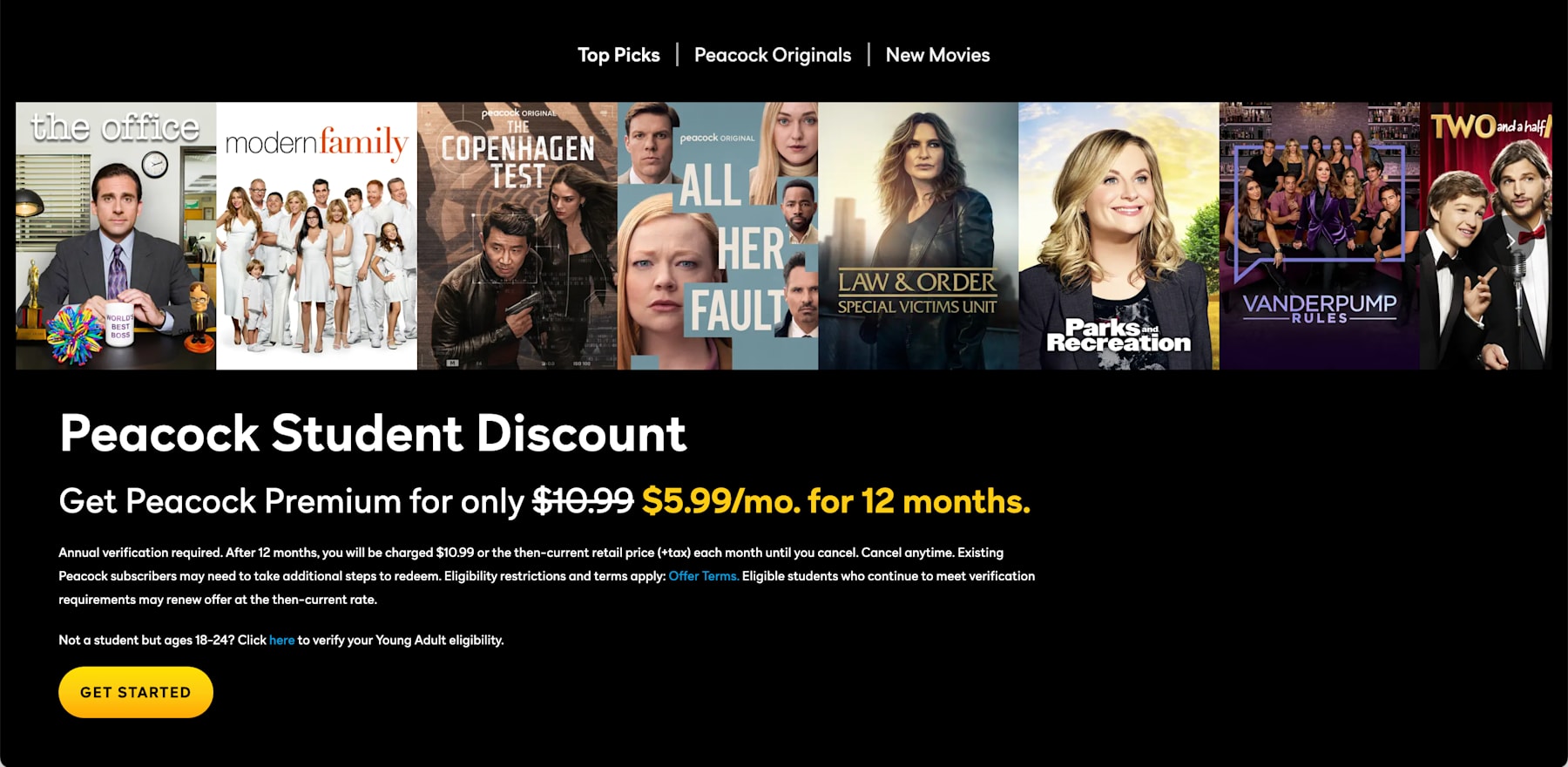
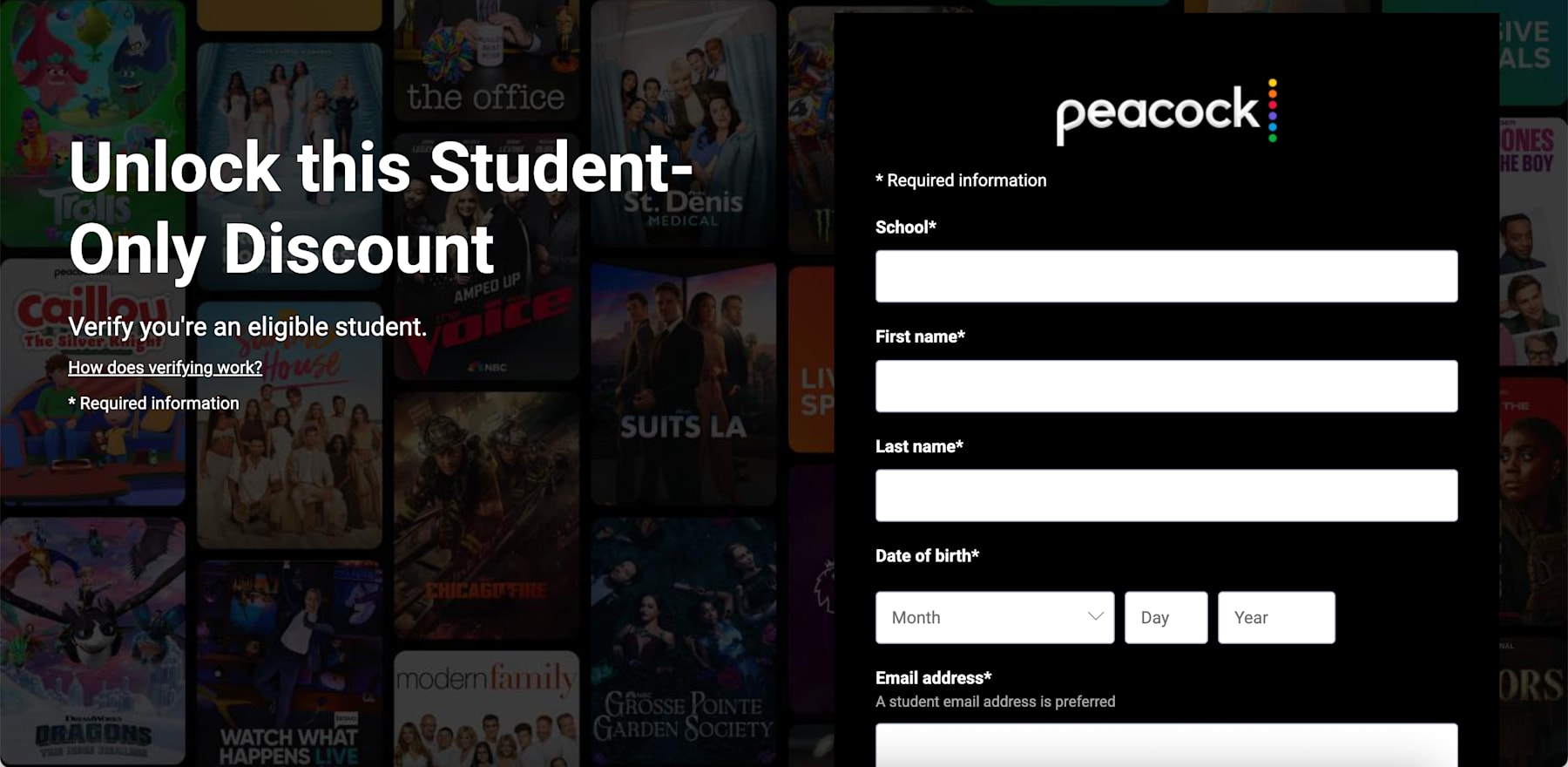
Step 2: Verify Your Status via SheerID. Click the "Get Started" or "Verify Status" button. You will be redirected to SheerID, a third-party service used to confirm eligibility.
-
For Students: You will need to provide your full name, date of birth, and the name of your Title IV-accredited college or university. In some cases, you may be asked to upload a document like a class schedule, transcript, or student ID if the system can't instantly find you.
-
For Young Adults: You will simply need to verify your age and identity.
Step 3: Get Your Unique Promo Code. Once SheerID gives you the green light (which is usually instant), you will be provided with a unique, single-use promo code. Copy this code immediately. You will need it for the next step.
Step 4: Create Your Account or Log In.
-
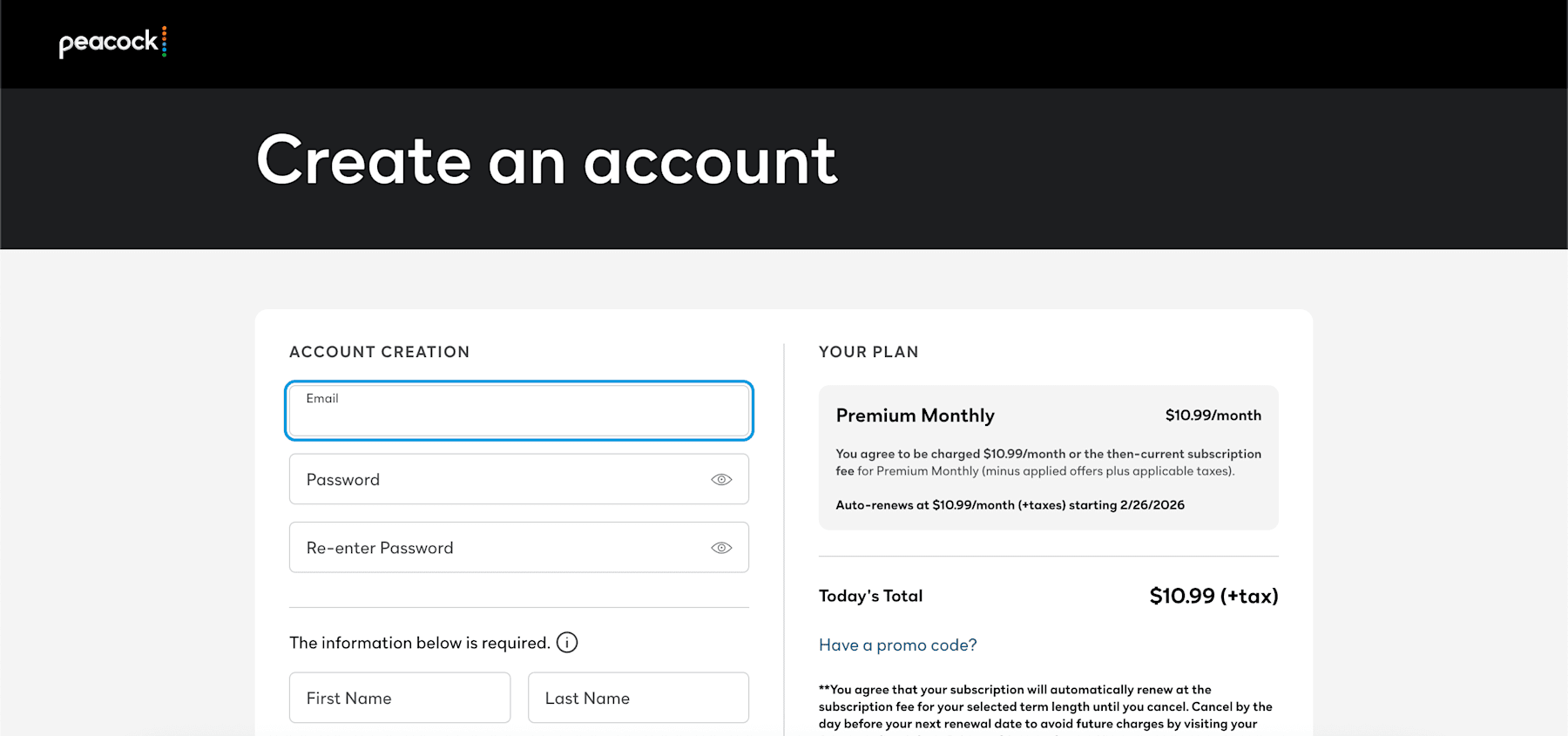
New Users: Click "Redeem Now" to be taken to the account creation page. The promo code should automatically apply, but double-check the "Promo Code" field at checkout just to be sure.
-
Existing Users: If you already have an account, log in and navigate to your Account settings. Look for the "Plans and Payments" tab. There should be a field to enter a promo code. Paste your student code there to adjust your rate.
Key Details to Remember
-
The Price: Currently $5.99/month for 12 months (down from the standard $12.99/month).
-
Eligibility: Must be 18+ and enrolled in a Title IV-accredited U.S. college, OR aged 18-24 for the Young Adult offer.
-
Renewal: The code is valid for 12 months. After that year is up, you will be charged the standard rate unless you re-verify your status to get a new code.
-
Payment: You must provide a valid credit card or PayPal account to redeem the offer, even though the price is discounted.
The SheerID Cheat Sheet: Documents You Might Need
While SheerID can often verify you instantly using just your name and date of birth, sometimes the system needs a little extra proof. If you get asked to upload documentation, don't panic. You will generally need to upload a digital copy (a photo or scan is fine) of one of the following that clearly shows your full name and a current issue date:
-
Official School Transcript: It must show your current enrollment status.
-
Class Schedule: Ensure it lists the current semester and your name.
-
Tuition Receipt: A receipt for the current term's tuition payment.
-
Student ID Card: Note that many student IDs do not have expiration dates; if yours doesn't, you may need to provide one of the other documents listed above to prove you are currently enrolled.
Important Note for Existing Subscribers
If you are already paying for Peacock Premium, you might encounter an error saying you already have an active plan. In this case, you generally need to cancel your current subscription and wait for the billing cycle to end. Once your account status switches to "inactive" or "free," you can log back in, go to "Plans and Payments," and successfully redeem your student promo code.
Everything You Need to Know About the Peacock Student Discount
While the price tag is the headline, there are plenty of nitty-gritty details about the Peacock student discount that you should know before handing over your credit card info. From understanding which plan you actually get to troubleshooting pesky error codes, we've broken down the fine print so you don't have to.
How Much Does Peacock Normally Cost?
Understanding the standard Peacock pricing is the best way to appreciate just how good the student deal actually is. Peacock has simplified its lineup into three main tiers for the general public: Select, Premium, and Premium Plus. While prices did see a hike in mid-2025, the service remains competitive against rivals like Netflix and Max, especially considering the sheer volume of live sports included in the base plan.
Here is a quick breakdown of the current Peacock pricing landscape to help you compare your options:
| Plan Level | Monthly Price | Annual Price | Ads? | Key Features |
| Student Discount | $5.99 | N/A | Yes | Full library access, live sports, next-day NBC shows. |
| Peacock Select | $8.99 | $89.99 | Yes | Curated selection of TV favorites from NBC and Bravo. |
| Peacock Premium | $12.99 | $129.99 | Yes | Full access, live sports, and current NBC hits. |
| Peacock Premium Plus | $19.99 | $199.99 | No** | Ad-free, offline downloads, live local NBC channel 24/7. |
Don't forget, student pricing is for the Premium tier only. Promotional rates may occasionally drop lower during special events and sales, particularly around major sports events and holidays. Because of streaming rights, ads generally apply to on-demand content. Whichever plan you choose, live events and occasional other programming will still contain limited commercial breaks.
What Plan Comes With the Student Discount (and Are There Ads)?
The student discount applies strictly to the Peacock Premium plan. It's important to note that despite the name "Premium," this is the ad-supported tier. While Peacock does offer a "Premium Plus" plan that removes most ads and includes features like offline downloads and your local NBC channel live 24/7, the student discount cannot be applied to that tier.
So, yes, you will have to sit through commercials. Think of it as a built-in study break—perfect for checking your phone or grabbing a snack while you binge The Office.
Is Premium Plus Worth the Upgrade?
For most students, the standard Premium tier (which you get with the discount) is more than enough. It unlocks the entire catalog of movies, TV shows, and—crucially—live sports. However, if you are a commuter who needs to watch shows on the subway without Wi-Fi, or if you simply cannot stand commercial breaks, the Premium Plus tier is the only way to get offline downloads and ad-free viewing. Just remember: you cannot apply the student discount to the Plus plan, so you'd be jumping from ~$6/month to roughly $20/month.
Does Peacock Have A Free Trial?
If you are looking for a big "Start Your Free Trial" button on the Peacock homepage, you are going to be disappointed. Peacock has completely done away with its standard free trial for the general public, and the old "Free Tier" is long gone. That said, you can still snag free access if you know where to look.
While Peacock itself doesn't offer a trial, partner platforms sometimes do. Occasionally, you can find a 7-day free trial if you subscribe to Peacock as an add-on channel through services like Amazon Prime Video or via specific Samsung Galaxy device promotions. Be sure to check the terms, as these offers rotate frequently.
Can You Use Peacock Gift Cards for Student Plans?
Generally, no. Because the student discount is a recurring subscription that requires annual re-verification, Peacock typically requires a payment method that supports recurring billing, such as a credit card, debit card, or PayPal account.
Pre-paid Peacock gift cards (often found at retailers like Best Buy or Target) are usually designed to fund standard accounts and may not trigger the promotional $5.99/month rate correctly during the checkout process. To stay safe, stick to a standard card or PayPal to secure the discount, and save the gift cards for gifting to friends who pay full price.
Does Peacock Have Live TV?
Yes, but with a catch. The student plan (Premium) gives you access to a massive amount of live sports, including Sunday Night Football, Premier League soccer, Big Ten games, and WWE events. However, it does not include your local NBC station's live stream 24/7. To get your local news and broadcast channel live around the clock, you would need the full-price Premium Plus plan.
What Devices Can You Use?
Peacock is pretty much everywhere these days. You can stream on up to three devices at once on the following platforms:
-
TVs: Samsung, LG, Vizio, Hisense, and Android TVs.
-
Streaming Sticks: Roku, Amazon Fire TV, Apple TV, Chromecast.
-
Gaming Consoles: PlayStation and Xbox.
-
Mobile/PC: iOS, Android, Windows, Mac, and web browsers.
Can You Share Your Peacock Student Account?
College is all about sharing—notes, pizza, and yes, streaming passwords. But how strict is Peacock?
Compared to Netflix's recent crackdowns, Peacock is still relatively generous. Your student account allows for three concurrent streams at once. That means you can be watching a movie on your laptop in your dorm, your roommate can watch The Office on the TV, and you can still have a third stream active on a phone or tablet.
You can also create up to six different profiles on a single account. This is great for keeping your "Continue Watching" list separate from your roommate's, so their obsession with Dateline doesn't mess up your algorithm. Just remember: you are the account holder, so you are the one on the hook for the bill!
How Do I Renew My Peacock Student Discount?
The bad news is that your student discount doesn't roll over automatically. The good news is that you can renew it every single year for as long as you are still in school (or under 24 for the Young Adult plan). The process requires a little bit of manual effort, but it's worth it to avoid the standard $12.99/month rate.
The Renewal Process:
-
Watch the Calendar: Your discount is valid for exactly 12 months. Peacock or SheerID will usually send a reminder email when your time is almost up, but it's smart to set your own reminder for 11 months out.
-
Re-Verify Your Status: You cannot just "extend" the plan; you have to prove you are still a student. Go back to Peacock's student discount page and go through the SheerID verification process again.
-
Get a New Code: Once verified, you will receive a brand-new promo code.
-
Apply the Code: Log in to your account, go to the "Plans and Payments" tab, and enter your new code.
Critical Warning: If you do nothing, your subscription will not cancel—it will simply auto-renew at the full standard price ($12.99/mo). You must apply the new code before your billing cycle rolls over to keep your $5.99 rate seamless.
Why Is My Peacock Student Discount Not Working?
If you are struggling to redeem your code, you are not alone. This is the most common hurdle for new users. Here is a quick troubleshooting guide optimized to get you streaming fast:
-
You Already Have an Active Subscription: This is the #1 error. You generally cannot apply a student code to an account that already has an active, paid subscription. You must cancel your current plan and wait for the billing cycle to end (so your account status says "Free" or "Inactive") before the system will accept the promo code.
-
The Code Expired: Once SheerID generates your unique code, you typically have 30 days to use it. If you waited too long, you might need to go through the verification process again.
-
Third-Party Billing: If you pay for Peacock through Apple, Roku, or Amazon, the code won't work. You need to cancel that third-party subscription and set up direct billing with Peacock using a credit card or PayPal.
-
Already Redeemed: If you see this error, check your "Plans and Payments" tab. You may have already successfully applied it without realizing.
Can I Watch Peacock While Studying Abroad?
If you are planning to spend a semester in Europe or heading to Cancun for spring break, you might need to leave Peacock behind.
Peacock is currently exclusive to the United States (including American Samoa, Guam, Northern Mariana Islands, Puerto Rico, and the U.S. Virgin Islands). If you try to log in from outside these areas, you will likely be blocked from streaming.
Pro Tip: Since the student discount applies to the Premium tier (which supports ads), it usually does not include offline downloads. Offline viewing is a perk reserved for the pricier Premium Plus plan. So, unless you upgrade your plan, you won't be able to download shows to watch on the plane or while you're overseas.
How Do You Cancel Peacock?
Whether you are cancelling a subscription to apply a new discount code or just cutting costs, the process is simple—but you have to do it in the right place.
Steps to Cancel:
-
Log In: Go to PeacockTV.com on a web browser (you often cannot cancel directly inside the mobile app).
-
Go to Account: Click your avatar in the top right corner.
-
Select Plans and Payments: You will see your current plan listed here.
-
Click Cancel Plan: Follow the prompts.
-
Check for Email: Wait for the confirmation email to ensure it went through.
Will I Get a Refund?
No. Peacock (like most streamers) does not offer refunds for partial months. For example, if you cancel on January 15th but your billing cycle ends on January 30th, you will continue to have access until the 30th, and you won't get any money back.
More Ways to Save on Peacock in 2026
If you've already tossed your graduation cap or simply don't qualify for the student discount, don't worry—you don't necessarily have to pay full price. Peacock is actually one of the most bundle-friendly streaming services on the market, meaning there are several "backdoors" to getting a subscription for free or at a steep discount just by using other services you probably already pay for.
Switch to an Annual Plan (Save ~16%)
One of the easiest ways to lower your effective monthly rate is to stop paying monthly altogether. If you have the cash on hand, switching to an annual plan is an instant money-saver. Peacock structures its annual pricing to give you 12 months for the price of 10.
-
The Math: For the standard Premium plan, you'll pay $129.99 up front instead of roughly $156 over the year. For Premium Plus, it's $199.99 up front.
-
The Verdict: While dropping over a hundred dollars at once stings, it guarantees your rate won't increase for a full year and keeps about $26 in your pocket compared to the monthly grind.
Get Peacock Free With Instacart Plus
If you are already paying for grocery delivery, you might have a free subscription waiting to be claimed. Instacart Plus members receive Peacock Premium as a built-in perk at no additional cost.
-
How to Claim: Log in to your Instacart account, navigate to your account settings, and look for the "Benefits" section to activate the offer.
-
The Value: Since Instacart Plus costs roughly $99/year and Peacock Premium costs roughly $130/year, the streaming benefit alone effectively pays for the grocery membership.
Get Peacock Free With Walmart Plus
Similar to Instacart, Walmart has turned its membership program into a major streaming competitor. A Walmart Plus membership includes Peacock Premium for free.
-
The Deal: You get the ad-supported Peacock Premium tier included with your Walmart Plus subscription.
-
Why It Works: Considering a Walmart Plus membership also includes free shipping, fuel discounts, and Paramount Plus (Essential tier) in some bundles, this is arguably the best value stack in retail.
Bundle with Xfinity StreamSaver
If you are an Xfinity internet or TV customer, you have access to one of the most aggressive bundles in the streaming world: the StreamSaver. Rather than paying for apps individually, Xfinity combines three major services into one discounted monthly line item.
What is Included in StreamSaver?
-
Peacock Premium: (The standard ad-supported plan).
-
Netflix: (Standard with ads).
-
Apple TV Plus: (The full experience).
-
The Savings: By bundling these three, users typically save over 30% compared to subscribing to each service separately. If you are already paying for Netflix and internet, adding this bundle is often a no-brainer upgrade.
Discounts for Teachers, Military, and First Responders
Students aren't the only ones who get a break. Peacock has a strong history of honoring public service professions with rates that rival the student deal. If you fall into one of these categories, you can verify your status via SheerID (just like students do) to unlock special pricing.
Who is Eligible?
-
Teachers: Open to K-12 teachers and university professors/faculty.
-
Military: Active Duty, Reservists, National Guard, and Veterans.
-
First Responders: EMTs, Paramedics, Firefighters, and Police Officers.
-
The Deal: Eligible users typically qualify for a rate of $6.99/mo for 12 months. Like the student deal, this requires annual re-verification.
Check Your Credit Card Perks
Before you pay, check the logo on your credit card. Holders of World or World Elite Mastercards often qualify for a "statement credit" benefit specifically for streaming services.
In the past, this program has offered $3 to $5 back in monthly statement credits when you use your eligible card to pay for Peacock Premium. While it isn't a direct discount on the Peacock website, the cash back appears on your credit card statement, effectively lowering the monthly cost of your student plan even further—potentially down to just a dollar or two!
The "Cancellation" Retention Hack
This is a classic maneuver for veteran deal hunters. Sometimes, the best way to get a deal is to threaten to leave. If you are currently paying full price, try navigating to the "Cancel Plan" page in your account settings.
As you click through the warnings asking "Are you sure?", Peacock's algorithm may present you with a "retention offer"—typically a discounted rate (like $2.99/mo for 3 months) to convince you to stay. It's not guaranteed, but it's a risk-free way to potentially slash your bill for the next quarter. If they don't offer it, you can simply stop the cancellation process before the final step.
Wait for Holiday Promo Codes
Finally, timing is everything. If you aren't in a rush to sign up, wait for a major holiday. Peacock is notoriously aggressive during Black Friday and Cyber Monday, often dropping prices to as low as $0.99/mo or $19.99/yr for new customers. We also tend to see "Summer of Peacock" sales around July, especially during Olympic years or major Premier League kickoffs. Keep an eye on DealNews, as we track these flash sales the moment they go live.
What Can You Watch on Peacock in 2026?
You aren't just paying for a discount code; you're paying for entertainment. Fortunately, 2026 is arguably one of the strongest months in the platform's history. Between record-breaking original thrillers and the massive influx of live sports, Peacock has evolved from "just the place to watch The Office" into a powerhouse streaming contender.
Whether you need a distraction from your syllabus or a movie night pick, here is the top content trending on Peacock right now.
Top Trending TV Shows
The current lineup features a mix of high-stakes cyber-thrillers and beloved comfort comedies, making it perfect for late-summer binges.
-
The Undeclared War (Season 2): Premiering August 27, this intense series follows a GCHQ counter-cyberterrorism unit dealing with the aftermath of massive attacks.
-
Kim's Convenience: The critically acclaimed, newly acquired comfort comedy has made its new streaming home on the platform—perfect for unwinding between study sessions.
-
Love Island USA Reunions: Special reunion episodes and summer reality wrap-ups are currently dropping, driving massive weekend engagement for reality TV fans.
Must-See Movies
Peacock's movie library this August is a fantastic blend of breezy summer rom-coms, indie horror breakouts, and family-friendly animation.
-
You, Me and Tuscany: Released on August 7 and starring Halle Bailey alongside Regé-Jean Page, this breezy rom-com follows an aspiring chef who accidentally squats in an Italian villa and gets mistaken for a family member's fiancée.
-
The Super Mario Galaxy Movie: A massive, fun, family-friendly animated addition currently streaming in the platform's library.
-
Obsession: Curry Barker's breakout indie horror hit is streaming now and drawing major buzz across social media.
-
Pressure: An acclaimed World War II thriller starring Andrew Scott and Brendan Fraser that brings serious cinematic weight to the platform.
Live Sports
Live sports continue to be a massive selling point for a Peacock subscription as we head into the fall semester.
-
Premier League Soccer: The 2026–27 season officially kicked off on August 21. Your subscription gets you live match coverage, Goal Rush, and replays of key weekend fixtures.
-
Major League Baseball (MLB): Catch select live games, including late-August matchups like the Houston Astros taking on the New York Mets on August 28 and August 30.
-
European Soccer: Live Spanish-language coverage for Bundesliga, Serie A, and select friendlies are streaming heavily on the platform this month.
-
USL Super League and More: You can stream inaugural season matches for the USL Super League, as well as specialized events like Ironman Race Day Live and late-summer cycling coverage.
Coming Soon
If you plan to keep your student subscription rolling into the fall, there is a massive slate of content on the horizon. September kicks off with the arrival of the Twilight movie collection, The Traitors: New Blood, and the thriller series Line of Fire.
Looking further into late 2026, Peacock is rolling out highly anticipated originals like the Friday the 13th prequel series Crystal Lake, the Cold War spy thriller Ponies starring Emilia Clarke, and the drama The Good Daughter. Plus, blockbuster theatrical releases like Jurassic World Rebirth, M3GAN 2.0, and Wicked: For Good will eventually make Peacock their streaming home.
So, Are Peacock Student Discounts Worth Pursuing in 2026?
Let's be real: paying full price for streaming services in 2026 feels like a personal failure when there are so many deals floating around. With the standard Peacock Premium plan now sitting at $12.99 per month, the student discount is arguably the single most valuable "coupon" available for the platform. By dropping your rate to $5.99 per month (or even less during special promo windows), you are effectively keeping about $84 in your pocket this year. That is real money that can go toward textbooks, late-night food runs, or literally anything else.
Quick Summary: Pros and Cons of the Peacock Student Plan
If you are still on the fence, here is the fast breakdown of the trade-offs:
The Pros:
-
Massive Savings: You save roughly 45% off the standard monthly rate.
-
Live Sports: Includes NFL, Premier League, and Winter Olympics coverage.
-
Lock-in Rate: The price is good for 12 months, protecting you from mid-year price hikes.
-
Young Adult Option: Available to non-students aged 18-24.
The Cons:
-
Ads Are Mandatory: You cannot apply the discount to the ad-free "Premium Plus" tier.
-
No Offline Downloads: Because you are on the ad-supported plan, you cannot download shows for offline viewing.
-
No Local Live NBC: You don't get the 24/7 live stream of your local NBC affiliate (though you still get live sports and events).
-
Annual Verification: You must remember to re-verify your status every year, or the price nearly doubles automatically.
What Else to Consider About Peacock in 2026
When deciding if the $5.99/month student plan is right for you, it is important to factor in how you consume media. Peacock's rotating library means there is always a fresh batch of theatrical releases and live sports events to justify the cost, but you should still keep an eye on your billing cycle. Because student statuses expire, you'll want to review the exact terms and conditions to understand how and when you need to re-verify your enrollment to avoid automatically rolling into a standard, higher-priced tier.
If your university email changes, or if you run into any snags with the SheerID verification portal during sign-up, reaching out to customer service early is your best bet. You can easily contact their support team to resolve account access issues before a big live event—like a Premier League match or a WWE premium live event—starts broadcasting.
How We Find and Verify Streaming Promotions
At DealNews, we treat deal-hunting as a rigorous editorial process rather than relying on automated scrapers. When it comes to digital subscriptions, a promo code is only as good as the fine print attached to it. Our team manually investigates every streaming offer we publish, putting ourselves in the shoes of the consumer to ensure you aren't wasting time on expired promotions or convoluted sign-up loops.
Because student discounts require third-party verification portals, our team actively tests the checkout process. For example, Senior Editor Julie Ramhold leverages her deep knowledge of retail calendars to track Peacock's historical pricing trends. By mapping out exactly when Peacock traditionally drops its rare $1.99/month Black Friday promotions, she ensures we can accurately tell students whether the $5.99/month campus plan is the absolute best value available right now, or if a better seasonal offer is worth waiting for.
Similarly, Content Editor Jason Savage—who frequently hunts down the best ways to stream sports and WWE events for his family—takes a hands-on approach to the SheerID system. He tests the actual student verification portals and enrollment gates to confirm that the eligibility rules are straightforward, making sure the links we provide will get you straight to the discount without unnecessary roadblocks.
To ensure you lock in the best streaming value, our daily testing process includes:
-
Validating Verification Portals: We manually click through SheerID and student authentication gates to ensure they are actively accepting new enrollments and university credentials.
-
Deciphering the Fine Print: We analyze the renewal terms so you know exactly when a promotional rate expires and what the regular monthly cost will be once you graduate.
-
Monitoring Historical Lows: We cross-reference current student plans against past seasonal flash sales (like summer bundle deals) to guarantee the offer provides genuine value.
-
Tracking Competitor Bundles: We constantly monitor the broader streaming market to see if third-party providers (like cellular carriers or tech retailers) are offering Peacock for free, ensuring our posted deals are the smartest way to subscribe.
-
Editorial Independence: While we may earn a commission when you use our links, our validation is strictly independent. If a student offer is unnecessarily difficult to redeem or the portal is broken, we won't recommend it.
Stay Updated on the Latest Peacock Deals
Peacock regularly updates its subscription offers, student discounts, and limited-time streaming bundles—often with very little warning. To make sure you never miss out on the best ways to save on your entertainment:
-
Bookmark this page: We regularly update our list of verified Peacock promotions and student deals, so check back before you renew or sign up.
-
Sign up for deal alerts: Subscribe to our DealNews Select newsletter to get the hottest streaming discounts and entertainment bundles delivered straight to your inbox.
-
Set a custom deal alert: Create a personalized deal alert for Peacock or your favorite streaming platforms and receive instant notifications when a new promo or price drop goes live.
-
Follow us on social media: We frequently share flash sales and exclusive subscription deals on our social channels. Follow us here:
Staying proactive is the best way to maximize your streaming savings all year long!
A merging of our Streaming Services roundup writers into a singular, binge-watching, channel-surfing organism of expertise. Come for the convenient consolidation of promotions, promo codes, and free trials on top entertainment platforms like Disney Plus, YouTube TV, and Hulu—plus live sports streaming passes for the NFL, UFC, and beyond—stay for the rapid descent into absolute nonsense. Curated and manually verified by seasoned DealNews leaders Julie Ramhold and Jason Savage.
Sign In or Register