Sling TV Promo Code: 50% Off + 1% Cash Back October 2026
If you are tired of the endless subscription shuffle—like signing up for a YouTube TV free trial just to catch a weekend of playoff football before bailing on that huge monthly bill—it might be time to finally settle down with Sling TV. With major streaming competitors continually pushing price hikes in early 2026, this flexible platform stands out as one of the last reliable options for budget-conscious cord-cutters.
Our Top Sling TV Promo Codes and Coupons Offered in August 2026
Sling TV Orange 1-Day Pass
$4.99Get a Sling TV Orange 1-Day Pass for $4.99. There are no refunds once activated. Other fees and exclusions may apply. This offer ends December 31, 2026.
Sling TV Orange 3-Day Pass
$9.99Get a Sling TV Orange 3-Day Pass for $4.99. There are no refunds once activated. Other fees and exclusions may apply. This offer ends December 31, 2026.
Sling TV Orange 7-Day Pass
$14.99Get a Sling TV Orange 7-Day Pass for $4.99. There are no refunds once activated. Other fees and exclusions may apply. This offer ends December 31, 2026.
Sling TV Day Pass Deal
$1 Day PassBuy a 1-, 3-, or 7-Day Pass for Sling TV from March 19 through March 22, and if a 12-16 seed reaches the final 16, you'll get your next Day Pass for $1. Sling says eligible customers should watch their email to claim the $1 pass if the promotion triggers. Passes are one-time subscriptions, programming availability is limited to the United States, and blackout restrictions may apply. Deal ends March 22.
Sling TV Student Discount
$10 off for 6 monthsStudents can get $10 off for six months on Sling Orange, Sling Blue, or Sling Orange + Sling Blue through Student Beans. Verify your student status to access the Sling TV education store and unlock the discount. After the promo period, pricing starts at $45.99 for Sling Orange or Sling Blue and at $60.99 for Sling Orange + Sling Blue unless you cancel online. This offer is available only to new customers, and availability may vary by geographic location. This deal ends December 31.
Sling TV Orange Subscription
from $4.99/mo.The Sling TV Orange Subscription starts as low as $4.99 per month. You can get 1-day, 3-day, 7-day, monthly, or prepaid subscription to get NCAA, WNBA, ESPN, TNT, Disney, and more. Add Sports Extra for SEC, ACC, ESPNU, and more. Other fees and exclusions may apply. This offer ends December 31, 2026.
Sling TV MLB Streaming Deal
Sling Select starting at $19.99Watch MLB live on Sling Select with access to FS1, FOX, and NBC in select markets starting at $19.99. This offer is available to new customers upon account activation, with regular monthly billing beginning after the first month unless you cancel online. Availability for some local channels varies by market, and service is only offered in the United States. Deal ends December 31.
Sling Select Subscription
from $20/mo.The Sling Select Subscription starts as low as $19.99 per month. This subscription includes a curated selection of channels including NFL Network, National Geographic, FS1, FOX News, and more. Other fees and exclusions may apply. This offer ends December 31, 2026.
Sling TV Blue Subscription
from $45/mo.The Sling TV Orange Subscription starts at $45 per month. Other fees and exclusions may apply. This offer ends December 31, 2026.
Sling TV 3-Month Prepay Deal
Plans from $49.99Prepay for three months of Sling and prices start at $49.99, with plan options including Orange, Blue, Select, and Orange & Blue. The Select prepay plan starts at $49.99 for three months, while Orange and Blue are priced at $114.99 and Orange & Blue starts at $159.99. After the prepaid term ends, monthly billing continues at the plan's standard rate, and local channel availability varies by market. Deal ends December 31.
Sling TV Orange & Blue 3-Month Prepay Subscription
$160For new subscribers only in November 2025, that's a $23 savings on your first three months of Sling TV Orange & Blue. It includes channels like ESPN, MSNBC, TBS, and ABC. The subscription auto-renews after three months at $60.99 per month unless cancelled.You can bundle this with Sports Extra for $204.99, auto-renewing at $75.99 per month.
Sling TV Blue 3-Month Prepaid Subscription
$115Get the Sling TV Blue 3-Month Prepaid Subscription for $114.99 ($46 per month). This offer is valid for new customers only. Other fees and exclusions may apply. This offer ends December 31, 2026.
Sling TV Orange 3-Month Prepaid Subscription
$115Get the Sling TV Orange 3-Month Prepaid Subscription for $114.99 ($46 per month). This offer is valid for new customers only. Other fees and exclusions may apply. This offer ends December 31, 2026.
Sling TV Orange 3-Month Prepay Subscription
$115For new subscribers only, that's a $23 savings on your first three months of Sling TV Orange with this November 2025 deal. It includes channels like ESPN, TNT, and TBS. The subscription auto-renews after three months at $45.99 per month unless cancelled.You can bundle this with Sports Extra for $147.99, auto-renewing at $56.99 per month.
Sling TV Blue 3-Month Prepay Subscription
$115For new subscribers only, that's a $23 savings on your first three months of Sling TV Blue. It includes channels like MSNBC, USA, and ABC. The subscription auto-renews after three months at $45.99 per month unless cancelled.You can bundle this with Sports Extra for $147.99, auto-renewing at $56.99 per month.

Discovery Plus on Sling TV
30-day free trial w/ bundleYou can get a whole month of Discovery Plus for free when you sign up for a Sling Orange or Sling Blue streaming plan. Orange plans start from $4.99, and includes over 30 channels. This deal is ongoing.
Discovery Plus on Sling TV
7-day free trialGet a weeklong free trial of Discovery+ on Sling TV — Sling Freestream is included as part of the trial. After the seven days are up, your chosen plan will renew at its regular monthly rate ($4.99 or $6.99) unless cancelled. This deal is ongoing.
Discovery+ on Sling TV
$9.99 per monthYou can add a Discovery Plus ad-free plan to your Sling TV subscription for $9.99 per month. (The with ads plan costs $5.99. Sling Orange plans start from $4.99 per month.) This deal is ongoing.
While Sling TV frequently offers excellent discounts on its live TV streaming packages, you rarely need a traditional promo code to claim them. The best promotional offers are typically applied automatically to your cart at checkout.
You might want a long-term streaming package or just want to catch a single weekend of sports. Either way, here are the most consistent ways to score a Sling TV discount:
New Subscriber Sign-Up Deals
If you are new to the service, Sling TV features several heavily discounted introductory offers on their Sling Orange, Sling Blue, or combined base plans:
-
50% Off Your First Month: Automatically applied at checkout, this ongoing promotion cuts standard monthly plans (normally starting at $45.99) down to roughly $23 for your initial billing cycle.
-
40% Off Your First Two Months: You can often find this discount by purchasing a prepaid digital Sling TV code through third-party electronics retailers like Best Buy.
-
Prepay Bundle Discounts: If you prepay for your first three months of service, Sling frequently offers steep discounts on base plans bundled with add-ons (like the Sports Extra package for as low as $49.99 total). Prepaying multi-month blocks can also unlock bonus perks, such as a free streaming device.
-
Free Unlimited Cloud DVR: First-time subscribers typically get Unlimited Cloud DVR added to their first month of service completely free of charge.
-
Cash Back Portals: You can get the most out of your initial savings by activating offers through popular cash back and rewards portals when signing up.
Sling Freestream (100% Free Option)
If you do not want to pay for a monthly subscription, Sling Freestream is a completely free, ad-supported streaming tier that requires no credit card.
-
Live and On-Demand Content: Includes over 600 live channels (spanning news, sports, and entertainment like ABC News Live and beIN SPORTS XTRA) and an on-demand library with over 40,000 movies and shows.
-
Free Cloud DVR: Creating a free Sling account grants you 10 hours of free cloud DVR to record your favorite Freestream content.
-
Local Channel Integration: You can easily add free local broadcast networks into your Sling guide by connecting an Over-The-Air (OTA) antenna to an AirTV device.
-
A La Carte Premium Add-Ons: You can use the free Freestream interface to browse and buy over 50 standalone premium services like AMC Plus, SHOWTIME, MGM Plus, and Discovery Plus.
Student, Military, and First Responder Discounts
Sling TV offers targeted discounts for verified users on any of its base plans (Orange, Blue, or Orange + Blue).
-
Student Discount: College students who verify their status via Student Beans can get $10 off their monthly bill for six months.
-
Military and First Responder Deals: Active military members and first responders who verify their identity through services like Beans ID receive the same discount of $10 off per month for the first six months of service.
Promotions for Existing Sling TV Customers
Because standard promo codes are almost always reserved for new sign-ups, existing users need to look elsewhere for savings:
-
Account-Specific Upgrades: Log into the "My Account" portal to check for targeted loyalty deals or discounted upgrade offers specific to your subscription history.
-
Premium Add-On Promos: Sling frequently offers stackable, discounted trial periods for premium network add-ons, allowing existing users to add channels like Paramount+, STARZ, or AMC+ at a fraction of the regular cost.
How to Redeem a Sling TV Promo Code
While the majority of Sling TV's best 2026 discounts are applied automatically when you click a dedicated promotional link, you might still find yourself with a unique alphanumeric code. Whether it is a targeted win-back offer or an employee discount, knowing exactly where to plug it in is the only way to guarantee your savings.
To get through checkout without a headache, follow these exact steps to apply your discount successfully. The process depends entirely on whether you are setting up a brand new account or adding a code to an existing subscription.
Steps For New Subscribers
If you are completely new to the platform, you have two easy ways to lock in your discount. Simply choose the method below that best fits how you are signing up.
Method 1: Apply the Promo Code on the Deals Page
-
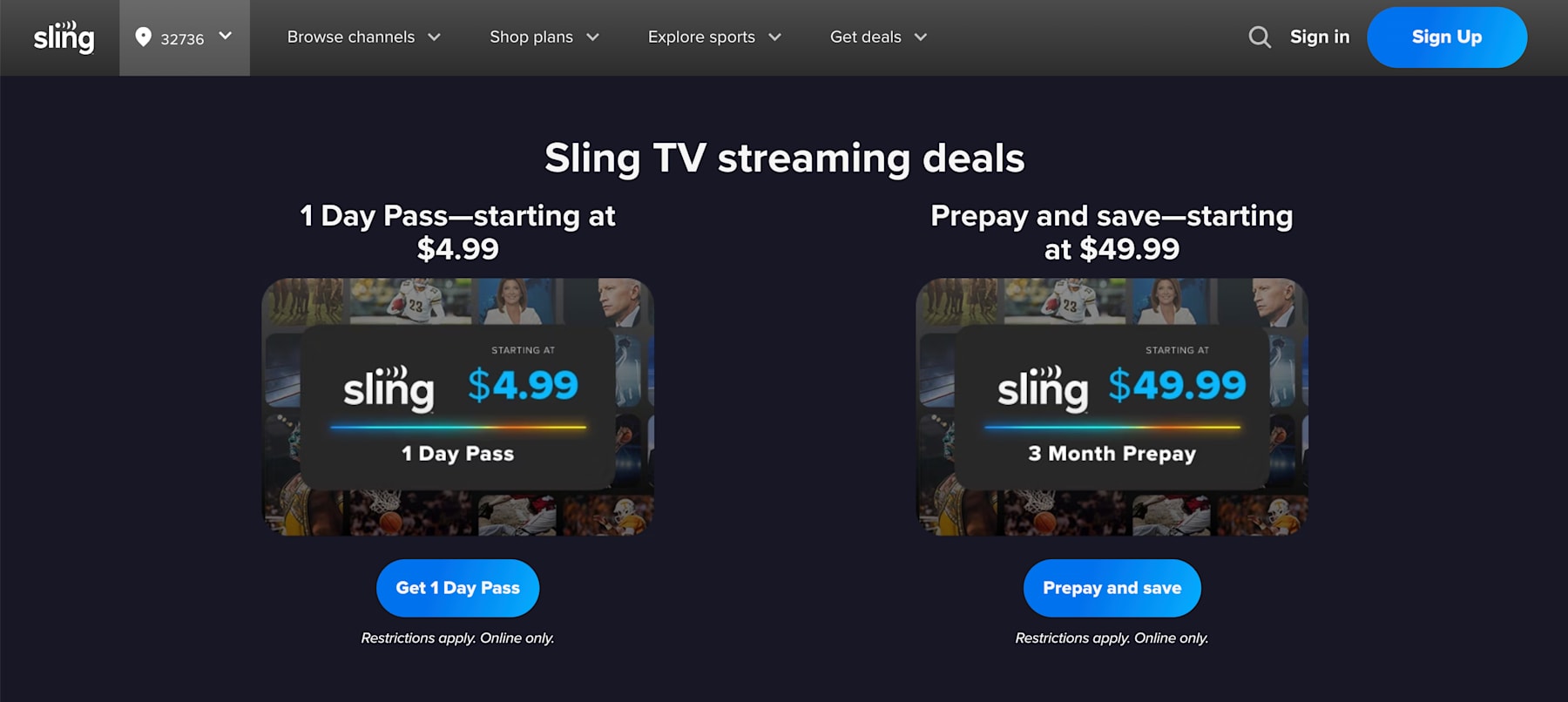
Go directly to sling.com/deals using your preferred web browser.
-
Enter your specific Sling promo code in the designated entry field right in the middle of the screen. (If there are no valid promo codes floating around, this section might not appear.)
-
Click the button labeled "Validate Code" or "Apply" to verify the offer.
-
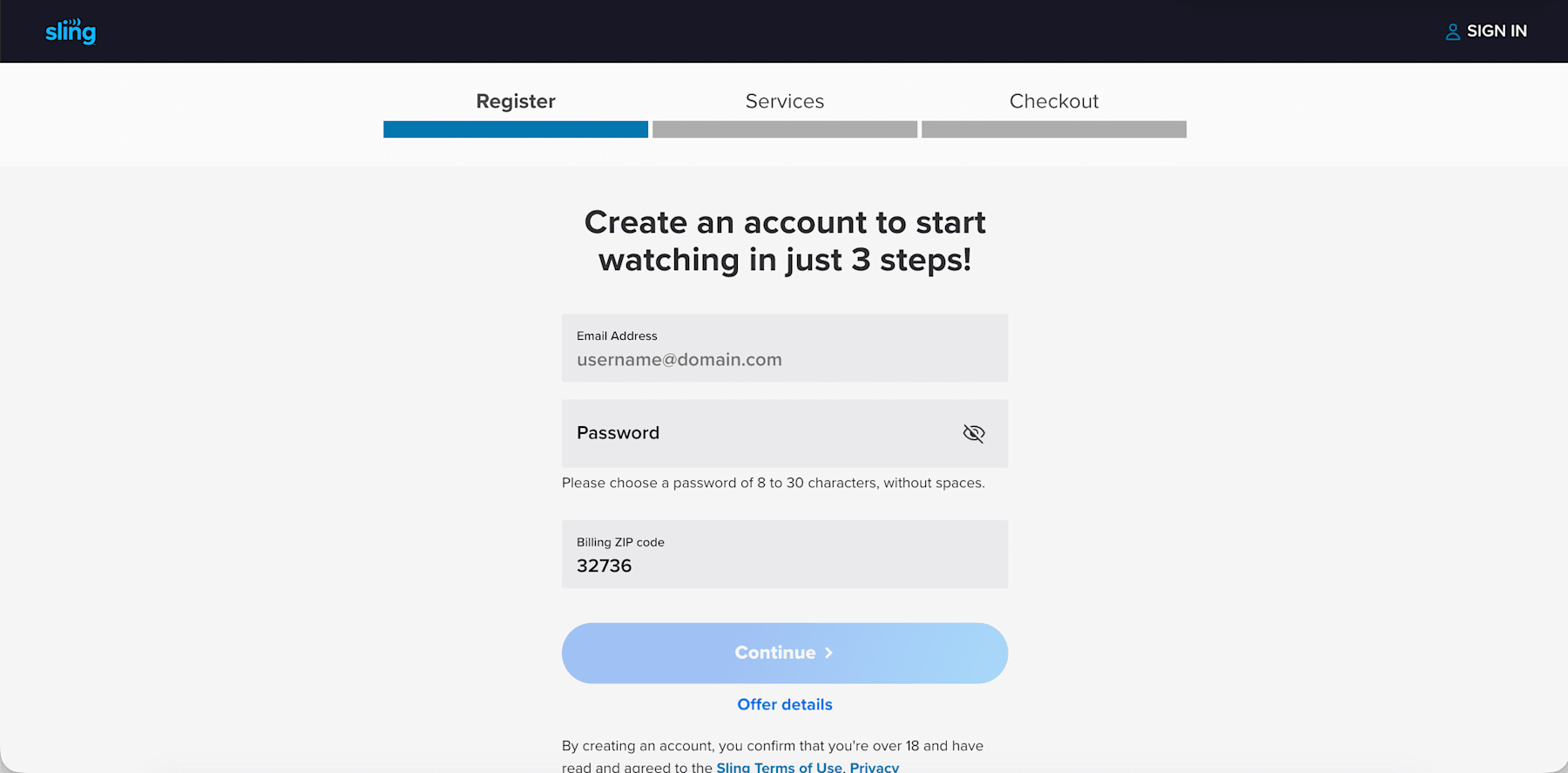
Create your brand new account by entering a fresh email address and a secure password.
-
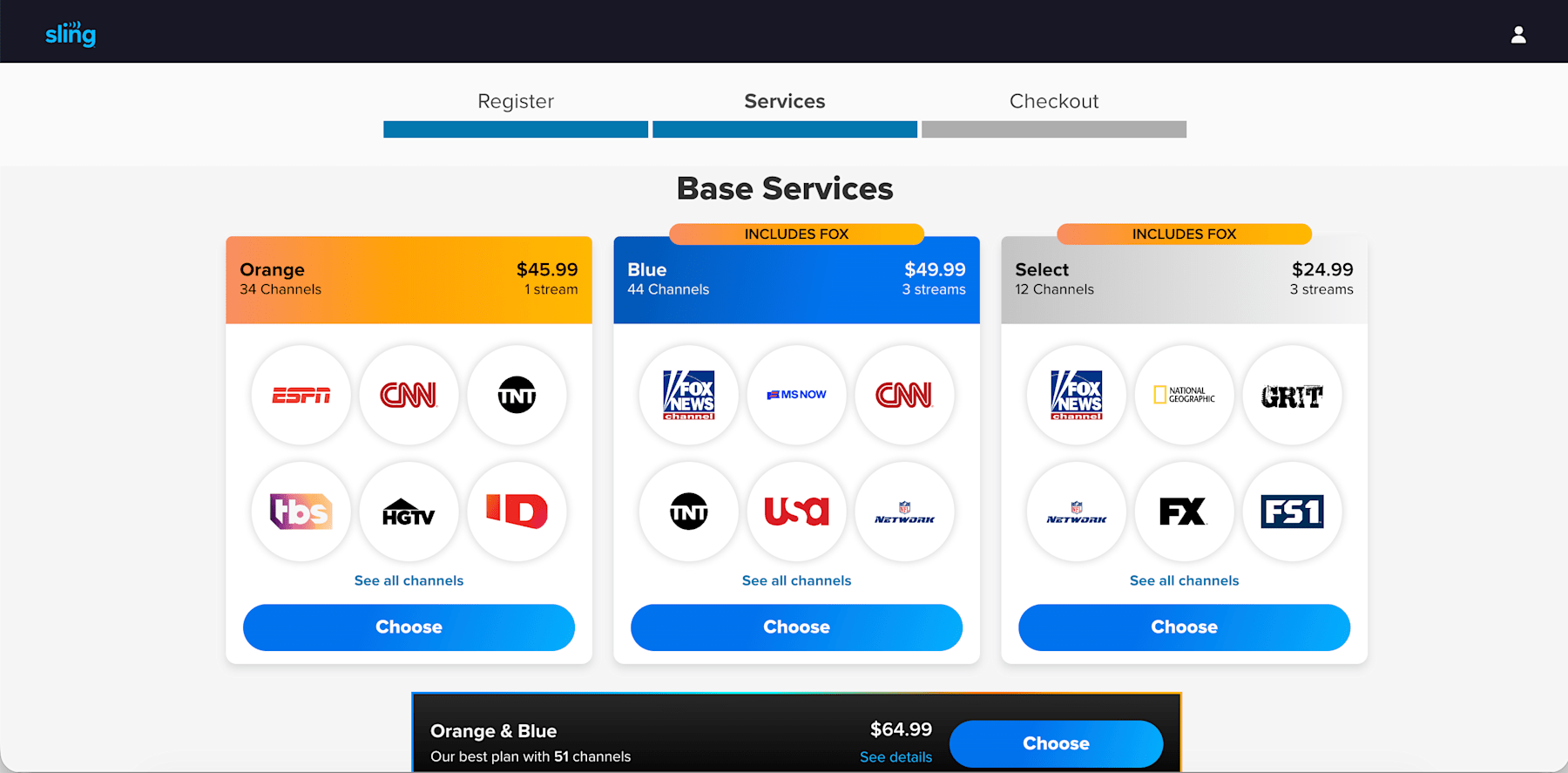
Select your preferred base package (Sling Orange or Sling Blue) and any extra channel packs.
-
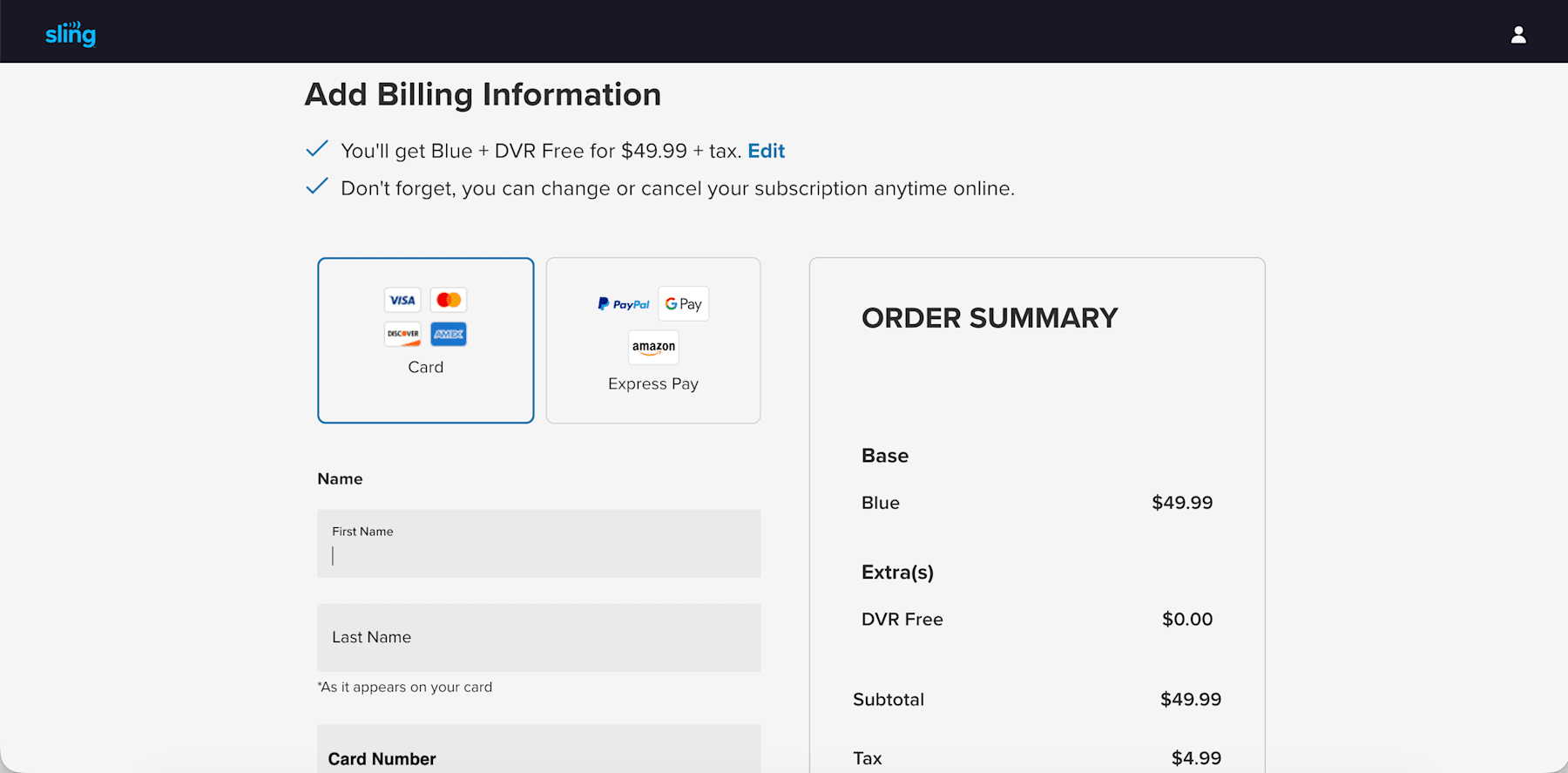
Proceed to the final screen, where your discount will be automatically applied to your checkout total.
Method 2: The Standard Checkout Route
-
Head over to the main Sling TV homepage and select your desired base plan.
-
Proceed to the primary checkout screen to begin building your account.
-
Look carefully for the specific promo code entry box before you type in any of your payment information.
-
Type in your code, making absolutely sure there are no accidental blank spaces before or after the text.
-
Click "Apply" to visually verify that the discount has reduced your order summary.
-
Complete your sign-up process to finalize the deal and start streaming.
Steps for Existing Subscribers
If you already have an active subscription, the standard checkout page will not help you. Instead, you need to apply the code directly to your account dashboard.
-
Log in to your account at sling.com/my-account.
-
Look for the specific "Redeem Promo Code" option right on your My Account dashboard. (Again, this might not appear if the company does not have any current alphanumeric coupon codes in circulation).
-
Enter your code and apply it to your account to see your next billing cycle update.
DealNews Pro Tip: If you are trying to redeem a Sling TV gift card rather than a standard discount code, you need to go to a completely different page. Head over to sling.com/gift to apply those funds to your account balance.
Troubleshooting: What to Do if Your Code Is Not Working
Digital couponing relies heavily on backend server verifications, and things do not always work flawlessly on the first try. If you hit an error message, run through this quick troubleshooting checklist.
-
Check For Automatic Application: Remember, many of the best current deals do not require a manual code at all. If you clicked a special offer link, the discount is likely already baked into your final price.
-
Verify New Customer Status: This is the most common roadblock. Many codes are strictly reserved for brand-new accounts. If you are an existing user trying to apply a new-user code, the system will flag it as invalid or ineligible. Also, old browser cookies can mess with the tracking, so open an incognito window to clear out the digital cobwebs.
-
Check The Expiration Date: Promotional marketing campaigns operate on tight timelines. If your code shows up as invalid, it might simply be expired.
-
Ask The Chatbot: If you are still stuck, Sling makes it easy to get help. Click the Chat icon on the Sling TV help page and type "promo code" to get immediate assistance from their automated support bot.
Key Things to Know About Sling TV Promotions This August
Entering the digital checkout line without knowing the rules of the road is a surefire way to overpay. The streaming industry has shifted wildly over the past two years, bringing massive price hikes and new regional fees across the entire market. To make sure you get the absolute best return on your entertainment dollars, you need to understand exactly how this platform operates.
We have compiled everything you need to know to stream smarter this year.
What Is the Best Time to Save at Sling?
Patience pays off in the modern digital streaming economy. While Sling TV offers introductory discounts year-round, their most aggressive promotional deals typically drop in the late fall and winter. The Black Friday and Cyber Monday shopping weekend in late November is historically the absolute best time to subscribe.
You will frequently see buy-one-get-one promotions, heavy discounts dropping base packages to roughly $15, or expensive streaming hardware thrown in completely free of charge. The start of the college and professional football seasons in late August and September also triggers a wave of excellent sports-focused deals.
What Does Sling Normally Cost in 2026?
To really know if a discount is worth your time, you first need to look at the sticker price. Sling's cost structure has evolved for 2026, so let's break down exactly what the main Sling TV plans cost before you apply any coupons.
-
Sling Select ($19.99/month): The newest ultra-budget tier features daily news and lifestyle channels but completely excludes all expensive live sports networks.
-
Sling Orange ($45.99/month): Highly focused on family programming and major sports, including the ESPN family of networks and Disney channels, limited to a single simultaneous stream.
-
Sling Blue ($45.99/month): Heavily focused on news, premium entertainment, and select local broadcast networks like NBC and FOX, allowing up to three simultaneous streams.
-
Sling Orange And Blue ($60.99/month): Combines every single channel from both lineups with an automatic $30.99 built-in monthly discount.
What Channels Can I Get With Each Sling TV Plan?
Sling is famous for its "a la carte" setup, letting you build a customized lineup instead of forcing you to pay for 200 channels you never actually watch. Depending on the base package and add-ons you choose, you can access everything from premium prestige dramas to live college football. Here is a breakdown of what you can expect to find:
-
Sling Select: The ultra-budget tier keeps you informed and entertained with Fox News, MSNBC, CNN, the Hallmark Channel, the History Channel, and FX, but completely excludes sports.
-
Sling Orange: This is your go-to for family and sports, featuring ESPN, ESPN2, ESPN3, the Disney Channel, Freeform, CNN, HGTV, and the Food Network.
-
Sling Blue: Perfect for news and entertainment junkies, this tier packs in NBC, FOX, and ABC (in select local markets), plus the USA Network, FX, Bravo, the Discovery Channel, MSNBC, Fox News, AandE, and National Geographic.
-
Premium Networks: Sling acts as a hub for major premium streaming brands, allowing you to bundle Max, Paramount Plus with Showtime, Starz, MGM Plus, and AMC Plus directly into your monthly bill.
What Features and Add-Ons Does Sling TV Include?
To get the most out of your entertainment budget, you need to understand exactly what you are paying for. Sling TV operates on an "a la carte" philosophy. This highly modular approach allows you to select a basic base plan and meticulously build out your channel guide using specific extra packages and premium network add-ons.
Here is our breakdown of the core Sling TV features and add-ons available in 2026.
Add-On Packages
Once you choose your base plan, you can add premium networks or genre-specific mini bundles that cost between $6 and $15 per month. Viewers can add channels dedicated to sports, comedy, kids programming, lifestyle, or news.
-
Sports Extra: For $11 to $15 per month (depending on your base plan), die-hard fans gain access to NFL RedZone, NBA TV, the NHL Network, and regional college networks like the SEC Network.
-
Comedy Extra: For $6 per month, this pack adds entertainment staples like MTV, the Paramount Network, CMT, and TV Land.
-
Kids Extra: Keep the family entertained for $6 per month with Nicktoons, Nick Jr., TeenNick, and Boomerang.
-
Lifestyle Extra: Also priced at $6 per month, this bundle features the Cooking Channel, the Magnolia Network, and the DIY Network.
-
News Extra: Stay informed globally for $6 per month with BBC World News, NewsNation, and CNBC.
-
The Total TV Deal: If you want it all, this massive bundle combines all seven available extras into one package for just $21 per month, offering incredible value over buying them individually.
-
Premium Networks: You can easily add prestige networks directly to your Sling guide. Top options include Paramount Plus With Showtime for $10 per month, Starz for $11 per month, and AMC Plus for $9 per month. You can even bundle Max for $17 per month.
Cloud DVR and Other Popular Features
A great channel lineup is useless if the underlying technology cannot keep up. Sling offers a solid suite of technical features designed to compete with the heavy hitters in the streaming space.
-
Standard Cloud DVR: Every single base subscription automatically includes 50 hours of free cloud DVR storage. You can record live sports, movies, and daily news broadcasts, and you can fast-forward through the commercials on your recorded content.
-
Unlimited DVR Upgrade: If 50 hours is not enough for your household, you can purchase the DVR Plus upgrade. For an extra $5 per month, this expands your storage capacity up to 200 hours, making sure you never have to delete an old recording to make room for a new one.
-
4K Streaming: Sling actively rolled out 4K streaming capabilities for select live sporting events and premium content, providing crystal-clear resolution on supported smart TVs and streaming dongles.
-
Flexible Access: The platform requires absolutely no long-term contracts. You can downgrade, upgrade, or pause your service entirely from your dashboard, and you can access your account from virtually any modern streaming device, including Roku, Amazon Fire TV, and Apple TV.
How Do Sling Discounts Compare With Competitors?
To really know if you are getting a good deal, you have to look at the bigger picture. The streaming world is crowded in 2026, so let's see how Sling holds its own against the big corporate giants trying to take over your living room.
| Streaming Service | Starting Price | Primary Focus | Best Discount Strategy |
| Sling TV | $19.99 to $45.99 | Affordable, customizable skinny bundles | 50% off first month or prepay bundles |
| Philo | $25.00 | Pure entertainment, zero sports or local news | Occasional 7-day free trials |
| YouTube TV | $82.99 | Premium, comprehensive cable replacement | Free trials or first-time user discounts |
| Hulu Plus Live TV | $89.99 | Massive Disney integration and on-demand libraries | Bundle with Disney Plus and ESPN Plus |
| Fubo | $79.99+ | Extreme niche sports and regional sports networks | Short-term free trials |
If you are hunting for YouTube TV promo codes or similar premium service discounts, you will quickly notice their base prices start incredibly high. Even with a generous first-time user discount, you still commit to a massive monthly bill of over $70 once the promotional period ends. Sling TV remains over $30 cheaper per month than YouTube TV and Hulu Plus Live TV. It provides the exact same networks without forcing you to pay for huge on-demand libraries or bloated channel lineups you never actually watch.
For extreme budget hunters, Philo used to be the undisputed king at $25 a month. The newly introduced Sling Select package completely beats Philo's base price while actually providing access to major national news networks like Fox News and CNN. Unless you need highly specific regional sports networks that only Fubo savings can provide, or you require the massive Disney bundle included with Hulu Plus Live TV discounts, Sling is mathematically the smartest choice for most audiences.
What Have Sling Prices Looked Like in The Past?
Sling TV originally made waves as the ultimate budget-friendly cable alternative, famously launching its base packages for just $20 and eventually resting at $25 a month for years. But as the cost of network broadcast rights and sports licensing skyrocketed across the entire market, Sling had to adapt and push the baseline cost of both Sling Orange and Sling Blue up to their current $45.99 price tags. Sling introduced the Sling Select tier for $19.99 in 2026 to give customers a much more affordable choice.
Can I Use Multiple Discount Codes?
We all love stacking coupons at the grocery store, but streaming services play by a much stricter set of rules. Unfortunately, Sling's checkout system will not let you double-dip on digital discounts.
-
No Direct Code Stacking: You absolutely cannot apply two different promo codes at checkout. The system will only accept one alphanumeric code per transaction.
-
Combining Introductory Promos: You generally cannot combine a 50% off first-month promotion with a hardware prepay bundle. You must choose which introductory offer provides the highest total savings for your specific needs.
-
Bundle Stacking: You can, however, take advantage of built-in package discounts. For example, you can combine the discounted Sling Orange and Blue tier with the 4-Extra channel bundle, layering platform-level discounts together.
What to Do if My Promo Code Does Not Work?
If your promo code isn't working, the culprit is almost always your account history. Streaming companies burn through marketing budgets to get new users, not reward old ones. If you try to use a "new customer" code on an email address that had a subscription three years ago, the system will block it immediately. You need a brand new email address to unlock those savings. Also, old browser cookies can mess with the tracking, so open an incognito window to clear out the digital cobwebs.
Does Sling Have a Rewards Program?
While most streaming services just take your money every month, Sling actually rewards you for sticking around. They have turned watching TV into a game where consistent viewing can literally pay off.
-
Watch And Win Sweepstakes: By simply watching 30 minutes of television daily, you earn direct entries into regular cash sweepstakes.
-
Spin And Win Wheel: Meeting daily viewing requirements unlocks spins on a digital prize wheel directly within the user interface.
-
Inclusive Participation: You do not even need a paid subscription to participate. Users enjoying the free, ad-supported Sling Freestream tier are fully eligible to build watch streaks and win cash prizes or free months of premium service.
How Do I Cancel My Sling TV Subscription?
Let's face it: the absolute best part about ditching the cable company is that you are no longer held hostage by a multi-year contract. Sling operates on a strict, prepaid 30-day billing cycle, meaning you can pull the plug and cancel your subscription at the drop of a hat.
Expert deal seekers exploit this flexibility through "subscription churning." This involves applying a Sling TV promo code to secure a discounted subscription, adding premium channel packs only when a specific show or sports season is active, and instantly canceling the add-on the morning after the finale airs.
To manage your plan, you must go to the My Account section using a web browser. You cannot access the cancel subscription settings directly through the app on your streaming device. Here is the exact process to stop your service:
-
Log In On A Web Browser: Sign in using your computer or mobile browser.
-
Access Your Dashboard: Click your profile icon to open your main dashboard and select Manage Account.
-
Initiate Cancellation: Click the Cancel Subscription link and follow the on-screen prompts to confirm your decision.
-
Check Your Email: Always make sure you receive a confirmation email for your records to avoid any unexpected auto-renewal charges to your credit or debit card.
Account Management Tips:
Before you completely walk away from the platform, there are a few basic account management details our team recommends you review.
-
The Pause Option: Instead of a full cancellation, you can choose to pause your subscription for 1 to 3 months. This is perfect if you only use the service for football season or are taking a long vacation. Just be aware that pausing for more than 1 month will permanently delete your saved DVR recordings.
-
Third-Party Billing: If you started a free trial or paid for your service through a third-party platform like Roku, Amazon, Google Play, or Apple, you cannot use the standard Sling portal. You must navigate directly to the specific subscription menu on that exact platform to stop your billing.
-
Keep Watching Until The End: Because Sling does not offer partial refunds, your cancellation simply stops the next scheduled payment. You can continue streaming your channels until the exact moment your current billing cycle expires.
What Is Sling's Return and Refund Policy?
Because Sling is a prepaid service, they generally do not do refunds if you change your mind halfway through the month. If you cancel on day ten, you will not get cash back for the remaining twenty days—but you do get to keep watching until your billing cycle officially runs out.
How Do Local Channel Surcharges Impact My Bill?
The biggest headache for streamers in 2026 is undoubtedly the local channel surcharge. If you grab the Sling Blue package, your bill might jump by $4 or even $9 a month depending on where you live, just for the privilege of watching your local ABC, NBC, or FOX affiliates.
The only way to totally dodge these fees? Stick to Sling Orange or the new Sling Select tier, which skip local broadcasts entirely.
Other Ways Customers Can Save With Sling TV Discounts In 2026
Getting a discount on your first month is an excellent starting point, but if you want to keep your bank account happy in the long run, you need to think beyond the initial sign-up bonus. True financial savings come from actively managing your subscription rather than just setting up auto-pay and forgetting about it.
Here are the expert moves you need to make to get the most for your money in 2026.
The Sling Orange and Blue Bundle Strategy
The most straightforward method to get the best dollar-to-channel ratio is to stop thinking of Sling Orange and Sling Blue as separate products. If your household is split between die-hard sports fans who need ESPN and reality TV lovers who cannot live without Bravo, buying two separate accounts is a massive financial mistake that will cost you nearly $92 a month.
By choosing the combined Sling Orange and Blue package for $60.99, Sling automatically applies a huge $30.99 monthly discount. This strategy eliminates the need for a second subscription from a different provider while making sure everyone gets their fix.
Use Flexible Day Passes for Short-Term Needs
In a massive industry shakeup for 2026, Sling introduced the Flexible Day Pass, a feature that completely revolutionizes how casual viewers interact with live TV. Instead of forcing you to pay $45.99 for a full month just to watch a single weekend golf tournament or election night coverage, you can now purchase highly specific micro-subscriptions.
-
1-Day Pass ($4.99): Perfect for a specific event like the Super Bowl or the Academy Awards.
-
3-Day Pass ($9.99): Ideal for a weekend sports tournament or a short holiday.
-
7-Day Pass ($14.99): Great for a full week of news coverage or a short-term guest.
No Commitment: The service automatically terminates at midnight on the final day, meaning you avoid all cancellation hassles and never have to worry about an unexpected auto-renewal charge.
Switch to the New Sling Select Tier
If you are tired of paying nearly $50 dollars a month when you really just want the news and some evening entertainment, the new Sling Select package is a great option. Responding to consumer frustration over rising costs, Sling launched this tier for exactly $19.99 per month. The catch? They stripped out the single most expensive component of cable TV: live sports.
If you can live without ESPN and NFL RedZone, downgrading to Sling Select saves you over $300 a year. You still get major news networks like CNN, Fox News, and MSNBC, alongside entertainment staples like FX and the Hallmark Channel. It is the absolute basics of the "skinny bundle" concept, and for non-sports households, it is the best deal in streaming.
Use Hardware Bundles to Bypass Fees
One of the best long-term savings strategies involves a bit of upfront investment in the AirTV setup. The AirTV Anywhere is a network tuner box that connects to a standard HD antenna and your Wi-Fi router. It captures free local broadcast signals from ABC, CBS, FOX, NBC, and PBS and wirelessly streams them right into your Sling guide.
Why does this matter for your wallet? It allows you to downgrade to a cheaper base package or avoid the Sling Blue tier entirely, helping you dodge the new $4 to $9 monthly regional broadcast surcharges. Sling frequently runs promotions where prepaying for a few months of service heavily discounts this hardware. It easily pays for itself within the first year by completely eliminating those recurring fees.
Binge During Free Preview Weekends
One of the best passive saving strategies is to keep an eye out for "Free Preview" weekends. Sling frequently partners with premium networks like Starz, MGM Plus, or Paramount Plus with Showtime to open up their entire libraries for 48 hours, usually from Friday evening through Sunday night. If there is a specific ten-episode drama series you are dying to watch, do not immediately pay the $10 monthly add-on fee. Wait for a free preview weekend, binge the entire season for free, and enjoy the content without ever adding a cent to your bill.
What Else to Consider About Sling TV in 2026
Before you finally cut the cord, you must understand the true value of Sling TV in 2026. While their modular channel packages offer incredible savings over traditional cable, the service relies strictly on your physical billing zip code to determine your local channel lineup. This means your channel guide and those mandatory local broadcasting surcharges will shift based on your location, and specific regional sports blackouts will absolutely still apply.
It is also smart to read the fine print before applying a Sling TV promo code to your account. Your streaming subscription is legally bound to personal, residential use. Broadcasting a playoff game at a commercial business will trigger an immediate account ban. For a complete breakdown of binding arbitration clauses and strict refund policies, we highly recommend reviewing the official Sling Terms of Use.
How We Find And Verify Streaming Promotions
We do not rely on automated scrapers or generic algorithms to evaluate the shifting streaming market. Instead, our dedicated team manually hunts down and tests every single Sling TV promo code, prepay bundle, and free trial we publish.
Experts like Senior Editor Julie Ramhold dive straight into the fine print and checkout portals. For instance, when tracking a heavily discounted prepay bundle—like one offering a free AirTV Mini streaming device—she manually verified that the promotional purchase actually triggered the correct channel tier without any hidden activation fees, ensuring the hardware provided genuine value for cord-cutters.
Likewise, Content Editor Jason Savage leverages his 10+ years of cost-cutting expertise to scrutinize third-party billing offers and massive network partnerships. To ensure you never face a rejected checkout cart or a surprise monthly charge, our daily verification includes:
-
Testing Account Restrictions: We evaluate Sling promotions using both brand-new and returning test accounts to clearly outline which codes are strictly for first-time users.
-
Deciphering The Fine Print: We translate the legal terms of service so you do not have to. If a 50% off discount strictly excludes regional broadcast fees or premium add-on bundles, we highlight those limitations upfront.
-
Checking Stackability: We actively test whether you can combine a unique promo code with existing platform discounts, like the built-in savings of the Sling Orange and Blue combined tier.
-
Real-Time Competitor Tracking: We instantly compare Sling's current promotions against aggressive introductory rates from competing live television providers to ensure the deal we post genuinely represents the lowest barrier to entry.
Stay Updated On The Latest Sling TV Promo Codes
Sling TV is always releasing new promo codes, exclusive offers, and limited-time discounts—sometimes with little warning. To make sure you never miss out on the best ways to save:
-
Bookmark this page: We regularly update our list of verified Sling TV promo codes and deals, so check back before every order.
-
Sign up for deal alerts: Subscribe to our DealNews Select newsletter to get the hottest streaming discounts delivered straight to your inbox.
-
Set a custom deal alert: Create a personalized deal alert for Sling TV or your favorite premium channel add-ons and receive instant notifications when a new promo goes live.
-
Follow us on social media: We frequently share flash promo codes and exclusive deals on our social channels. Follow us here:
Staying proactive is the best way to maximize your Sling TV savings all year long.
A merging of our Streaming Services roundup writers into a singular, binge-watching, channel-surfing organism of expertise. Come for the convenient consolidation of promotions, promo codes, and free trials on top entertainment platforms like Disney Plus, YouTube TV, and Hulu—plus live sports streaming passes for the NFL, UFC, and beyond—stay for the rapid descent into absolute nonsense. Curated and manually verified by seasoned DealNews leaders Julie Ramhold and Jason Savage.
Sign In or Register