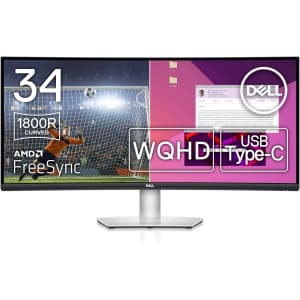
Two-monitor setups make a real difference for multitasking, and this pairing of 32-inch 4K IPS panels gives you sharp detail and wide color accuracy across both screens without buying them separately. Newegg's bundle suits anyone building a dual-display workstation for design, spreadsheets, or general office work. Buy Now at Newegg
- 3840x2160 (4K) resolution, 60Hz refresh rate
- 1x HDMI, 1x DisplayPort, 1x USB-C, Ethernet
- IPS panel for accurate color
- Integrated speakers for audio
- Model: E32k G5

Setting up a dual-monitor workstation gets a lot cheaper when the panels come as a matched pair, and IPS screens mean consistent color if you're placing them side by side. FreeSync also makes this pack worth a look for casual gaming setups where you want smoother motion without paying extra for it. Buy Now at Newegg
- 1080p resolution, 165Hz refresh rate
- AMD FreeSync
- 2x HDMI ports, 1x DisplayPort
- Model: VX2418-P-MHD

Anyone who works across multiple locations or needs a second screen for a laptop will get the most out of this, since it slips into a bag and only needs a single USB-C cable to run. Newegg's version comes with the same 1080p clarity you'd want for spreadsheets or split-screen work without adding much bulk to your setup. Buy Now at Newegg
- 1080p resolution
- Portable travel design
- USB Type-C connectivity
- Bluetooth speaker with microphone
- Model: M15

Doubling your screen space on the go is the main draw here, since the 1080p IPS panel plugs into most laptops via USB-C for a second display without needing an outlet. It suits anyone who works from coffee shops or hotel rooms and misses having a proper dual-monitor setup at their desk. Buy Now at Newegg
- 1080p resolution, 60Hz refresh rate
- 1ms response time
- USB-C and HDMI connectivity
- Integrated kickstand and speakers
- Ultra-slim 14-inch portable design

Two of these side by side gives you a full curved-desk setup without matching seams or brightness differences you'd get buying two monitors separately, which suits anyone building a multi-screen workstation for trading, design, or coding. Newegg's bundling them as a pair also tends to work out cheaper than buying each 34" IPS display on its own. Buy Now at Newegg
- 3440x1440p resolution, 60Hz refresh rate
- 100W USB-C docking station
- Integrated 3W speakers
- HDMI, DisplayPort, USB Hub, Ethernet ports
- Model: VP3456a

Anyone splitting time between spreadsheets and gaming will notice the jump in detail that HDR and 1440p bring over a standard 1080p screen, and the IPS panel keeps colors consistent even if you're viewing at an angle. It's a solid step up for a home office setup that doubles as your evening gaming station. Buy Now at Newegg
- 2560x1440 (1440p) resolution, 240Hz refresh rate
- HDR10
- 1ms response time for blur-free gaming
- IPS panel for accurate color reproduction
- Model: Viewedge 27

Two-monitor setups make a real difference for multitasking, and this pairing of 32-inch 4K IPS panels gives you sharp detail and wide color accuracy across both screens without buying them separately. Newegg's bundle suits anyone building a dual-display workstation for design, spreadsheets, or general office work. Buy Now at Newegg
- 3840x2160 (4K) resolution, 60Hz refresh rate
- IPS display panel for wide viewing angles
- 1x USB-C, 1x DisplayPort, 1x HDMI, 1x Ethernet, 4x USB-A
- Integrated speakers and ergonomic adjustable stand
- Model: E32k G5

Setting up a dual-monitor workstation gets cheaper with this two-pack, and the IPS panels mean colors stay consistent whether you're viewing straight-on or at an angle. FreeSync also makes this pairing worth a look if you game on the side and want smoother motion without shelling out for a specialty display. Buy Now at Newegg
- 1920x1080 (1080p) resolution, 100Hz refresh rate
- AMD FreeSync
- 1x HDMI, 1x DisplayPort
- Model: VX2716

Gamers who want smoother motion without ghosting will notice the difference with this monitor's fast IPS panel and FreeSync support, especially if your GPU already supports variable refresh rates. Newegg's price puts a solid 1080p gaming display within reach without pushing you toward a pricier panel size or resolution you don't need. Buy Now at Newegg
- 1920x1080 (1080p) resolution, 180Hz refresh rate
- HDR10
- AMD FreeSync
- 2x HDMI 2.0 ports, 1x DisplayPort 1.2
- Model: XF243Y X1

Suits anyone setting up a compact desk with a Lenovo Tiny PC, since this monitor's built-in dock lets the mini computer mount right on the back and tuck out of sight, leaving just a monitor and cables on your desk. Buy Now at Newegg
- 23.8 inch display with 16.7 million colors
- Built-in speaker and webcam
- Tilt, swivel, pivot, and height adjustable stand
- 1x HDMI port
- Model: 12NAGAR1US

Setting up a home office or small workstation gets easier with two matching displays instead of hunting for a second monitor separately, and the 1080p resolution keeps text sharp for everyday work and browsing. Newegg's pack pricing makes sense if you need a matched pair for dual-monitor setups without dealing with mismatched brands or bezels. Buy Now at Newegg
- 1920x1080 resolution, 60Hz refresh rate
- 1x HDMI, 1x VGA, 1x DisplayPort
- Dual monitor stand included
- ThinkPad USB-C dock included
- Model: ThinkVision E24

Anyone upgrading from 1080p will notice the difference immediately, and the IPS panel keeps colors accurate whether you're editing photos or just browsing at an angle. The 27-inch size hits a sweet spot for desk space without forcing you to sit further back to see the whole screen. Buy Now at Newegg
- 1440p resolution, 75Hz refresh rate
- 99% sRGB color accuracy
- HDMI, DisplayPort, VGA ports
- Ergonomic adjustable stand design
- Model: VA27AQSE

Set aside if you're after a reliable second monitor for spreadsheets, browsing, or office work rather than gaming or color-critical design, since the IPS panel gives you decent viewing angles at a resolution that keeps text sharp without straining your eyes. Buy Now at Newegg
- 1920x1080 resolution
- 6ms gray-to-gray response time
- 23.8-inch LED backlit display
- 1000:1 contrast ratio
- Model: P2418HZ

Anyone juggling multiple windows or editing timelines will appreciate the extra horizontal space this curved 35" ultrawide provides, and the 1440p resolution keeps text and images sharp without demanding a high-end GPU. FreeSync also makes it a solid pick if you game on the side and want smoother motion without screen tearing. Buy Now at Newegg
- 3440x1440 resolution, 100Hz refresh rate
- AMD FreeSync
- 1x HDMI, 1x DisplayPort, 2x USB
- Model: 35WN75C-B

Anyone setting up a budget-friendly desk or gaming corner benefits from the IPS panel's accurate colors and FreeSync's smoother motion during fast-paced games, without paying for extras you don't need. It's a solid pick for everyday use, from spreadsheets to casual gaming, without the higher price tag of premium panels. Buy Now at Newegg
- 1080p resolution, 144Hz refresh rate
- AMD FreeSync Premium
- 3x HDMI ports
- Model: E275B-FPN168

Two matching displays make sense if you're setting up a home office or trading desk and want a consistent look without hunting down a second monitor separately, and Newegg's bundling it as a pair keeps the per-screen cost down compared to buying them individually. Buy Now at Newegg
- 1080p resolution, 60Hz refresh rate
- 1x HDMI, 1x VGA, 1x DisplayPort
- Integrated speakers
- Dual monitor desk mount included
- Model: ThinkVision E24

Two monitors at once make sense for anyone setting up a home office or trading desk without wanting to mismatch brands or hunt down a second deal separately, and the 1080p resolution keeps things affordable for everyday tasks like email, spreadsheets, and browsing. Newegg's bundle pricing on the pair typically beats buying two individually. Buy Now at Newegg
- 1080p resolution, 75Hz refresh rate
- Built-in dual speakers
- HDMI, VGA, DisplayPort connectivity
- Included dual monitor desk stand
- Model: P24h G5

Setting up a second screen at a coffee shop or splitting your desk into dual monitors gets simpler with this one, since it's slim enough to toss in a bag and only needs a USB-C cable to run. Newegg's price makes it a reasonable pickup if you're tired of squinting at a single laptop display during travel or client meetings. Buy Now at Newegg
- 1080p resolution with 15.6-inch IPS display
- Wireless screen mirroring for cable-free connectivity
- Integrated battery for true portable use
- Built-in dual speakers for immersive audio
- VESA mount and LS stand for versatile setup

Handy for anyone who works across multiple screens or wants a second display for a laptop while traveling, since touch input means you can skip hauling a mouse. At $120, that's $60 off the $180 list price. Buy Now at Newegg
- 1080p resolution, 60Hz refresh rate
- 15.6-inch 10-point IPS touchscreen
- Built-in speakers for audio playback
- HDMI and USB-C connectivity for universal compatibility
- Model: UPERFECT 15.6

Setting up a second screen for a laptop or a small retro gaming console gets easier with a monitor this size, since the touchscreen means you're not always hunting for a mouse. Newegg has it in the 10.1-inch range, which fits well for travel or tight desk setups where a full-size monitor doesn't make sense. Buy Now at Newegg
- 1024x600 resolution IPS LCD touchscreen
- Built-in dual speakers
- HDMI connectivity for multi-device support
- Portable module design for Raspberry Pi and consoles
- Model: 10.1 IPS LCD
Computer Monitors: The Basics
You’ve found your perfect computer, but now you need a display. The type of monitor you should buy (and how much you’ll spend) depends on what you’re using it for. A gamer has different needs from someone who will only use their monitor for watching YouTube. No matter what you’re shopping for, DealNews has the monitor deals you need.
Common Terms
When you’re shopping for a monitor, it’s important to understand some basic terminology:
- Aspect Ratio
This measurement, expressed as two numbers separated by a colon, is a proportional representation of the monitor’s height and width. The three most common aspect ratios are 4:3, 16:9, and 21:9, with higher-end monitors available in more extreme ratios.
- Viewable Screen Area
The viewable screen is the part of a monitor that displays content, as opposed to the parts that may be covered by a border. You might see this measurement listed after the size, such as: 24’’(23.6” Viewable). Many monitors are now borderless.
- Resolution
Resolution is how many pixels make up a screen, and is described as length x width. For example, a 1080p monitor has a resolution of 1920x1080 pixels.
- Response Time
The response time is how long it takes for a monitor to change individual pixels from black to white (or in some technologies, gray to gray). This determines how sharp an image is. When viewing a monitor’s response time, the lower the number, the better.
- Refresh Rate
The refresh rate is how many times the image updates each second. This is measured in Hertz (Hz). In general, you should buy a monitor with at least a 60Hz refresh rate, but higher numbers are generally better. (Note that not all manufacturers include specs regarding refresh rate.)
-
Display Panel Types
- Twisted Nematics (TN): These panels are the fastest and most inexpensive panels on the market. But what you make up for in speed and price, you lose in color and viewing angles. TN panels are an especially good choice for gamers who need higher refresh rates, and low response time.
- Vertical Alignment (VA): Considered the middle ground between TN and IPS panels, VA monitors have good color and contrast and a mid-tier price. These panels have some of the slowest response times, so they’re best suited to general use.
- In-Plane Switching (IPS): These panels have great color and viewing angles with a response time that falls between TN and VA panels. IPS panels are the most expensive, and are best suited for professional design use.
Frequently Asked Questions
What features should I consider when purchasing a monitor?
First, think about how you’ll use the monitor. The screen size, resolution, panel type, and response time you’ll need are all heavily dependent on your use case. It’s also important to make sure your monitor has the correct inputs for your computer — if not, you should look into purchasing an adapter. Once you’ve decided on the specs you’ll need, check out DealNews for the best deals on cheap monitors.
What is a curved monitor?
Curved monitors are growing in popularity, as they can help your eyes take in more of the screen at once. If you tend to use dual monitors, a single curved monitor can typically fulfill the same role. Unfortunately, the technology is still relatively new and curved monitor prices tend to be higher.
What brands have the best monitor deals?
When it comes to monitors, finding the right brand is less important than finding the right combination of features. To help you find exactly what you need, DealNews publishes deals from many different monitor manufacturers. You can see all the monitor sales here, or you can check out monitors on our brand- and store-specific pages, including Acer , Alienware , Asus , Dell , Lenovo , LG , Samsung and more!
A Georgia girl with three years of experience in IP Law and grounded in understanding marketing and consumer motives. When she's not working with the fabulous staff of DealNews, you can find her whining at rowing practice and browsing the Hot Deals on the site.