YouTube TV's 21 Day Free Trial: September 2026 Trial Period & More
If you've been watching your streaming bills creep up, you're not alone. The landscape for savings has changed significantly this year. YouTube TV recently shifted away from the standard 7-day trial, with 21-day free trials now becoming the benchmark for new accounts. Beyond the trial period, you can find YouTube TV promo codes that can help you save money when considering signing up for the live TV service.
Does YouTube TV Have a Free Trial This September?
YouTube TV Base Plan New User Offer
$75 off first 5 monthsYouTube TV's main plan starts at $67.99 per month for new subscribers' first 5 months, down from the regular $82.99 per month. It includes unlimited cloud DVR storage and support for up to 6 household accounts with 3 simultaneous streams. Note that after 5 months your subscription will automatically renew at the then-current price unless you cancel beforehand. This offer is available to new subscribers who are not current YouTube TV Base Plan subscribers, have not been YouTube TV Base Plan subscribers, or participated in a YouTube TV Base Plan trial previously. This deal ends November 30.
YouTube TV Free Trial
Sign Up TodayGive this premium service a try before going all-in on a subscription! Trial lengths can vary, so before you sign up, you may want to check the length to make sure you get the most from your trial period. We've seen trials as short as 2 days but also as long as 21 or even 30 days in the past, so it's worth digging around to make sure you're getting enough time to explore everything YouTube TV has to offer. Note that as soon as your trial ends, you'll be charged the then-current rate for the service. This deal is ongoing.
Paramount+ Premium Subscription at YouTube TV
$10.99/mo.YouTube TV subscribers can add Paramount+ Premium to your account for an additional $10.99 per month and get all your streaming favorites in one place. You'll have a 7-day trial to see if you want everything Paramount+ Premium (the tier with Showtime) has to offer, but if you decide it's not worth it, you can cancel at any time. Note that some exclusions may apply. This offer is ongoing.
HBO Max at YouTube TV
From $18.49/mo.YouTube TV subscribers can add HBO Max to your account starting at just $18.49 per month. You'll get all your favorites from both services streaming in one place, which makes binge-watching even easier. Note that some exclusions may apply. This is an ongoing offer.
YouTube TV Spanish Plan
$34.99/mo.YouTube TV subscribers can add more Spanish content to your account with the Spanish Plan for an additional $34.99 per month. You'll get a 7-day trial to see if it's worth the cost, so if you're not totally sold, be sure to cancel before your trial period is up. This is an ongoing offer.
YouTube TV Spanish Plus Add-On
$14.99/mo.Sign up for Spanish Plus with your YouTube TV account and you'll get instant access to telenovelas, live sports, and more for just $14.99 per month. Note that some exclusions may apply. This offer is ongoing.
YouTube TV Sports Plus w/ NFL Redzone Add-On
$10.99/mo.Sports enthusiasts can add this bundle to their YouTube TV subscription for just $10.99 per month. You'll get access to more than 13 sports networks to catch all your favorites and be able to enjoy watching live games without jumping through a ton of hoops.
YouTube TV Entertainment Plus Add-On
$29.99/mo.Add this package to your YouTube TV subscription and you'll get HBO Max, Paramount+ Premium, and Starz in one handy bundle. It's a great way to have your streaming favorites in one place for easier binge watching. This offer is ongoing.
YouTube TV Premium Channel Add-Ons
From $1.99/mo.Customize your YouTube TV experience and add on your favorite premium channels to have all your streaming favorites in one place! These add-ons start at just $1.99 per month, and you'll find tons of popular options like Shudder, Max, Starz, AMC+, and much more. In some cases you may be able to try out these channels for free for a limited time, as well, so it's a good way to test out some you may be less familiar with before committing.
YouTube TV 4K Plus Add-On
$4.99/mo. for 12 monthsIf you want to upgrade your YouTube TV experience, you can grab the 4K Plus add-on right now for just $4.99 per month instead of the usual $9.99 per month. Even better, this deal will net you that discounted price for a whole 12 months. Be sure to set a reminder to cancel this add-on before it renews in a year, though, unless you're okay with paying double for the perks.
The standard YouTube TV free trial in 2026 typically lasts between 7 and 21 days, though the exact duration changes frequently based on active promotions. While a 21-day trial is currently the most common offer for new users, special events may temporarily offer 30-day trials for specific add-ons like 4K Plus.
-
Standard Trial Length: 10 days (for new subscribers).
-
No-Card Option: You can watch a 20-minute preview on tv.youtube.com without entering any payment information.
-
Eligibility: Limited to first-time users who have not previously used a YouTube TV trial.
-
Requirement: A valid credit card or PayPal is required to start the trial, but you will not be charged if you cancel before the period ends.
Does YouTube TV Have a Cheaper Plan?
Depending on what you actually watch, here are the four main ways to save:
-
The Entertainment Plan ($54.99/mo): This is the best value for fans of scripted drama and lifestyle TV. It strips out the expensive sports networks and focuses on heavy hitters like FX, AMC, Hallmark, and HGTV. Choosing this over the Base Plan saves you about $336 a year.
-
The Sports Plan ($64.99/mo): If you only keep cable for game day, this is your best bet. It includes ESPN, FS1, and local sports networks but cuts out the extra fluff. It's a solid middle ground that keeps your bill under $65.
-
The Sports + News Bundle ($71.99/mo): This hybrid option is designed for the "live TV" power user who needs to stay informed. It combines the core sports lineup with major news outlets like CNN, Fox News, and MSNBC.
-
Spanish Plan ($34.99/mo): A highly affordable standalone option (or add-on) for households that exclusively want Spanish-language programming without the high cost of a full English-language lineup.
Is There a YouTube TV Military or First Responder Discount?
Verified military members, veterans, first responders, and teachers can receive a $15 monthly discount on the YouTube TV Base Plan for the first 12 months. This reduces the monthly cost to $67.99.
-
Verification Method: Must be verified via ID.me.
-
Total Annual Savings: $180 over the first year.
-
NFL Sunday Ticket Bonus: Verified groups often receive exclusive pricing on NFL Sunday Ticket (e.g., $198 for the 2026 season).
-
Exclusions: This offer generally cannot be combined with other introductory coupons or "refer-a-friend" credits.
Can Students Get a Discount on YouTube TV?
While YouTube TV does not offer a discounted monthly rate for its Live TV Base Plan for students, there are significant savings available on sports content. Eligible students can purchase the NFL Sunday Ticket Student Plan for approximately $119–$129 per season.
-
Verification: Student status must be verified annually through SheerID.
-
Requirements: Must be enrolled in a U.S.-accredited college or university.
-
YouTube Premium Alternative: Students can get ad-free YouTube and Music for a discounted rate of $7.99/month, which is separate from the YouTube TV live service.
How Can I Get YouTube TV Through My Internet Provider?
Many internet service providers (ISPs) offer YouTube TV as a discounted add-on to their fiber or 5G home internet plans. These are often the most stable long-term discounts available.
-
Frontier Fiber: This is one of the most consistent offers on the market. New Frontier customers can typically knock $10 to $15 off their monthly bill for a full 12 months. It's a "set it and forget it" discount that adds up to a significant $180 annual saving.
-
Verizon Home Internet: Whether you have Verizon 5G Home or Fios, you're often eligible for a steep introductory discount. We frequently see offers for $20 off per month for the first 6 months, which is one of the largest monthly price cuts available right now.
-
WOW! Internet: WOW! takes a different approach by integrating YouTube TV directly into your internet statement. By bundling the two, you usually get a reduced combined rate compared to paying for both services separately, plus the convenience of a single monthly bill.
Even if you aren't a "new" customer, it is worth logging into your ISP's member portal. Providers often roll out "Loyalty Rewards" that include 2–3 months of YouTube TV for free or at a discounted rate just for staying with the service.
How to Sign Up for the YouTube TV Free Trial
-
Visit the YouTube TV Website: Navigate to tv.youtube.com on your web browser or download the YouTube TV app on your mobile device or smart TV.
-
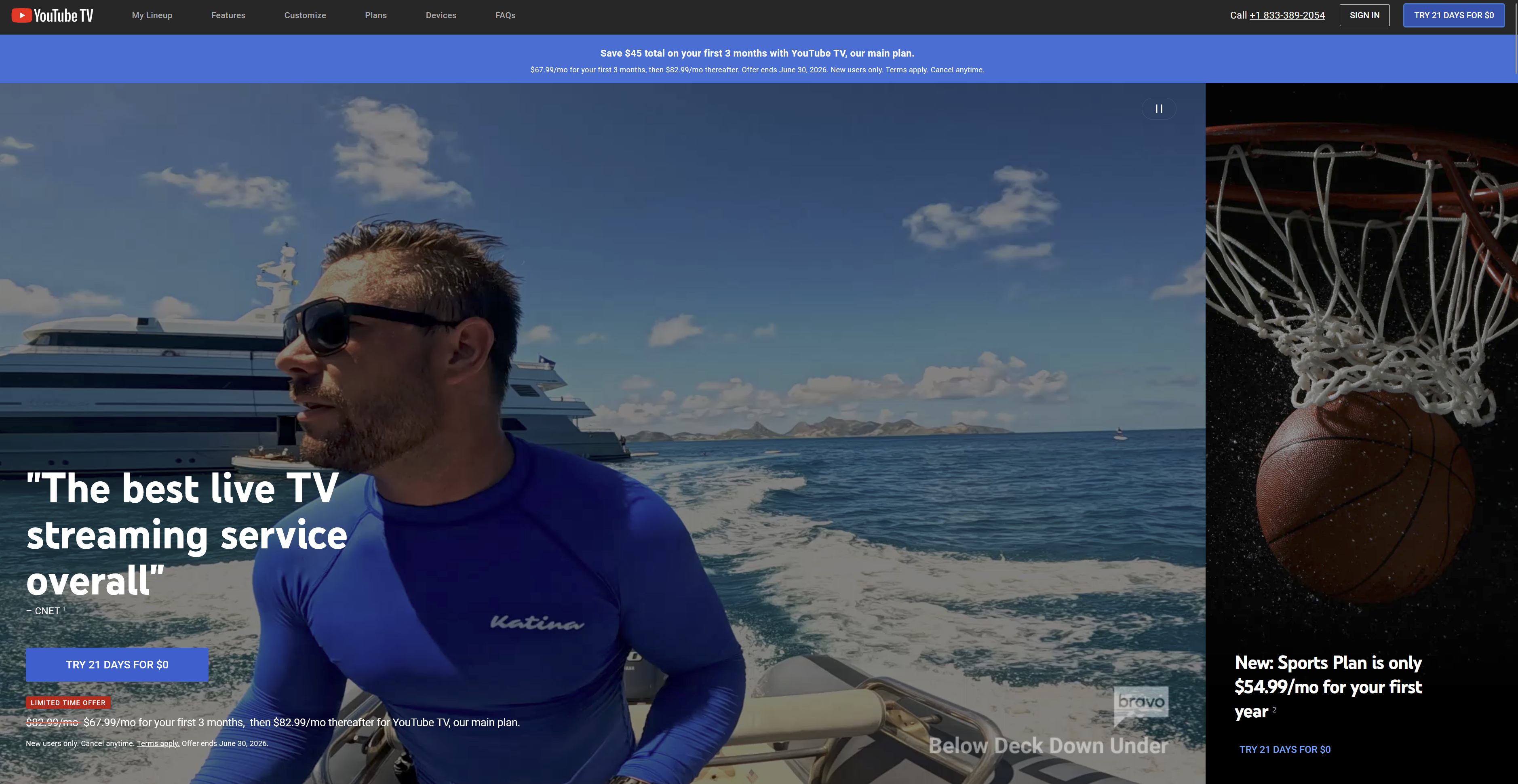
Click the "Try It Free" Button: Locate and click the prominent "Try It Free" or "Start Free Trial" button on the homepage.
-
Sign In to Your Google Account: Log in using your existing Google/Gmail credentials; if you do not have an account, you will need to create one to proceed.
-
Confirm Your Location: Enter your home zip code when prompted to ensure you receive the correct local network broadcasts for your specific area.
-
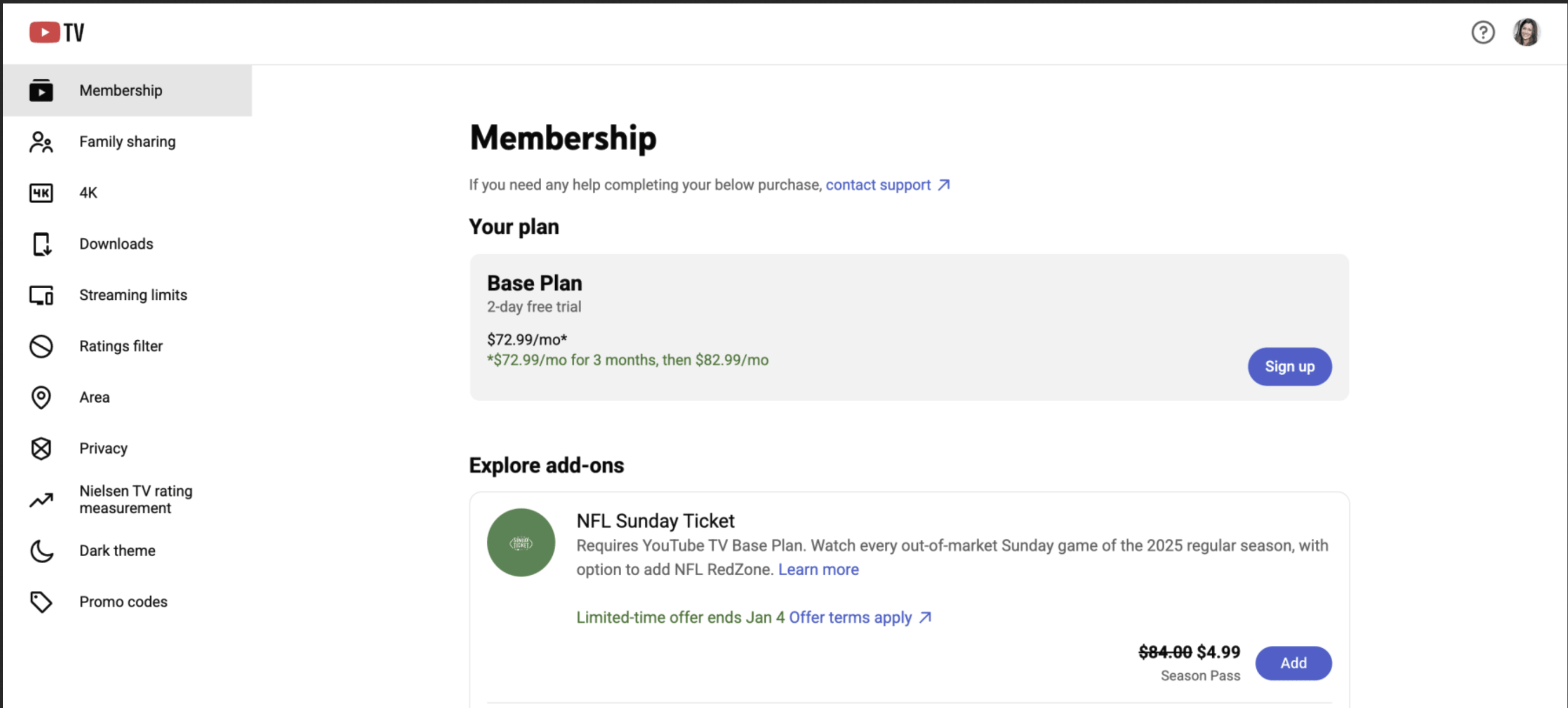
Review the Trial Offer: Check the current length of the free trial (usually 7 to 21 days) and the monthly price that will apply once the trial period expires.
-
Customize Your Plan: Choose any optional premium add-on networks, such as Max, Showtime, or 4K Plus, if you want to include them in your trial period.
-
Enter Payment Information: Provide a valid credit card, debit card, or PayPal account; while you won't be charged during the trial, this is required to authorize the account.
-
Submit and Start Streaming: Review your order summary and click "Start Trial" to gain immediate access to live TV and the unlimited DVR features.
What Does YouTube TV Cost After the Trial?
Once your free trial concludes, YouTube TV automatically transitions into a paid monthly subscription. The primary option for most users is the Base Plan, which currently costs $82.99 per month. This flat rate covers over 100 live channels—including local broadcast networks, sports, and news—and features unlimited cloud DVR storage that allows you to share the service with up to six accounts per household.
While the Base Plan is the standard, there are several variations and additional costs to consider:
-
Spanish Plan: Available for $34.99 per month, this serves as a standalone plan for those who only want Spanish-language programming.
-
4K Plus Add-on: For an additional $9.99 per month, you can upgrade to 4K Ultra HD streaming, unlimited simultaneous streams at home, and the ability to view DVR recordings offline.
-
Premium Networks: Individual channels like Max ($16.99/mo), Paramount Plus with SHOWTIME ($12.99/mo), and Starz ($11/mo) can be added to your monthly bill.
-
Sports Plus: For $10.99 per month, you can add a bundle of sports-centric channels including NFL RedZone, FanDuel TV, and BeIN Sports.
-
NFL Sunday Ticket: This is available as a seasonal add-on, with pricing that typically ranges from $350 to $450 per season depending on available promotions.
It is important to keep in mind that the final price on your monthly statement may be slightly higher than the advertised rate due to state and local sales taxes, which are determined by your billing zip code. Because YouTube TV does not require a long-term contract, you are billed on a month-to-month basis and have the flexibility to cancel or pause your membership at any time without paying early termination fees.
How the YouTube TV Free Trial Compares to Competitors
When choosing a live TV streaming service, the free trial period is often the deciding factor for many users. YouTube TV is generally considered the industry leader in this category, not just for the length of its trial, but for the ease of the sign-up process. Below is a breakdown of how YouTube TV stacks up against its primary rivals.
| Service | Standard Trial Length | Monthly Price (Post-Trial) | Primary Advantage |
| YouTube TV | 7 to 21 Days | $82.99 | Most generous trial length and unlimited DVR. |
| Fubo | 5 Days | $14.99 - $103.99 | Best trial for testing regional sports coverage. |
| Hulu + Live TV | 3 Days | $89.99 | Includes Disney+ and ESPN+ bundle. |
| Sling TV | None (Offers discounts) | $19.99 - $60.99 | Lowest entry price, though rarely "free." |
| DirecTV Stream | 5 Days | $94.99 - $171.98 | Best for traditional cable-like channel lineups. |
Analysis of Trial Length and Value
YouTube TV stands out because it frequently fluctuates its trial length based on seasonal promotions. While the standard offer is typically seven days, it is common to see 14-day or even 21-day "extended trials" during major events like the NFL season or the Olympics. This gives users significantly more time to explore the interface and test the unlimited DVR functionality compared to DirecTV Stream's much shorter five-day window.
Trial Availability vs. Promotional Discounts
One of the biggest differences in the market is the approach taken by live TV competitors. Hulu + Live TV now offers a 3-day free trial, giving you a brief window to test its live channels and the included Disney+ bundle before you have to pay. In contrast, Sling TV often skips the free trial entirely in favor of a "50% off your first month" promotion. While this makes Sling the cheapest way to start watching live TV, YouTube TV and Hulu + Live TV remain the better options for those who want to test a service without any initial financial commitment—though YouTube TV typically gives you a much longer window to make up your mind.
Feature Access During the Trial
Unlike some software services that limit features for "free" users, YouTube TV provides full access to its entire platform during the trial period. This includes the ability to create up to six individual household profiles and use the "Key Plays" view for sports. In contrast, Fubo's trial is excellent for sports fans, but users should be aware that Fubo often applies a "Regional Sports Fee" (up to $14.99) as soon as the trial ends, which can make the transition to a paid plan more expensive than YouTube TV.
What Other YouTube TV Deals Are Available This September?
While the free trial is the most common way to start, YouTube TV frequently offers stackable promotions and seasonal discounts that can significantly lower your monthly bill for the first year of service.
New Subscriber Introductory Offer
YouTube TV offers a standard introductory discount for new users. Instead of paying the full $82.99 immediately after your trial, you can typically secure a rate of $67.99 per month for your first three months.
NFL Sunday Ticket Early Bird Discount
This month marks the beginning of the "Early Bird" period for NFL Sunday Ticket. YouTube TV often leverages this to attract sports fans during the off-season. New subscribers who bundle the Base Plan with NFL Sunday Ticket can often save up to $215 in total. This is usually broken down into a $170 discount on the Sunday Ticket season pass and the standard $15/month discount on the first three months of the Base Plan. Even existing subscribers can often find "renewal" deals in their account settings during this window, offering $100 off the upcoming season.
T-Mobile and Verizon Member Perks
If you are a customer of a major wireless provider, you may be eligible for a permanent or long-term discount.
-
T-Mobile: Customers on eligible Go5G or Magenta plans can receive a $10 monthly credit toward their YouTube TV subscription for up to 24 months. Note that this discount is now applied as a bill credit on your T-Mobile account rather than a reduction on your YouTube TV invoice.
-
Verizon: Verizon occasionally offers "On Us" promotions for Home Internet or 5G mobile customers, which can include anywhere from 6 to 12 months of YouTube TV for free or at a heavily discounted rate of $10 off per month. Don't forget to check out other Verizon deals available this month.
Referral Program Discounts
Existing YouTube TV members have access to a referral program located in the "Settings" menu of the app. If you sign up using a referral link from a friend, you will receive a discount on your first month (typically between $15 and $20 off), and the person who referred you will receive a credit of the same amount toward their next bill. This is one of the few deals that can occasionally be "stacked" with the free trial.
Spanish Plan Promotional Pricing
For those interested in the Spanish Plan rather than the English Base Plan, YouTube TV offers a deep introductory discount. While the plan normally costs $34.99 per month, new users can often sign up for $24.99 per month for the first six months. This is an excellent way to get over 30 Spanish-language channels, including ESPN Deportes and CNN en Español, at a fraction of the cost of traditional cable.
Key Things to Know About YouTube TV Deals and Trials
Navigating the various offers and trial periods for YouTube TV can be confusing, especially with seasonal promotions changing frequently. To ensure you get the most value out of your subscription, keep these essential factors in mind.
The Fluctuating Duration of the Free Trial
The length of a YouTube TV free trial is not set in stone; it changes based on when you sign up and what marketing campaigns are currently active. While the standard offer is seven days, it is very common to see extended windows during high-traffic periods.
-
Standard Trial: Usually 7 days for most users throughout the year.
-
Extended Trials: Often 14 to 21 days, typically offered during major sporting events like the Super Bowl or the NBA Finals.
-
Special Partnerships: Companies like Best Buy or Roku sometimes offer 30-day trials with the purchase of a new streaming device.
Automatic Billing After the Trial Period Ends
YouTube TV requires you to provide a payment method—such as a credit card or PayPal account—before you can begin your free trial. It is important to remember that the service operates on an "opt-out" basis, meaning you will be automatically charged the full monthly subscription price the moment your trial expires. There is no grace period after the trial ends, so if you do not intend to keep the service, you must take action before the final hour of your last trial day.
Eligibility Requirements for New Subscriber Discounts
To qualify for the "three months at a discounted rate" or any extended free trial, you must be considered a new subscriber by Google's standards. This definition is often stricter than users realize, as Google uses a combination of account data, payment history, and device tracking to prevent the repeated use of promotional offers.
-
No Previous Trials: Your Google account is the primary tracker for eligibility. If you have ever signed up for a YouTube TV trial—even if it was years ago or for a different promotional period—you will likely be ineligible for a new one. This also applies to the "discounted introductory rate"; if you have been a paid member in the past and are now returning to the service, you will generally be required to pay the full standard price of $82.99 immediately.
-
Credit Card History: Google's billing system flags specific credit and debit cards that have been associated with a YouTube TV account in the past. If you attempt to sign up with a new Gmail address but provide a credit card that was used on a previous account, the system will often recognize you as a "returning user" and deny the promotional pricing. Furthermore, YouTube TV does not support prepaid cards for trials, as it requires a traditional bank-backed payment method to authorize future recurring billing.
-
Family Group Status: Being part of a Google Family Group can complicate your individual eligibility. If you are currently a member of a family group where the manager has already redeemed a trial, or if you were previously a member of a group that had YouTube TV, you may be disqualified from starting a separate trial of your own. Google's logic is that the household has already benefited from the service's introductory offers.
Beyond these primary factors, there are technical and geographic requirements that must be met to access any deals. You must be at least 18 years old to manage a YouTube TV account and have a personal Google account; "Workspace" or "G Suite" business accounts are generally ineligible for YouTube TV subscriptions and family sharing. Additionally, because YouTube TV is currently only available in the United States, you must be physically located within the U.S. and provide a valid domestic billing address to verify your residency and local network availability.
Immediate Loss of Access Upon Cancellation
Unlike many other streaming services that allow you to cancel a trial and continue watching until the expiration date, YouTube TV often terminates your access the moment you hit the "Cancel" button. If you sign up for a 21-day trial and cancel on day two to avoid a future charge, you may lose your access to live channels immediately. It is generally safer to set a calendar reminder for the day before your trial expires rather than canceling too early.
Trial Limits for Returning Members and Households
Google tracks trial eligibility through a combination of account data and device hardware IDs. This means that simply creating a new Gmail account may not always be enough to trigger a second free trial if you are using the same physical streaming device and credit card. YouTube TV's goal is to prevent "trial hopping," so they closely monitor household patterns to ensure that the promotional rates are reserved for genuine first-time users.
Managing Independent Add-On Trials
You can often trial premium networks like Max, MGM+, or NBA League Pass independently of your Base Plan trial. Even if you are already a long-term paid subscriber to YouTube TV, you can still take advantage of individual 7-day trials for these add-on channels as they become available. These add-ons have their own separate billing cycles and cancellation settings, allowing you to test specific premium content without affecting your primary subscription.
Device Compatibility and Simultaneous Streaming Limits
Before committing to a subscription or even starting a free trial, it is vital to ensure that your home hardware is compatible and that the service's streaming limits align with your household's viewing habits. YouTube TV is renowned for its broad device support, but it does enforce specific boundaries regarding how many people can watch content at the same time and where that content can be accessed.
-
Standard Three-Stream Limit: By default, the YouTube TV Base Plan allows for three simultaneous streams. This means three different devices can be watching live or recorded content at once, whether they are inside your home or using mobile data on the go. If a fourth person attempts to log in and watch, one of the existing streams will be interrupted.
-
The 4K Plus Unlimited Advantage: For larger households, the "4K Plus" add-on is often a necessity. This upgrade removes the three-stream cap specifically for devices connected to your home Wi-Fi network, allowing an unlimited number of screens to stream simultaneously. However, even with this upgrade, you are still limited to three concurrent streams when watching outside of your home network.
-
Family Group Sharing: Every YouTube TV subscription allows you to create a "Family Group" with up to five additional members (six total profiles). Each member gets their own unique login, personalized recommendations, and a private unlimited DVR library. It is important to note, however, that while there are six profiles, they must still share the three simultaneous streams provided by the Base Plan.
The service is designed to be "plug and play" across nearly every category of modern electronics. Because YouTube TV relies on a high-speed internet connection rather than a cable box, you can access the app on everything from a dedicated home theater setup to a smartphone in a coffee shop.
-
Streaming Media Players: This is the most common way to watch. Full support is provided for Roku (all models), Amazon Fire TV sticks and Cubes, Apple TV (4th Gen and 4K), and Google's own Chromecast with Google TV.
-
Smart TVs: Most major television manufacturers built after 2016 include a native YouTube TV app. This includes Samsung, LG, Vizio, and Hisense, as well as any TV running the Android TV or Google TV operating system (like Sony and TCL).
-
Gaming Consoles: If you prefer to use your gaming hub as a media center, the app is available for download on the PlayStation 4, PlayStation 5, Xbox One, and Xbox Series X/S.
-
Mobile and Web: For viewing on the move, you can use the YouTube TV app on iOS and Android devices, or simply navigate to a web browser on a Mac, PC, or Chromebook.
Technical performance can vary slightly depending on the device you choose. For instance, high-end streaming boxes like the Apple TV 4K or Nvidia Shield typically offer faster navigation through the channel guide compared to the built-in apps on older Smart TVs. Regardless of the device, Google recommends a minimum download speed of 3 Mbps for standard definition, 7 Mbps for a single HD stream, and at least 25 Mbps if you intend to stream content in 4K.
The Importance of the Home Area and Zip Code
When you sign up for a trial, the zip code you provide determines your "Home Area," which dictates which local news and sports networks you can view. You are allowed to use YouTube TV while traveling, but you must check in from your Home Area at least once every three months to keep the account active. If you move permanently, you must update your zip code in the settings, though Google only allows you to change your home area a limited number of times per year.
Avoiding Third-Party Billing and Reseller Scams
It is highly recommended that you sign up for YouTube TV directly through the Google website rather than through third-party billing services like the Apple App Store. Signing up through Apple often makes it more difficult to claim promotional discounts or manage your subscription. Additionally, users should be wary of websites or social media ads offering "lifetime" YouTube TV subscriptions or heavily discounted codes; these are almost always scams or fraudulent accounts that will be shut down by Google within a few days.
Other Ways Customers Can Save With YouTube TV Discounts This September
Beyond the standard free trial, there are several strategic ways to lower your monthly bill or gain access to premium content at a fraction of the cost. From carrier-specific perks to early bird sports specials, this month is a particularly active month for subscription deals.
The Introductory Three-Month Discount
The most consistent way for new subscribers to save money is through the standard introductory offer. YouTube TV is offering a significant reduction on the Base Plan for the first 90 days of service. Instead of the standard $82.99, new users typically pay $67.99 per month for the first three months. This provides an immediate $45 in total savings, allowing you to settle into the service before the full price kicks in.
Early Bird NFL Sunday Ticket Savings
This month marks a critical window for football fans as the "Early Bird" pricing for NFL Sunday Ticket officially begins. While the season doesn't start until September, YouTube TV incentivizes users to commit early by offering some of the steepest discounts of the year.
-
Bundle Discounts: New subscribers who sign up for the YouTube TV Base Plan and NFL Sunday Ticket together can often save up to $170 on the season pass.
-
Existing Member Offers: Current subscribers should check their "Membership" settings, as Google frequently offers a $100 discount to those who renew their Sunday Ticket subscription before the summer months.
-
Payment Plans: During this early bird window, YouTube TV often allows users to split the cost of the season pass into four monthly installments, making the high entry price more manageable.
T-Mobile Magenta And Go5G Billing Credits
T-Mobile has a long-standing partnership with Google that provides eligible wireless customers with a consistent monthly discount. This is not a one-time trial but a recurring credit that can drastically change the long-term value of the service.
-
$10 Monthly Credit: Customers on Go5G Next, Go5G Plus, or Magenta MAX plans are often eligible for a $10 per month discount on YouTube TV for up to 12 or 24 months.
-
Redemption Process: You must claim the offer through the T-Mobile Life (formerly T-Mobile Tuesdays) app or the "Promotions" section of your T-Mobile account to receive a unique code.
-
Account Linking: Once the code is applied, the discount is typically reflected as a bill credit on your T-Mobile statement rather than a reduction in the YouTube TV app interface.
Verizon Home Internet And 5G Perks
Verizon often includes YouTube TV as a "choice" perk for their 5G Home Internet and premium mobile data customers. Depending on the current month's promotion, Verizon customers can often secure the service for free for a period of six to twelve months. Even if a "free" year isn't currently available, Verizon's "+play" platform frequently offers $10 monthly credits for subscribers who manage their YouTube TV billing through their Verizon account.
The YouTube TV Referral Program
One of the most overlooked ways to save is through the internal referral system. If you know someone who already uses the service, they can send you a personalized referral link. When you sign up using this link, you receive a discount on your first month (usually between $15 and $45 off, depending on the current promotion), and the person who referred you receives a credit of the same value toward their next bill. This is a win-win scenario that can be used to effectively "stack" savings on top of the initial free trial.
Frontier And Google Fiber Internet Bundles
If you are moving or looking to switch your home ISP this, look for bundles through Frontier Communications or Google Fiber. Since these providers do not offer their own proprietary cable TV packages, they officially partner with YouTube TV to provide video services.
New Frontier fiber customers can often receive a $10 to $15 discount per month for the first year of service when they add YouTube TV to their internet plan. Similarly, Google Fiber customers occasionally receive promotional credits or the ability to consolidate their billing, which can sometimes unlock exclusive "loyalty" discounts not available to the general public.
Discounted Spanish Plan Introductory Rates
For households that primarily consume Spanish-language content, the YouTube TV Spanish Plan offers a much lower entry point than the Base Plan. This plan includes over 30 channels, such as Univision, Telemundo, and Fox Deportes.
-
Introductory Pricing: While the standard rate is $34.99 per month, promotions often drop this price to $24.99 per month for the first six months.
-
Standalone Flexibility: You do not need to subscribe to the $82.99 Base Plan to get this deal; the Spanish Plan can be purchased as a completely standalone service.
-
Trial Period: The Spanish Plan also comes with its own 7-day free trial, allowing you to test the channel lineup before the promotional rate begins.
Seasonal Sports Add-On Promotions
With the NBA and NHL playoffs typically beginning in, YouTube TV often runs flash sales on sports-centric add-ons. You might find "end-of-season" pricing on NBA League Pass, which allows you to catch the final stretch of the regular season and out-of-market games for a fraction of the original mid-season price. Additionally, the "Sports Plus" pack—which includes NFL RedZone and beIN SPORTS—is sometimes offered at a discounted "trial rate" of $5 for the first month to coincide with the start of the MLB season and international soccer tournaments.
Annual Billing For Premium Network Add-Ons
While the YouTube TV Base Plan is strictly month-to-month, many of the premium add-on networks available through the platform offer hidden savings if you look for annual options. Networks like Max, Paramount+ with SHOWTIME, and Starz frequently offer "bundle and save" deals within the YouTube TV interface. By committing to a longer term for these specific channels, you can often save 15% to 20% compared to paying the monthly add-on fee, effectively giving you two months of premium cinema and original programming for free.
Final Verdict: Is the Trial Worth It?
If you are considering cutting the cord and moving away from traditional cable, the YouTube TV free trial is arguably the best "no-risk" entry point in the streaming market. Unlike some competitors that offer limited versions of their service or require immediate upfront payments, YouTube TV gives you full, unrestricted access to its entire feature set. This means you can record dozens of movies to the unlimited DVR, test the multi-view sports features, and share the account with your family to see if the interface works for everyone in the house.
The trial is definitely worth it if:
-
You are a sports fan: It is the most effective way to test the latency and picture quality of live sports on your home Wi-Fi without committing to a $82.99 bill.
-
You need local channels: Since local channel availability varies by zip code, the trial allows you to verify that you'll actually receive your local ABC, CBS, NBC, and FOX affiliates.
-
You want to test "User Experience": YouTube TV is widely considered to have the most intuitive interface; a week-long trial is plenty of time to see if it's easier to navigate than your current cable box.
However, the trial is only "worth it" if you are diligent about the expiration date. Because the post-trial price of $82.99 is among the highest in the industry, forgetting to cancel can be a costly mistake. For those who want the most bang for their buck, we recommend timing your trial to coincide with a major viewing event—like a playoff series or a holiday weekend—to truly put the service through its paces. Ultimately, given the ease of cancellation and the depth of the channel lineup, there is very little reason not to give it a try if you are looking for a premium live TV experience.
How We Find and Verify YouTube TV Trials and Streaming Promos
Finding a legitimate streaming trial shouldn't be as frustrating as deciding what to watch. Instead of relying on automated scrapers or copying and pasting expired codes, our editorial team treats deal-hunting as a rigorous, manual process. We constantly research the entire streaming landscape in real time, tapping into community insights to pinpoint exactly when hidden trial extensions or bundle deals drop.
Because advertised "free trials" often target only new users or exclude premium add-ons, our verification goes deep. We actively click through to the checkout screens to verify the actual terms—ensuring you don't face sudden usage limits, restricted channel lineups, or hidden fees. We dissect the legal disclosures and fine print upfront, so you know exactly when a trial ends or if a promotion requires a specific payment method.
Our expertise is driven by veterans in the space who know exactly what to look for. For example, Senior Editor Julie Ramhold brings her meticulous eye for detail to the digital realm. Known for navigating tricky seasonal sales on smart home gadgets and big-box retailers, Julie applies that same rigor to streaming ecosystems. She actively tests the stackability of offers—such as whether you can use discounted digital gift cards sourced from Costco or Lowe's to fund your YouTube TV subscription—verifying the face-value terms so you get genuine, usable value for your home entertainment setup.
Similarly, Content Editor Jason Savage leverages his 10+ years of cost-cutting experience—and his passion for basketball and Duke sports—to hunt down the best live sports streaming packages. When he's not busy being the ultimate dad of five, he's verifying complex digital bundles, like ensuring YouTube TV's NBA League Pass or sports add-ons actually apply correctly at checkout without voiding your base free trial.
We also monitor official channels, cash back portals, and competitor services (like Hulu + Live TV or Sling) to ensure the YouTube TV offer we post is genuinely the best cord-cutting option available. While we may earn a commission from our links, our editorial independence remains strict: if a trial offer or promo code doesn't actively work as promised, it doesn't make the cut.
What Else to Consider About YouTube TV in 2026
As cable prices continue to climb, YouTube TV remains one of the most comprehensive cord-cutting solutions in 2026. Beyond the base channel lineup of over 100 networks, its unlimited cloud DVR and seamless integration with premium sports packages make it a powerhouse for sports fans and binge-watchers alike. However, it's important to remember that streaming ecosystems are constantly evolving, with new base pricing and add-on tiers frequently adjusting based on regional availability.
Before committing to any subscription post-trial, we highly recommend reviewing the official YouTube TV terms and conditions to fully understand their policies on household sharing, location requirements, and auto-billing. Knowing exactly when your 21-day trial converts to a paid membership is crucial to avoiding unwanted charges, and utilizing features like pausing your membership can save you money during months you aren't watching live TV.
Stay Updated on the Latest YouTube TV Promo Codes
YouTube TV is always releasing new promo codes, exclusive offers, and limited-time discounts—sometimes with little warning. To make sure you never miss out on the best ways to save:
-
Bookmark this page: We regularly update our list of verified YouTube TV promo codes and deals, so check back before every order.
-
Sign up for deal alerts: Subscribe to our DealNews Select newsletter to get the hottest streaming and cord-cutting discounts delivered straight to your inbox.
-
Set a custom deal alert: Create a personalized deal alert for YouTube TV or your favorite streaming service and receive instant notifications when a new promo goes live.
-
Follow us on social media: We frequently share flash promo codes and exclusive deals on our social channels. Follow us here:
Staying proactive is the best way to maximize your YouTube TV savings all year long!
A merging of our Streaming Services roundup writers into a singular, binge-watching, channel-surfing organism of expertise. Come for the convenient consolidation of promotions, promo codes, and free trials on top entertainment platforms like Disney Plus, YouTube TV, and Hulu—plus live sports streaming passes for the NFL, UFC, and beyond—stay for the rapid descent into absolute nonsense. Curated and manually verified by seasoned DealNews leaders Julie Ramhold and Jason Savage.
Sign In or Register